User manualபயனர் கையேடு · Score: the salesman appScore: சேல்ஸ்மேன் ஆப்
Van salesவேன் விற்பனை (Van sales)
Sell straight from your van in Score, and check what is left in the van.Score-இல் உங்கள் வேனில் இருந்து நேரடியாக விற்பனை செய்யுங்க, வேனில் என்ன மீதி இருக்கிறது என்று பாருங்க.
- Where to find itஎங்கே இருக்கிறது
- Score → Score → profile menu → Bills from; Today → My van
- Who uses itயார் பயன்படுத்துவார்கள்
- Van salesmenவேன் சேல்ஸ்மேன்கள்
If the office puts you in charge of a van, Score can bill from the van's stock. A bill from the van counts as delivered when you make it.
Before you start
The office marks a warehouse as a van and puts you in charge of it (Masters → Warehouse, This is a van). The office loads the van under Transactions → Van Loading.
Until then, the profile menu shows Sale / Load with a note on how to get a van.
Switch to Load
- Tap the person icon at the top right.
- Under Bills from, tap Load. The line reads Load: from …, delivered at once.
- To bill from the godown again, tap Sale. The line reads Sale: from the godown, delivered later.
When you switch, your open carts start again.
Sell from the van
With Load on, take orders as usual. See Take an order.
- The product list shows the van's stock.
- The bill takes the van's vehicle number.
- When the bill is saved, it is marked delivered on the same day.
See what is in the van
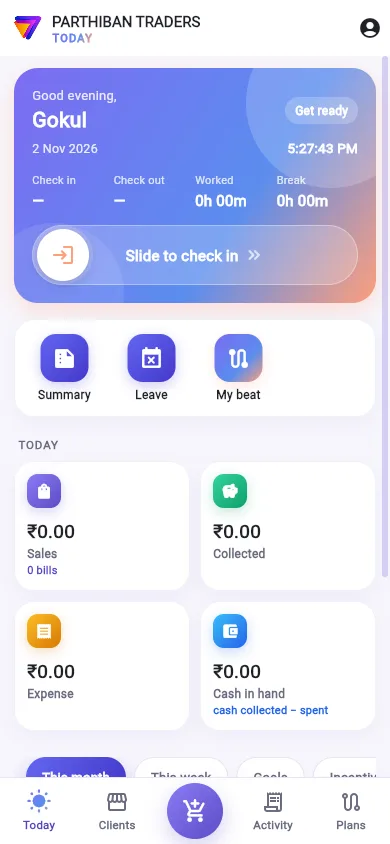
- On the Today tab, tap My van.
- The top shows … products in the van and Worth ₹… at selling rates.
- Use Search products… to find one.
- Tap the WhatsApp button to send the van stock, or Print to print it on the Bluetooth printer.
If the van is empty, you see The van is empty and The office loads it under Transactions → Van Loading.
Good to know
- Bills from shows only for someone in charge of a van.
- A bill that waits for approval is not marked delivered by Score. Mark it with Update status (delivery, payment) in Activity.
- Goods back unsold go back with a Load return (back unsold, nothing collected). See Returns.
Related
- Van Loading: how the office loads the van
- Warehouse: marking a warehouse as a van
- Printing: the Bluetooth printer
அலுவலகம் உங்களை ஒரு வேனுக்குப் பொறுப்பாக வைத்தால், Score வேனின் இருப்பில் இருந்து பில் போடலாம். வேனில் இருந்து போடும் பில், போட்ட உடனே டெலிவரி ஆனதாகக் கணக்கில் வரும்.
தொடங்கும் முன்
அலுவலகம் ஒரு கிடங்கை வேனாகக் குறித்து, உங்களை அதற்குப் பொறுப்பாக வைக்கும் (முதன்மைப் பதிவுகள் → கிடங்கு (Masters → Warehouse), இது ஒரு வேன் (This is a van)). அலுவலகம் பரிவர்த்தனைகள் → வேன் ஏற்றம் (Transactions → Van Loading) கீழ் வேனில் சரக்கு ஏற்றும்.
அதுவரை, புரொஃபைல் மெனு விற்பனை / லோடு (Sale / Load) என்பதை, வேன் எப்படிப் பெறுவது என்ற குறிப்புடன் காட்டும்.
லோடுக்கு மாறுதல்
- மேலே வலது பக்கம் உள்ள நபர் ஐகானைத் தட்டுங்க.
- பில்கள் முதல் (Bills from) கீழ், லோடு (Load) தட்டுங்க. வரி லோடு: … இலிருந்து, உடனே டெலிவரி (Load: from …, delivered at once) என்று காட்டும்.
- மறுபடியும் குடோனில் இருந்து பில் போட, விற்பனை (Sale) தட்டுங்க. வரி விற்பனை: கிடங்கிலிருந்து, பிறகு டெலிவரி (Sale: from the godown, delivered later) என்று காட்டும்.
மாறும் போது, திறந்திருக்கும் உங்கள் கார்ட்கள் புதிதாகத் தொடங்கும்.
வேனில் இருந்து விற்பனை
லோடு (Load) ஆன் ஆக இருக்கும் போது, வழக்கம் போல ஆர்டர் எடுங்க. பாருங்க: ஆர்டர் எடுத்தல்.
- பொருள் பட்டியல் வேனின் இருப்பைக் காட்டும்.
- பில்லில் வேனின் வாகன எண் வரும்.
- பில் சேமித்ததும், அதே நாளில் டெலிவரி ஆனதாகக் குறிக்கப்படும்.
வேனில் என்ன இருக்கிறது என்று பார்த்தல்
- இன்று டேபில், என் வேன் (My van) தட்டுங்க.
- மேலே வேனில் … பொருட்கள் (… products in the van), விற்பனை விலையில் ₹… மதிப்பு (Worth ₹… at selling rates) தெரியும்.
- ஒரு பொருளைக் கண்டுபிடிக்க பொருட்களைத் தேடு… (Search products…) பயன்படுத்துங்க.
- வேன் இருப்பை அனுப்ப WhatsApp பட்டனைத் தட்டுங்க, அல்லது புளூடூத் பிரிண்டரில் அச்சிட அச்சிடு (Print) தட்டுங்க.
வேன் காலியாக இருந்தால், வேன் காலியாக உள்ளது (The van is empty), அலுவலகம் பரிவர்த்தனைகள் → வேன் லோடிங்கில் ஏற்றும். (The office loads it under Transactions → Van Loading.) என்று வரும்.
தெரிந்துகொள்ள வேண்டியது
- வேனுக்குப் பொறுப்பானவருக்கு மட்டுமே பில்கள் முதல் (Bills from) தெரியும்.
- ஒப்புதலுக்குக் காத்திருக்கும் பில்லை Score டெலிவரி ஆனதாகக் குறிக்காது. செயல்பாட்டில் நிலையைப் புதுப்பி (டெலிவரி, கட்டணம்) (Update status (delivery, payment)) மூலம் குறியுங்க.
- விற்காமல் திரும்பும் சரக்கு லோடு திருப்பம் (விற்காமல் திரும்பியது, வசூல் இல்லை) (Load return (back unsold, nothing collected)) மூலம் திரும்பப் போகும். பாருங்க: திருப்பங்கள்.
தொடர்புடையவை
- வேன் ஏற்றம்: அலுவலகம் வேனில் எப்படி சரக்கு ஏற்றுகிறது
- கிடங்கு: ஒரு கிடங்கை வேனாகக் குறித்தல்
- அச்சிடுதல்: புளூடூத் பிரிண்டர்