User manualபயனர் கையேடு · Score: the salesman appScore: சேல்ஸ்மேன் ஆப்
Printingஅச்சிடுதல் (Printing)
Connect a Bluetooth thermal printer, print bills and receipts, and print or send your day summary.புளூடூத் தெர்மல் பிரிண்டரை இணையுங்க, பில்களையும் ரசீதுகளையும் அச்சிடுங்க, உங்கள் நாள் சுருக்கத்தை அச்சிடுங்க அல்லது அனுப்புங்க.
- Where to find itஎங்கே இருக்கிறது
- Score → Score → profile menu → Bluetooth printer
- Who uses itயார் பயன்படுத்துவார்கள்
- Salesmen, delivery staffசேல்ஸ்மேன்கள், டெலிவரி பணியாளர்கள்
Score prints on a 58 mm or 80 mm Bluetooth thermal printer. You choose the printer once, and Score remembers it on this phone.
Set up the printer
- Pair the printer in the phone's Bluetooth settings first. Its PIN is often 0000 or 1234.
- In Score, tap the person icon at the top right.
- Tap Bluetooth printer.
- Under Choose the printer, pick 58 mm or 80 mm for the paper.
- Tap the printer in the list.
- Tap the receipt button next to Bluetooth printer for a Test print.
To stop using the printer, tap Disconnect.
Print a bill
- After saving, tap Save & print in the cart, or Print on the Bill saved screen.
- Later, in Activity, tap Print / PDF on the entry, then Bluetooth printer.
- On the delivery run, tap Print on the bill.
You see Printed when it worked.
What the receipt shows
The receipt has the company name and phone, the bill title, number, date and client, each line, the totals and the GST. A collection shows Received and Mode.
What the office set in its print settings decides:
- Tamil labels or English, and local product names.
- How many copies, up to 3.
- The client's previous balance and Balance now due.
- A UPI QR code with Scan to pay, when the company has a UPI id.
Score draws the receipt as a picture, so Tamil prints properly on any 58 or 80 mm printer.
PDF and other paper sizes
In Activity, Print / PDF also offers the company's bill formats, PDF in each paper size, and Share PDF. The Bill saved screen has A4 / system print.
The day summary
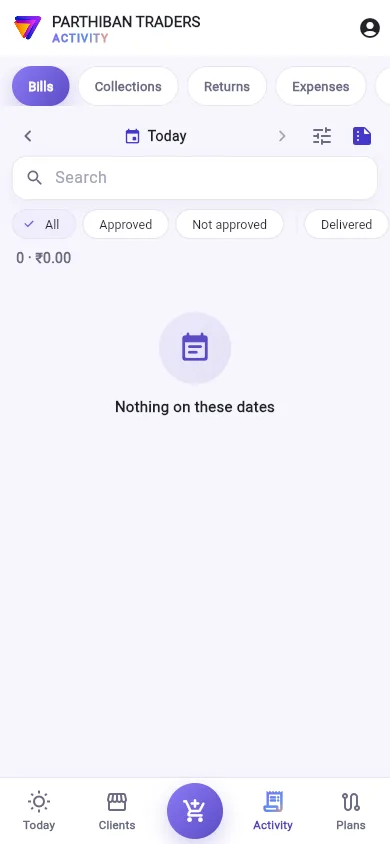
- Go to Activity and choose the date.
- Tap the Day summary button at the right of the date bar.
- Day summary · … shows Bills, Collected, Cash in hand, orders, returns, expenses and the Load chart (each product's quantity).
- Tap Print for the Bluetooth printer, or WhatsApp to send it as text.
Good to know
- Bluetooth printing works on the Android app only.
- If printing fails, Score says why: Turn Bluetooth on., Allow "Nearby devices" (Bluetooth) for Score in the phone settings., or Could not connect to … — is it on and near?
- The van stock and the dues list can be printed too. See Van sales and Clients.
- On the Basic plan, receipts end with a Stockflow line.
Related
- Take an order: Save & print
- Activity: print a saved entry
- Bill Designs: the company's bill formats
Score 58 mm அல்லது 80 mm புளூடூத் தெர்மல் பிரிண்டரில் அச்சிடும். பிரிண்டரை ஒரு முறை தேர்ந்தெடுத்தால் போதும், இந்த போனில் Score அதை நினைவில் வைத்துக்கொள்ளும்.
பிரிண்டரை அமைத்தல்
- முதலில் போனின் Bluetooth அமைப்புகளில் பிரிண்டரை pair செய்யுங்க. அதன் PIN பெரும்பாலும் 0000 அல்லது 1234.
- Score-இல், மேலே வலது பக்கம் உள்ள நபர் ஐகானைத் தட்டுங்க.
- புளூடூத் பிரிண்டர் (Bluetooth printer) தட்டுங்க.
- பிரிண்டரைத் தேர்வு செய் (Choose the printer) கீழ், காகிதத்துக்கு 58 mm அல்லது 80 mm தேர்ந்தெடுங்க.
- பட்டியலில் பிரிண்டரைத் தட்டுங்க.
- சோதனை அச்சு (Test print) எடுக்க புளூடூத் பிரிண்டர் (Bluetooth printer) பக்கத்தில் உள்ள ரசீது பட்டனைத் தட்டுங்க.
பிரிண்டரைப் பயன்படுத்துவதை நிறுத்த, துண்டி (Disconnect) தட்டுங்க.
பில்லை அச்சிடுதல்
- சேமித்த பிறகு, கார்டில் சேமித்து அச்சிடு (Save & print) தட்டுங்க, அல்லது பில் சேமிக்கப்பட்டது (Bill saved) திரையில் அச்சிடு (Print) தட்டுங்க.
- பிறகு, செயல்பாடு (Activity) இல், பதிவில் உள்ள அச்சு / PDF (Print / PDF) தட்டி, பிறகு புளூடூத் பிரிண்டர் (Bluetooth printer) தட்டுங்க.
- டெலிவரி சுற்றில், பில்லில் உள்ள அச்சிடு (Print) தட்டுங்க.
வேலை செய்தால் அச்சிடப்பட்டது (Printed) என்று வரும்.
ரசீதில் என்ன இருக்கும்
ரசீதில் நிறுவனப் பெயர், போன், பில் தலைப்பு, எண், தேதி, வாடிக்கையாளர், ஒவ்வொரு வரியும், மொத்தங்கள், GST இருக்கும். வசூல் ரசீது பெறப்பட்டது (Received), முறை (Mode) காட்டும்.
அலுவலகம் அதன் அச்சு அமைப்புகளில் வைத்தது இவற்றை முடிவு செய்யும்:
- தமிழ் லேபிள்களா ஆங்கிலமா, உள்ளூர் மொழிப் பொருள் பெயர்கள்.
- எத்தனை பிரதிகள், அதிகபட்சம் 3.
- வாடிக்கையாளரின் முந்தைய நிலுவையும் தற்போதைய மொத்த நிலுவை (Balance now due) உம்.
- நிறுவனத்துக்கு UPI id இருந்தால், செலுத்த ஸ்கேன் செய்யுங்கள் (Scan to pay) உடன் ஒரு UPI QR குறியீடு.
Score ரசீதை ஒரு படமாக வரைகிறது, அதனால் எந்த 58 அல்லது 80 mm பிரிண்டரிலும் தமிழ் சரியாக அச்சாகும்.
PDF, மற்ற காகித அளவுகள்
செயல்பாடு (Activity) இல், அச்சு / PDF (Print / PDF) நிறுவனத்தின் பில் வடிவங்கள், ஒவ்வொரு காகித அளவிலும் PDF, PDF பகிர் (Share PDF) ஆகியவற்றையும் தரும். பில் சேமிக்கப்பட்டது (Bill saved) திரையில் A4 / சாதாரண அச்சு (A4 / system print) இருக்கும்.
நாள் சுருக்கம்
- செயல்பாடு (Activity) போய் தேதியைத் தேர்ந்தெடுங்க.
- தேதிப் பட்டையின் வலது பக்கம் உள்ள நாள் சுருக்கம் (Day summary) பட்டனைத் தட்டுங்க.
- நாள் சுருக்கம் · … (Day summary · …) பில்கள் (Bills), வசூலானது (Collected), கையிருப்பு ரொக்கம் (Cash in hand), ஆர்டர்கள், திருப்பங்கள், செலவுகள், லோடு அட்டவணை (Load chart) (ஒவ்வொரு பொருளின் அளவு) காட்டும்.
- புளூடூத் பிரிண்டருக்கு அச்சிடு (Print) தட்டுங்க, அல்லது டெக்ஸ்டாக அனுப்ப WhatsApp தட்டுங்க.
தெரிந்துகொள்ள வேண்டியது
- புளூடூத் அச்சிடுதல் Android ஆப்பில் மட்டுமே வேலை செய்யும்.
- அச்சிட முடியாவிட்டால், Score காரணம் சொல்லும்: புளூடூத்தை ஆன் செய்யுங்கள். (Turn Bluetooth on.), போன் அமைப்புகளில் Score-க்கு "அருகிலுள்ள சாதனங்கள்" (புளூடூத்) அனுமதியைக் கொடுங்கள். (Allow "Nearby devices" (Bluetooth) for Score in the phone settings.), அல்லது … உடன் இணைக்க முடியவில்லை — அது ஆன் ஆகி அருகில் உள்ளதா? (Could not connect to … — is it on and near?)
- வேன் இருப்பையும் நிலுவைப் பட்டியலையும் கூட அச்சிடலாம். பாருங்க: வேன் விற்பனை, வாடிக்கையாளர்கள்.
- Basic பிளானில், ரசீதுகள் ஒரு Stockflow வரியுடன் முடியும்.
தொடர்புடையவை
- ஆர்டர் எடுத்தல்: சேமித்து அச்சிடு (Save & print)
- செயல்பாடு: சேமித்த பதிவை அச்சிட
- பில் வடிவமைப்புகள்: நிறுவனத்தின் பில் வடிவங்கள்