User manualபயனர் கையேடு · Score: the salesman appScore: சேல்ஸ்மேன் ஆப்
Plansதிட்டங்கள் (Plans)
See today's outlets, which ones you have ordered, visited or collected from, and open the route on the map.இன்று போக வேண்டிய கடைகளைப் பாருங்க, எவற்றில் ஆர்டர் எடுத்தீங்க, சந்தித்தீங்க, வசூலித்தீங்க என்று பாருங்க, வழித்தடத்தை மேப்பில் திறங்க.
- Where to find itஎங்கே இருக்கிறது
- Score → Score → Plans → Today's beat
- Who uses itயார் பயன்படுத்துவார்கள்
- Salesmenசேல்ஸ்மேன்கள்
The Plans tab shows your beat for today: the shops you should cover, and what you have done at each.
Where the beat comes from
- If the office made plans for you that fall on today, the beat is those plans' shops, in the plan's order.
- If not, the beat is the shops on the routes you chose at check in.
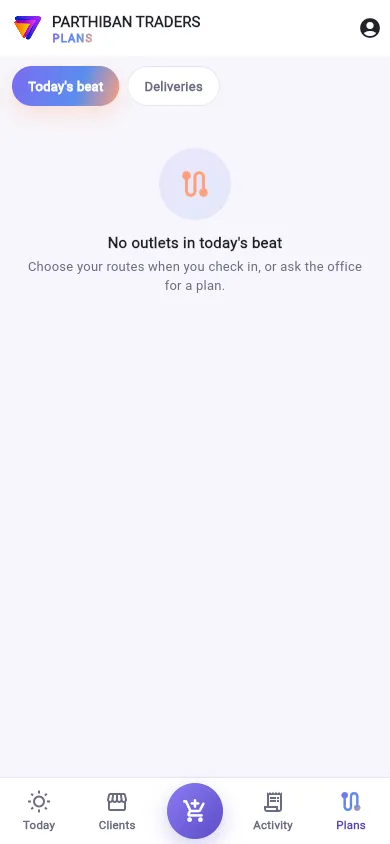
If there are none, you see No outlets in today's beat and Choose your routes when you check in, or ask the office for a plan.
What you see
- The top card: … of … outlets done, a progress bar, and Ordered, Visited and Collected. A shop counts as done when it has an order or a visit today.
- Route: opens Google Maps through the shops not yet ordered that have a map pin. It shows only when some shops have a pin.
- Search outlets.
- All, Orders to take, Not visited and Dues to collect: filter the list.
- A card for each shop, with Ordered or Order pending, Visited, and the amount collected today. The card has the same buttons as on the Clients tab.
Work through the beat
- Tap Plans, then Today's beat. You can also tap My beat on the Today tab.
- Tap Route to plan your drive.
- At each shop, use Order, Collect or Visit on its card.
- Pull the list down to refresh it.
Good to know
- The Google Maps route takes up to 10 stops.
- Deliveries next to Today's beat is for delivery work. See Delivery.
- Plan: sales, order and collection plans need Pro · Large Stockist or higher. Without plans, the beat follows your routes.
Related
- Start and end the day: choose routes at check in
- Goals and incentives: how your plans are going this month
- Sales Plan: how the office plans your beat
- Routes: the routes and their visit days
திட்டங்கள் (Plans) டேப் இன்றைய உங்கள் சுற்றைக் காட்டும்: நீங்கள் போக வேண்டிய கடைகள், ஒவ்வொன்றிலும் என்ன செய்து முடித்தீங்க.
சுற்று எங்கிருந்து வருகிறது
- இன்றைக்கு வரும்படி அலுவலகம் உங்களுக்குத் திட்டங்கள் போட்டிருந்தால், அந்தத் திட்டங்களின் கடைகளே சுற்று, திட்டத்தின் வரிசையில்.
- இல்லையென்றால், வருகை பதிவின் போது நீங்கள் தேர்ந்தெடுத்த வழித்தடங்களில் உள்ள கடைகளே சுற்று.
எதுவும் இல்லை என்றால், இன்றைய சுற்றில் கடைகள் இல்லை (No outlets in today's beat), வருகை பதிவின்போது வழித்தடங்களைத் தேர்ந்தெடுக்கவும், அல்லது அலுவலகத்திடம் திட்டம் கேளுங்கள். (Choose your routes when you check in, or ask the office for a plan.) என்று வரும்.
திரையில் என்ன தெரியும்
- The top card (மேல் அட்டை): … கடைகளில் … முடிந்தது (… of … outlets done), ஒரு முன்னேற்றப் பட்டை, ஆர்டர் ஆனது (Ordered), சந்தித்தது (Visited), வசூலானது (Collected). இன்று ஒரு ஆர்டரோ சந்திப்போ இருந்தால் அந்தக் கடை முடிந்ததாகக் கணக்கு.
- வழித்தடம் (Route): இன்னும் ஆர்டர் எடுக்காத, மேப் பின் உள்ள கடைகள் வழியாக Google Maps திறக்கும். சில கடைகளுக்காவது பின் இருந்தால் மட்டுமே தெரியும்.
- கடைகளைத் தேடு (Search outlets).
- அனைத்தும் (All), எடுக்க வேண்டிய ஆர்டர்கள் (Orders to take), சந்திக்கவில்லை (Not visited), வசூலிக்க வேண்டிய நிலுவை (Dues to collect): பட்டியலை வடிகட்ட.
- A card for each shop (ஒவ்வொரு கடைக்கும் ஒரு அட்டை), ஆர்டர் ஆனது (Ordered) அல்லது ஆர்டர் நிலுவையில் (Order pending), சந்தித்தது (Visited), இன்று வசூலித்த தொகையுடன். வாடிக்கையாளர்கள் டேபில் உள்ள அதே பட்டன்கள் அட்டையில் இருக்கும்.
சுற்றை முடித்தல்
- திட்டங்கள் (Plans), பிறகு இன்றைய சுற்று (Today's beat) தட்டுங்க. இன்று டேபில் உள்ள என் பீட் (My beat) தட்டியும் வரலாம்.
- உங்கள் பயணத்தைத் திட்டமிட வழித்தடம் (Route) தட்டுங்க.
- ஒவ்வொரு கடையிலும், அதன் அட்டையில் உள்ள ஆர்டர் (Order), வசூலி (Collect) அல்லது சந்திப்பு (Visit) பயன்படுத்துங்க.
- பட்டியலைப் புதுப்பிக்க கீழே இழுங்க.
தெரிந்துகொள்ள வேண்டியது
- Google Maps வழித்தடத்தில் அதிகபட்சம் 10 நிறுத்தங்கள் வரும்.
- இன்றைய சுற்று (Today's beat) பக்கத்தில் உள்ள டெலிவரிகள் (Deliveries) டெலிவரி வேலைக்கானது. பாருங்க: டெலிவரி.
- பிளான்: விற்பனை, ஆர்டர், வசூல் திட்டங்களுக்கு Pro · பெரிய ஸ்டாக்கிஸ்ட் (Pro · Large Stockist) அல்லது அதற்கு மேல் வேண்டும். திட்டங்கள் இல்லாவிட்டால், சுற்று உங்கள் வழித்தடங்களைப் பின்பற்றும்.
தொடர்புடையவை
- நாளைத் தொடங்குதல், முடித்தல்: வருகை பதிவின் போது வழித்தடங்களைத் தேர்ந்தெடுக்க
- இலக்குகள், ஊக்கத்தொகைகள்: இந்த மாதம் உங்கள் திட்டங்கள் எப்படிப் போகின்றன
- விற்பனைத் திட்டம்: அலுவலகம் உங்கள் சுற்றை எப்படித் திட்டமிடுகிறது
- வழித்தடங்கள்: வழித்தடங்களும் அவற்றின் வருகை நாட்களும்