User manualபயனர் கையேடு · Office: TransactionsOffice: பரிவர்த்தனைகள் (Transactions)
Incentive Settlementஊக்கத்தொகைத் தீர்வு (Incentive Settlement)
Work out staff incentives from your rules, approve them into each person's account, and release the payment.உங்கள் விதிகளை வைத்து ஊழியர்களின் ஊக்கத்தொகையைக் கணக்கிட, ஒவ்வொருவர் கணக்கிலும் அங்கீகரிக்க, பிறகு பணத்தை விடுவிக்க.
- Where to find itஎங்கே இருக்கிறது
- Office → Transactions → Incentive Settlement
- Who uses itயார் பயன்படுத்துவார்கள்
- Owner, admin, accountantஉரிமையாளர், நிர்வாகி, கணக்காளர்
An incentive settlement books an incentive a person has earned. It debits Incentives and credits the person's account. You do this in three steps: work out, approve, then pay.
What you see
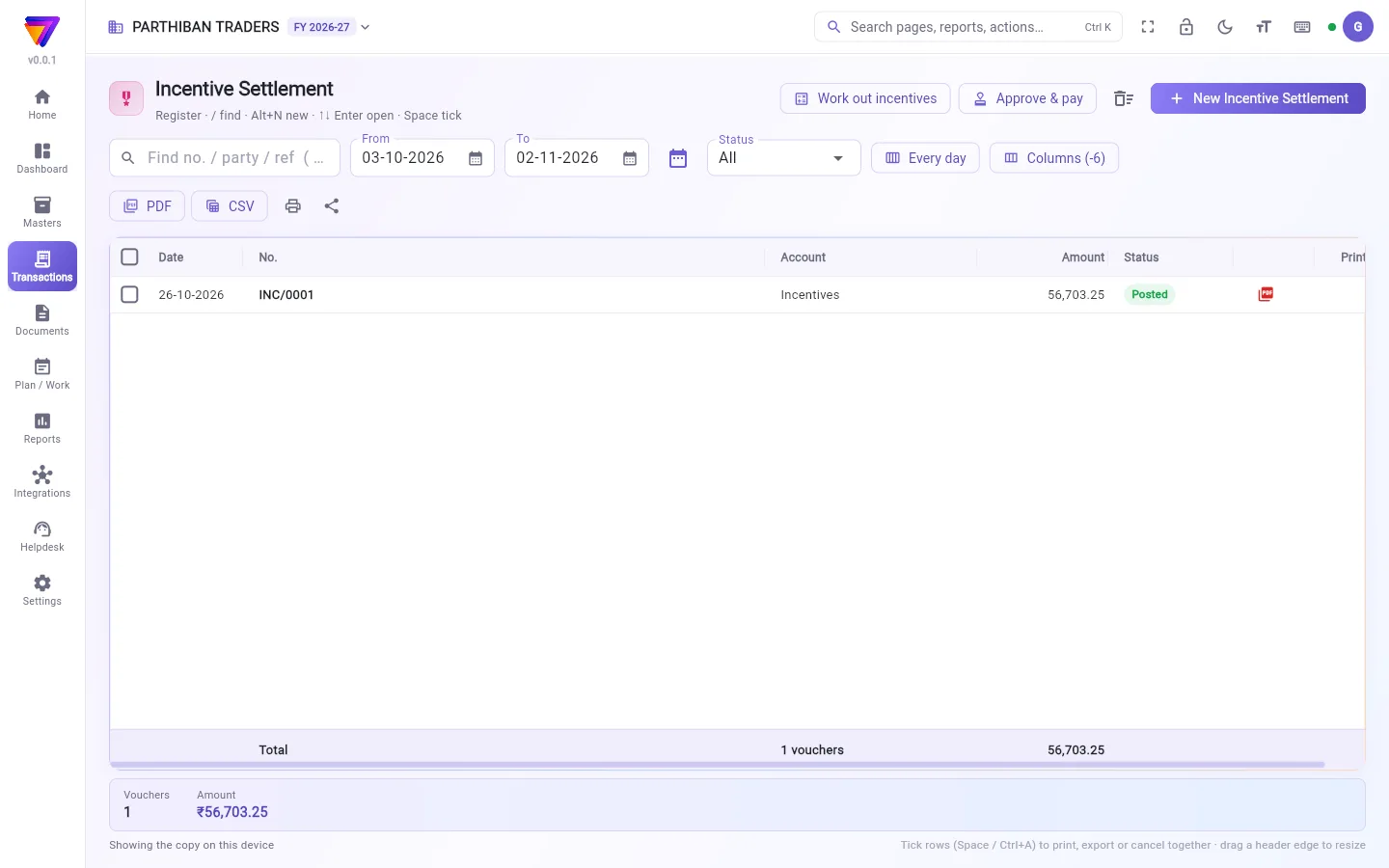
The register lists your settlements, numbered INC/0001, INC/0002 and so on, with the Amount of each. It works like every other voucher register. See The register: finding, filtering and exporting bills.
Two extra buttons sit at the top: Work out incentives and Approve & pay.
1. Work out incentives
- Click Work out incentives.
- Set From and To.
- To use only some rules, click All rules (n) and tick them. Click Use these.
- Click Work out. The screen shows each award and who shares it.
- Click Save as entries. The entries are saved as Eligible.
Monthly and weekly rules are judged on the whole month or week. Working out again replaces eligible entries. Approved and paid entries never change.
2. Approve
- Click Approve & pay. The screen lists entries by status: Eligible, Approved, Ready to claim, Rejected, Paid and All.
- Tick the eligible entries.
- Click Approve (n) and confirm.
For each person, one Incentive Settlement is posted: Incentives debit, the person's incentive account credit. Shares with no delivery person or cashier on the bill go to the Company Incentive account. They are never paid out.
To refuse an entry, tick it and click Reject. You must give a reason.
Before approving, you can tick one eligible entry and click Change amount.
3. Pay
- On the Approved entries, click Release payment (n).
- Choose the Mode (Cash, Bank transfer or UPI), the account and the Date.
- Click Pay.
This makes one Payment per person: the person's account debit, cash or bank credit. You can also pay approved incentives with the salary, from the payslip.
Who can do what
- Work out incentives and Save as entries need the right to create incentive settlements.
- Approve (n) and Reject need the right to approve them.
- Release payment (n) needs the right to create payments.
- An entry the system holds from payment shows a warning in Details. Only the owner or an admin can click Accept the amount and allow payment.
Good to know
- Available on Pro · Large Stockist and Enterprise.
- New Incentive Settlement opens a blank entry with Incentives on Dr, for a one-off incentive by hand.
- Details shows how an entry was worked out and the bills behind it.
Related
ஒருவர் ஈட்டிய ஊக்கத்தொகையை ஊக்கத்தொகைத் தீர்வு பதிவு செய்யும். இது ஊக்கத்தொகைகள் (Incentives)-ஐப் பற்று வைத்து, அந்த நபரின் கணக்கில் வரவு வைக்கும். இதை மூன்று படிகளில் செய்யுங்க: கணக்கிடு, அங்கீகரி, பிறகு செலுத்து.
திரையில் என்ன தெரியும்
பதிவேட்டில் உங்கள் தீர்வுகள் INC/0001, INC/0002 என்று எண்ணுடன், ஒவ்வொன்றின் தொகை (Amount)-யுடன் வரும். மற்ற எல்லா வவுச்சர் பதிவேடுகளையும் போலவே இதுவும் வேலை செய்யும். பார்க்க: பதிவேடு: பில்களைத் தேடுவது, வடிகட்டுவது, ஏற்றுமதி செய்வது.
மேலே இரண்டு கூடுதல் பொத்தான்கள் இருக்கும்: ஊக்கத்தொகையைக் கணக்கிடு (Work out incentives), அங்கீகரித்துச் செலுத்து (Approve & pay).
1. ஊக்கத்தொகையைக் கணக்கிடுவது
- ஊக்கத்தொகையைக் கணக்கிடு (Work out incentives) அழுத்துங்க.
- முதல் (From), வரை (To) அமையுங்க.
- சில விதிகளை மட்டும் பயன்படுத்த, அனைத்து விதிகள் (n) (All rules (n)) அழுத்தி அவற்றை டிக் செய்யுங்க. இவற்றைப் பயன்படுத்து (Use these) அழுத்துங்க.
- கணக்கிடு (Work out) அழுத்துங்க. ஒவ்வொரு ஊக்கத்தொகையும், அதை யார் யார் பகிர்கிறார்கள் என்பதும் திரையில் தெரியும்.
- பதிவுகளாகச் சேமி (Save as entries) அழுத்துங்க. பதிவுகள் தகுதியானது (Eligible) என்று சேமிக்கப்படும்.
மாத, வார விதிகள் முழு மாதம் அல்லது வாரத்தை வைத்துக் கணக்கிடப்படும். மீண்டும் கணக்கிட்டால், தகுதியான பதிவுகள் மாற்றப்படும். அங்கீகரித்த, செலுத்திய பதிவுகள் ஒருபோதும் மாறாது.
2. அங்கீகரிப்பது
- அங்கீகரித்துச் செலுத்து (Approve & pay) அழுத்துங்க. திரை பதிவுகளை நிலை வாரியாகக் காட்டும்: தகுதியானது (Eligible), அங்கீகரிக்கப்பட்டது (Approved), கோரத் தயார் (Ready to claim), நிராகரிக்கப்பட்டது (Rejected), செலுத்தப்பட்டது (Paid), அனைத்தும் (All).
- தகுதியான பதிவுகளை டிக் செய்யுங்க.
- அங்கீகரி (n) (Approve (n)) அழுத்தி உறுதி செய்யுங்க.
ஒவ்வொரு நபருக்கும் ஒரு ஊக்கத்தொகைத் தீர்வு பதிவாகும்: ஊக்கத்தொகைகள் (Incentives) பற்று, அந்த நபரின் ஊக்கத்தொகைக் கணக்கு வரவு. பில்லில் டெலிவரி நபரோ காசாளரோ இல்லாத பங்குகள் நிறுவன ஊக்கத்தொகை (Company Incentive) கணக்குக்குப் போகும். அவை ஒருபோதும் யாருக்கும் கொடுக்கப்படாது.
ஒரு பதிவை மறுக்க, அதை டிக் செய்து நிராகரி (Reject) அழுத்துங்க. காரணம் கொடுக்க வேண்டும்.
அங்கீகரிப்பதற்கு முன், ஒரு தகுதியான பதிவை டிக் செய்து தொகையை மாற்று (Change amount) அழுத்தலாம்.
3. செலுத்துவது
- அங்கீகரிக்கப்பட்டது (Approved) பதிவுகளில், பணம் விடுவி (n) (Release payment (n)) அழுத்துங்க.
- முறை (Mode) (ரொக்கம் (Cash), வங்கிப் பரிமாற்றம் (Bank transfer) அல்லது UPI), கணக்கு, தேதி (Date) தேர்ந்தெடுங்க.
- செலுத்து (Pay) அழுத்துங்க.
இது ஒவ்வொரு நபருக்கும் ஒரு பணம் செலுத்துதலைப் போடும்: அந்த நபரின் கணக்கு பற்று, ரொக்கம் அல்லது வங்கி வரவு. அங்கீகரித்த ஊக்கத்தொகைகளைச் சம்பளச் சீட்டிலிருந்து சம்பளத்துடனும் கொடுக்கலாம்.
யார் என்ன செய்யலாம்
- ஊக்கத்தொகையைக் கணக்கிடு (Work out incentives), பதிவுகளாகச் சேமி (Save as entries) செய்ய ஊக்கத்தொகைத் தீர்வு உருவாக்கும் அனுமதி வேண்டும்.
- அங்கீகரி (n) (Approve (n)), நிராகரி (Reject) செய்ய அவற்றை அங்கீகரிக்கும் அனுமதி வேண்டும்.
- பணம் விடுவி (n) (Release payment (n)) செய்ய பணம் செலுத்துதல் உருவாக்கும் அனுமதி வேண்டும்.
- சிஸ்டம் பணம் செலுத்தாமல் நிறுத்தி வைத்த பதிவுக்கு விவரங்கள் (Details)-இல் எச்சரிக்கை தெரியும். உரிமையாளர் அல்லது நிர்வாகி மட்டுமே தொகையை ஏற்று பணம் செலுத்த அனுமதி (Accept the amount and allow payment) அழுத்த முடியும்.
தெரிந்துகொள்ள வேண்டியது
- Pro · பெரிய ஸ்டாக்கிஸ்ட், Enterprise பிளான்களில் கிடைக்கும்.
- New Incentive Settlement (புதிய ஊக்கத்தொகைத் தீர்வு), ஒருமுறை மட்டும் கையால் போடும் ஊக்கத்தொகைக்காக, பற்று (Dr)-இல் ஊக்கத்தொகைகள் (Incentives) உடன் ஒரு வெற்றுப் பதிவைத் திறக்கும்.
- ஒரு பதிவு எப்படிக் கணக்கிடப்பட்டது, அதற்குப் பின்னால் உள்ள பில்கள் என்ன என்பதை விவரங்கள் (Details) காட்டும்.
தொடர்புடையவை
- ஊக்கத்தொகை: ஊக்கத்தொகை விதிகளை அமைக்க.
- சம்பளம்: அங்கீகரித்த ஊக்கத்தொகைகளைச் சம்பளத்துடன் கொடுக்க.
- பணம் செலுத்துதல்கள்: பணம் விடுவி (Release payment) போடும் பணம் செலுத்துதல்கள்.
- பணியாளர்: ஊக்கத்தொகை ஈட்டும் நபர்கள்.