User manualபயனர் கையேடு · Score: the salesman appScore: சேல்ஸ்மேன் ஆப்
Collect moneyபணம் வசூலித்தல் (Collect money)
Take a payment from a client by cash, UPI, cheque or bank, and set it against their open bills.வாடிக்கையாளரிடம் ரொக்கம், UPI, காசோலை அல்லது வங்கி மூலம் பணம் வாங்கி, அவருடைய நிலுவை பில்களுக்கு எதிராக வரவு வையுங்க.
- Where to find itஎங்கே இருக்கிறது
- Score → Score → Clients → Collect
- Who uses itயார் பயன்படுத்துவார்கள்
- Salesmen, collection staff, delivery cashiersசேல்ஸ்மேன்கள், வசூல் பணியாளர்கள், டெலிவரி காசாளர்கள்
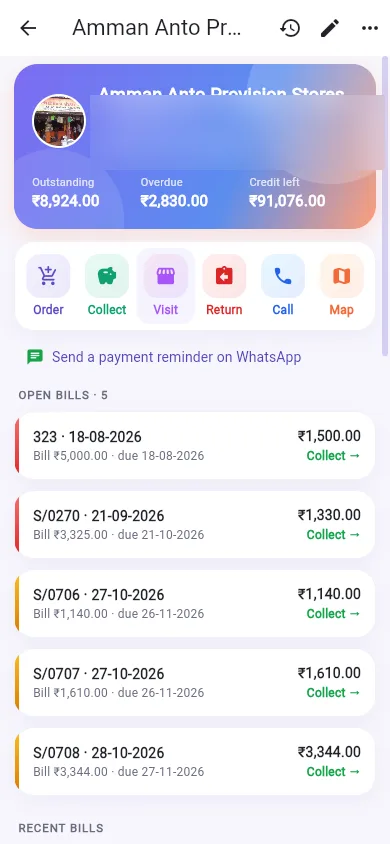
When a client pays you, record it in the Collect sheet. Score saves it as a receipt, the same as one made in the office, and sets it against the client's open bills.
Open the Collect sheet
Use any of these:
- Collect on a client card or client page.
- Collect on the Today tab, then choose the client. The list shows only clients who owe.
- Collect → on one open bill on the client page. That bill is ticked for you.
- Collect against this bill in the three-dot menu of a bill in Activity.
Take the payment
- The top shows the client's Outstanding, and the overdue amount if any.
- Check Amount received. It starts at what the client owes (or what the ticked bill owes). Change it to what you got.
- Choose how they paid: Cash, UPI, Cheque or Bank.
- For a cheque, enter Cheque number, Cheque date and Bank.
- For UPI, cheque or bank, tap Photo of the payment screen (or Photo of the cheque). The gallery button picks a photo you already have.
- Under Set against (oldest first), see which bills the money pays. To pay other bills, tick them. The list then says Set against the ticked bills. Oldest first goes back.
- Tap Save · ₹….
You see Receipt … saved.
Paid more than one way
- Tap Paid more than one way?
- Under Also paid by (2), choose the other way and type How much by ….
- Tap Add another payment method for a third way.
The first way takes the rest of the amount. Score saves one receipt for each way, and the oldest bills are paid first.
Fields
| Field | What to enter |
|---|---|
| Amount received | The total you got from the client |
| Payment way | Cash, UPI, Cheque or Bank |
| Received into | The cash or bank account (only when the company has more than one) |
| Collection date | Only if your role may enter an earlier date |
| Cheque number, Cheque date, Bank | For a cheque |
| Discount given and Reason | Only if your role may give a discount. A discount needs a reason |
Who can do what
- Collecting needs permission to create a Collection / Receipt.
- Collection date shows only for roles that may back-date receipts.
- Discount given shows only for roles that may give a receipt discount and also make journals. The discount is posted as its own journal after the receipt is posted.
Good to know
- If a collection from this shop is already waiting for approval, Score does not let you collect the same money again. You see how much is waiting and how much more is due.
- With Photo proof in Score on, a UPI collection needs a photo of the payment screen.
- After saving, WhatsApp opens with a message to the client, unless the office turned off Score: open WhatsApp with the receipt after a collection.
- With no network, the receipt is kept on the phone and sent later.
Related
- Clients: open bills and dues
- Delivery: collect on a delivery or collection run
- Collection / Receipt: the receipt in Office
வாடிக்கையாளர் உங்களிடம் பணம் கொடுத்தால், அதை வசூலி (Collect) ஷீட்டில் பதிவு செய்யுங்க. Score அதை அலுவலகத்தில் போடும் ரசீது போலவே ஒரு ரசீதாகச் சேமித்து, வாடிக்கையாளரின் நிலுவை பில்களுக்கு எதிராக வரவு வைக்கும்.
வசூலி ஷீட்டைத் திறத்தல்
இவற்றில் எதையாவது பயன்படுத்துங்க:
- வாடிக்கையாளர் அட்டையில் அல்லது வாடிக்கையாளர் பக்கத்தில் உள்ள வசூலி (Collect).
- இன்று டேபில் உள்ள வசூலி (Collect), பிறகு வாடிக்கையாளரைத் தேர்ந்தெடுங்க. பணம் தர வேண்டிய வாடிக்கையாளர்கள் மட்டுமே பட்டியலில் வருவார்கள்.
- வாடிக்கையாளர் பக்கத்தில் ஒரு நிலுவை பில்லில் உள்ள வசூல் → (Collect →). அந்த பில் தானாக டிக் ஆகிவிடும்.
- செயல்பாட்டில் ஒரு பில்லின் மூன்று-புள்ளி மெனுவில் உள்ள இந்த பில்லுக்கு வசூல் (Collect against this bill).
பணம் வாங்குதல்
- மேலே வாடிக்கையாளரின் நிலுவை (Outstanding), தாமதமான தொகை இருந்தால் அதுவும் தெரியும்.
- பெற்ற தொகை (Amount received) சரிபாருங்க. வாடிக்கையாளர் தர வேண்டிய தொகையில் (அல்லது டிக் செய்த பில்லின் நிலுவையில்) இருந்து தொடங்கும். உங்களுக்குக் கிடைத்த தொகைக்கு மாற்றுங்க.
- அவர் எப்படிக் கொடுத்தார் என்று தேர்ந்தெடுங்க: ரொக்கம் (Cash), UPI, காசோலை (Cheque) அல்லது வங்கி (Bank).
- காசோலைக்கு, காசோலை எண் (Cheque number), காசோலை தேதி (Cheque date), வங்கி (Bank) போடுங்க.
- UPI, காசோலை அல்லது வங்கிக்கு, பணம் செலுத்திய திரையின் புகைப்படம் (Photo of the payment screen) (அல்லது காசோலையின் புகைப்படம் (Photo of the cheque)) தட்டுங்க. கேலரி பட்டன் ஏற்கனவே உள்ள போட்டோவை எடுக்கும்.
- பில்களுக்கு (பழையது முதலில்) (Set against (oldest first)) கீழ், பணம் எந்த பில்களுக்குப் போகிறது என்று பாருங்க. வேறு பில்களுக்குக் கட்ட, அவற்றை டிக் செய்யுங்க. அப்போது பட்டியல் டிக் செய்த பில்களுக்கு (Set against the ticked bills) என்று காட்டும். பழையது முதலில் (Oldest first) பழைய முறைக்கே திருப்பும்.
- சேமி · ₹… (Save · ₹…) தட்டுங்க.
ரசீது … சேமிக்கப்பட்டது (Receipt … saved) என்று வரும்.
ஒன்றுக்கு மேற்பட்ட முறையில் பணம்
- ஒன்றுக்கு மேற்பட்ட முறையில் செலுத்தினாரா? (Paid more than one way?) தட்டுங்க.
- மேலும் செலுத்திய முறை (2) (Also paid by (2)) கீழ், மற்ற முறையைத் தேர்ந்தெடுத்து … மூலம் எவ்வளவு (How much by …) டைப் செய்யுங்க.
- மூன்றாவது முறைக்கு இன்னொரு செலுத்தும் முறை சேர் (Add another payment method) தட்டுங்க.
மீதித் தொகை முதல் முறைக்குப் போகும். ஒவ்வொரு முறைக்கும் Score ஒரு ரசீது சேமிக்கும், பழைய பில்கள் முதலில் கட்டப்படும்.
புலங்கள் (Fields)
| புலம் | என்ன போட வேண்டும் |
|---|---|
| பெற்ற தொகை (Amount received) | வாடிக்கையாளரிடம் இருந்து வாங்கிய மொத்தத் தொகை |
| செலுத்தும் முறை | ரொக்கம் (Cash), UPI, காசோலை (Cheque) அல்லது வங்கி (Bank) |
| வரவு வைத்த கணக்கு (Received into) | ரொக்க அல்லது வங்கிக் கணக்கு (நிறுவனத்துக்கு ஒன்றுக்கு மேல் இருந்தால் மட்டும்) |
| வசூல் தேதி (Collection date) | முந்தைய தேதி போட உங்கள் பொறுப்புக்கு அனுமதி இருந்தால் மட்டும் |
| காசோலை எண் (Cheque number), காசோலை தேதி (Cheque date), வங்கி (Bank) | காசோலைக்கு |
| கொடுத்த தள்ளுபடி (Discount given), காரணம் (Reason) | தள்ளுபடி கொடுக்க உங்கள் பொறுப்புக்கு அனுமதி இருந்தால் மட்டும். தள்ளுபடிக்குக் காரணம் கட்டாயம் |
யார் என்ன செய்யலாம்
- வசூலிக்க, வசூல் / ரசீது (Collection / Receipt) உருவாக்கும் அனுமதி வேண்டும்.
- ரசீதுகளுக்கு முந்தைய தேதி போட அனுமதி உள்ள பொறுப்புகளுக்கு மட்டுமே வசூல் தேதி (Collection date) தெரியும்.
- ரசீது தள்ளுபடி கொடுக்கவும், ஜர்னல் போடவும் அனுமதி உள்ள பொறுப்புகளுக்கு மட்டுமே கொடுத்த தள்ளுபடி (Discount given) தெரியும். ரசீது பதிவான பிறகு, தள்ளுபடி தனி ஜர்னலாகப் பதிவாகும்.
தெரிந்துகொள்ள வேண்டியது
- இந்தக் கடையில் இருந்து ஒரு வசூல் ஏற்கனவே ஒப்புதலுக்குக் காத்திருந்தால், அதே பணத்தை மறுபடியும் வசூலிக்க Score விடாது. எவ்வளவு காத்திருக்கிறது, இன்னும் எவ்வளவு நிலுவை என்று காட்டும்.
- Score-இல் புகைப்பட ஆதாரம் (Photo proof in Score) ஆன் ஆக இருந்தால், UPI வசூலுக்கு பணம் செலுத்திய திரையின் போட்டோ கட்டாயம்.
- சேமித்த பிறகு, வாடிக்கையாளருக்கான செய்தியுடன் WhatsApp திறக்கும், அலுவலகம் Score: வசூலுக்குப் பிறகு ரசீதுடன் WhatsApp திற (Score: open WhatsApp with the receipt after a collection) ஆஃப் செய்திருந்தால் தவிர.
- நெட்வொர்க் இல்லை என்றால், ரசீது போனில் வைக்கப்பட்டு பிறகு அனுப்பப்படும்.
தொடர்புடையவை
- வாடிக்கையாளர்கள்: நிலுவை பில்கள், நிலுவைகள்
- டெலிவரி: டெலிவரி அல்லது வசூல் சுற்றில் வசூலிக்க
- வசூல் / ரசீது: Office-இல் ரசீது