User manualபயனர் கையேடு · Office: TransactionsOffice: பரிவர்த்தனைகள் (Transactions)
Stock Transferஇருப்பு மாற்றம் (Stock Transfer)
Move stock from one warehouse to another, or to another company you run, and track whether it arrived.ஒரு கிடங்கிலிருந்து இன்னொரு கிடங்குக்கு, அல்லது நீங்க நடத்தும் இன்னொரு நிறுவனத்துக்கு இருப்பை மாற்றுங்க; அது போய்ச் சேர்ந்ததா என்று கண்காணியுங்க.
- Where to find itஎங்கே இருக்கிறது
- Office → Transactions → Stock Transfer
- Who uses itயார் பயன்படுத்துவார்கள்
- Godown in-charge, office staffகிடங்குப் பொறுப்பாளர், அலுவலக ஊழியர்கள்
A stock transfer moves goods from one warehouse to another. Stock goes out of the first warehouse and comes into the second when you save it. Your accounts do not change.
What you see
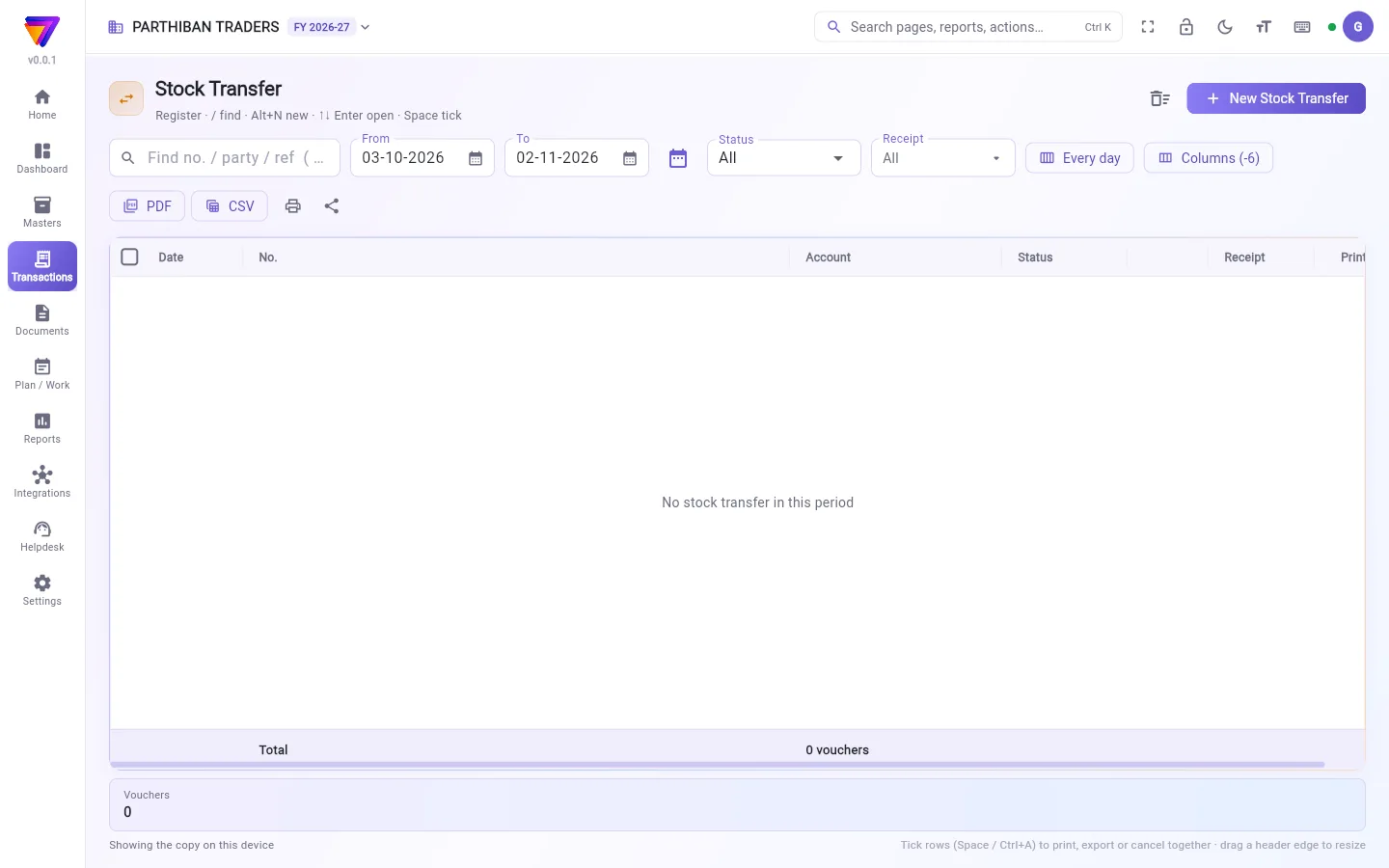
The register lists your transfers, numbered ST/0001, ST/0002 and so on. It works like every other voucher register. See The register: finding, filtering and exporting bills.
This register has one extra column and filter: Receipt. It shows whether the receiving side has the goods: Not started, Started or Received.
Move stock between warehouses
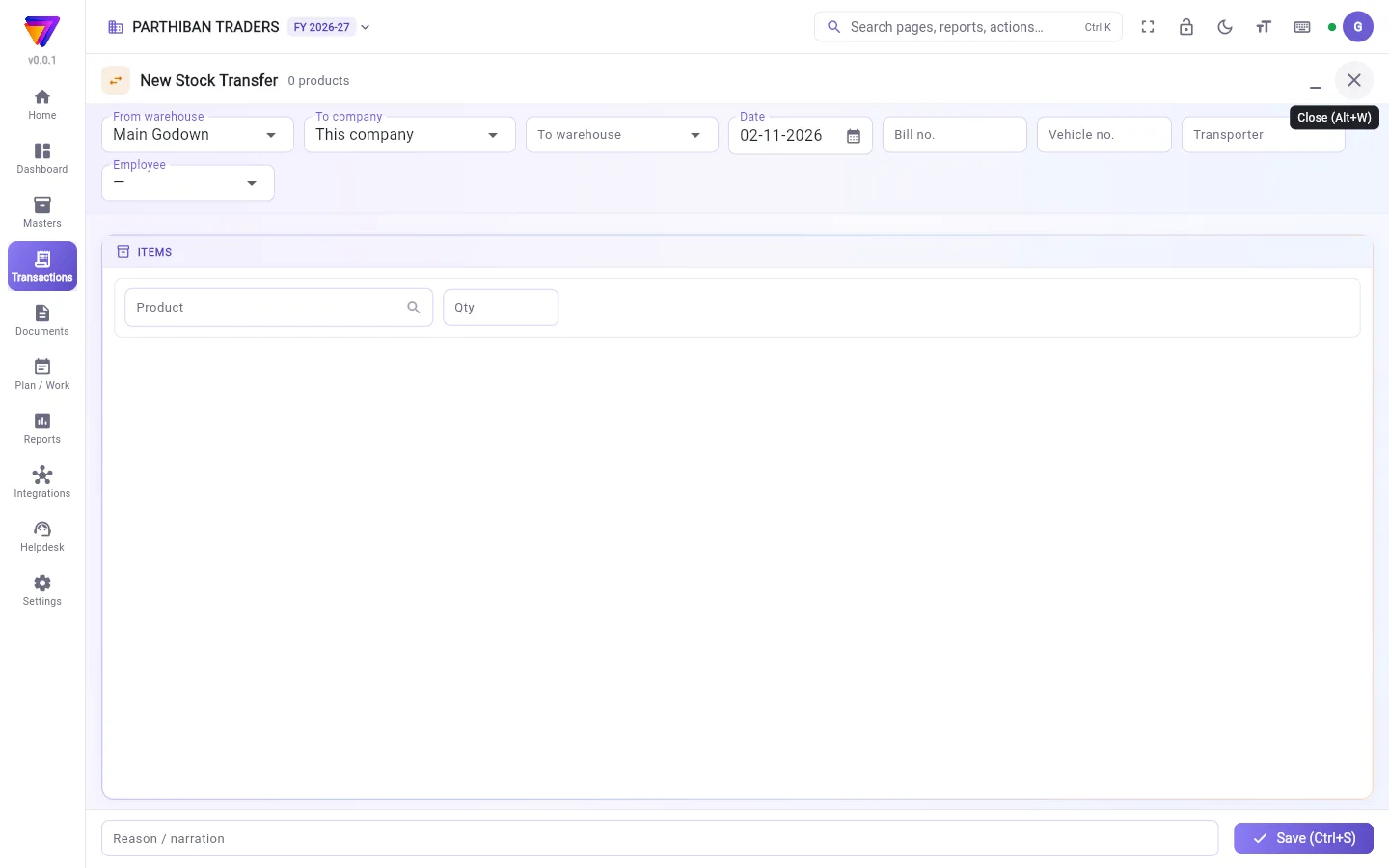
- Click New Stock Transfer.
- In From warehouse, choose where the goods are now.
- In To warehouse, choose where they go. The list leaves out the "from" warehouse.
- Check the Date.
- If you want, fill in Bill no., Vehicle no., Transporter and Employee.
- On each line, choose the Product, the Batch (if the product has batches) and the Qty. The line shows In stock for the "from" warehouse.
- Add a Reason / narration if you want.
- Click Save (Ctrl+S).
Move stock to another company
If your login has more than one company, the editor shows To company.
- In To company, choose the other company. To warehouse goes away.
- Add the products and quantities, then save.
The goods go out of this company's warehouse. They come into the other company's main warehouse. The other company finds each product by its code, then its barcode, then its exact name. If a product is not there, nothing is saved, and the message names the missing products. Add them in the other company first.
This makes two Stock Adjustment vouchers, one in each company. You need the right to create stock adjustments in both companies. It is not listed in this register.
Mark a transfer received
- In the register, tick one or more transfers.
- Click Receipt status.
- Choose the Status. For Received, set Received on.
- Add a Note (short / damaged …) if something was wrong.
- Click Update.
This only records the status. The stock moved when the transfer was saved.
Fields
| Field | What to enter |
|---|---|
| From warehouse | Where the goods are now. Required. |
| To warehouse | Where the goods go. Required. It must be a different warehouse. |
| Product, Qty | At least one product, with a quantity above zero. |
| Batch | Required for a product that has batches. |
| Date | The day the goods moved. |
| Bill no., Vehicle no., Transporter, Employee | Optional details of the trip. |
Who can do what
- Making, changing and cancelling transfers follows the role's rights on this page.
- Receipt status shows only for roles allowed to mark transfers received.
Good to know
- Available on every plan (Basic and up).
- If Allow billing more than the stock on hand is off in Settings, a transfer that takes the "from" warehouse below zero is refused.
- The Van Loading page also makes stock transfers, to load a van and bring stock back.
Related
- Warehouse: add the warehouses you move stock between.
- Van Loading: load and unload sales vans.
- Stock Adjustment: fix stock for damage, shortage or excess.
இருப்பு மாற்றம், பொருட்களை ஒரு கிடங்கிலிருந்து இன்னொரு கிடங்குக்கு நகர்த்தும். சேமித்தவுடன் முதல் கிடங்கிலிருந்து இருப்பு வெளியே போய் இரண்டாவதில் சேரும். உங்க கணக்குகள் மாறாது.
திரையில் என்ன தெரியும்
பதிவேடு உங்க மாற்றங்களை ST/0001, ST/0002 என்று எண்ணிட்டுக் காட்டும். இது மற்ற எல்லா வவுச்சர் பதிவேடுகள் போலவே வேலை செய்யும். பார்க்க: பதிவேடு: பில்களைத் தேடுதல், வடிகட்டுதல், எக்ஸ்போர்ட் செய்தல்.
இந்தப் பதிவேட்டில் ஒரு கூடுதல் நெடுவரிசையும் வடிகட்டியும் உண்டு: வசூல் (Receipt). பெறும் பக்கத்துக்குப் பொருட்கள் வந்து சேர்ந்ததா என்று இது காட்டும்: தொடங்கவில்லை (Not started), தொடங்கியது (Started) அல்லது பெறப்பட்டது (Received).
கிடங்குகளுக்கு இடையே இருப்பை மாற்றுவது
- புதிய இருப்பு மாற்றம் (New Stock Transfer) கிளிக் செய்யுங்க.
- கிடங்கிலிருந்து (From warehouse) பெட்டியில், பொருட்கள் இப்போது இருக்கும் கிடங்கைத் தேர்ந்தெடுங்க.
- கிடங்குக்கு (To warehouse) பெட்டியில், அவை போகும் இடத்தைத் தேர்ந்தெடுங்க. இந்தப் பட்டியலில் "இருந்து" கிடங்கு இருக்காது.
- தேதி (Date) சரிபாருங்க.
- வேண்டுமானால் பில் எண் (Bill no.), வாகன எண் (Vehicle no.), போக்குவரத்தாளர் (Transporter), பணியாளர் (Employee) நிரப்புங்க.
- ஒவ்வொரு வரியிலும் பொருள் (Product), பேட்ச் (Batch) (பொருளுக்கு பேட்ச் இருந்தால்), அளவு (Qty) தேர்ந்தெடுங்க. அந்த வரி "இருந்து" கிடங்கின் இருப்பில் (In stock) அளவைக் காட்டும்.
- வேண்டுமானால் காரணம் / விளக்கம் (Reason / narration) சேருங்க.
- சேமி (Ctrl+S) (Save (Ctrl+S)) கிளிக் செய்யுங்க.
இன்னொரு நிறுவனத்துக்கு இருப்பை மாற்றுவது
உங்க லாகினில் ஒன்றுக்கு மேற்பட்ட நிறுவனங்கள் இருந்தால், எடிட்டரில் நிறுவனத்துக்கு (To company) தெரியும்.
- நிறுவனத்துக்கு (To company) பெட்டியில் மற்ற நிறுவனத்தைத் தேர்ந்தெடுங்க. கிடங்குக்கு (To warehouse) மறைந்துவிடும்.
- பொருட்களையும் அளவுகளையும் சேர்த்து சேமியுங்க.
பொருட்கள் இந்த நிறுவனத்தின் கிடங்கிலிருந்து வெளியே போகும். அவை மற்ற நிறுவனத்தின் முதன்மைக் கிடங்கில் சேரும். மற்ற நிறுவனம் ஒவ்வொரு பொருளையும் முதலில் அதன் குறியீடு (code), பிறகு barcode, பிறகு சரியான பெயர் வைத்துக் கண்டுபிடிக்கும். ஒரு பொருள் அங்கே இல்லையென்றால் எதுவும் சேமிக்கப்படாது; இல்லாத பொருட்களின் பெயர்களைச் செய்தி சொல்லும். முதலில் அவற்றை மற்ற நிறுவனத்தில் சேருங்க.
இது இரண்டு இருப்புச் சரிசெய்தல் (Stock Adjustment) வவுச்சர்களை உருவாக்கும் — ஒவ்வொரு நிறுவனத்திலும் ஒன்று. இரண்டு நிறுவனங்களிலும் இருப்புச் சரிசெய்தல் உருவாக்கும் உரிமை உங்களுக்குத் தேவை. இது இந்தப் பதிவேட்டில் வராது.
மாற்றம் வந்து சேர்ந்ததாகக் குறிப்பது
- பதிவேட்டில் ஒன்று அல்லது பல மாற்றங்களை டிக் செய்யுங்க.
- பெறுதல் நிலை (Receipt status) கிளிக் செய்யுங்க.
- நிலை (Status) தேர்ந்தெடுங்க. பெறப்பட்டது (Received) என்றால் பெற்ற தேதி (Received on) அமைங்க.
- ஏதாவது தவறாக இருந்தால் குறிப்பு (குறைவு / சேதம் …) (Note (short / damaged …)) சேருங்க.
- புதுப்பி (Update) கிளிக் செய்யுங்க.
இது நிலையை மட்டுமே பதிவு செய்யும். மாற்றம் சேமித்தபோதே இருப்பு நகர்ந்துவிட்டது.
புலங்கள் (Fields)
| புலம் | என்ன உள்ளிட வேண்டும் |
|---|---|
| கிடங்கிலிருந்து (From warehouse) | பொருட்கள் இப்போது இருக்கும் இடம். கட்டாயம். |
| கிடங்குக்கு (To warehouse) | பொருட்கள் போகும் இடம். கட்டாயம். வேறு கிடங்காக இருக்க வேண்டும். |
| பொருள், அளவு (Product, Qty) | குறைந்தது ஒரு பொருள், பூஜ்ஜியத்துக்கு மேல் அளவுடன். |
| பேட்ச் (Batch) | பேட்ச் உள்ள பொருளுக்குக் கட்டாயம். |
| தேதி (Date) | பொருட்கள் நகர்ந்த நாள். |
| பில் எண், வாகன எண், போக்குவரத்தாளர், பணியாளர் (Bill no., Vehicle no., Transporter, Employee) | பயணத்தின் விருப்ப விவரங்கள். |
யார் என்ன செய்யலாம்
- மாற்றங்களை உருவாக்குவது, மாற்றுவது, ரத்து செய்வது இந்தப் பக்கத்தில் அந்தப் பொறுப்புக்கு (role) உள்ள உரிமைகளைப் பொறுத்தது.
- மாற்றங்களைப் பெற்றதாகக் குறிக்க அனுமதி உள்ள பொறுப்புகளுக்கு மட்டுமே பெறுதல் நிலை (Receipt status) தெரியும்.
தெரிந்துகொள்ள வேண்டியது
- எல்லா திட்டங்களிலும் (Basic முதல்) உண்டு.
- அமைப்புகளில் கையிருப்பை விட அதிகமாக பில் போட அனுமதி (Allow billing more than the stock on hand) அணைக்கப்பட்டிருந்தால், "இருந்து" கிடங்கை பூஜ்ஜியத்துக்குக் கீழே கொண்டுபோகும் மாற்றம் ஏற்கப்படாது.
- வேன் ஏற்றம் (Van Loading) பக்கமும் இருப்பு மாற்றங்களை உருவாக்கும் — வேனில் ஏற்றவும், இருப்பைத் திரும்பக் கொண்டுவரவும்.
தொடர்புடையவை
- கிடங்கு (Warehouse): இருப்பை மாற்றும் கிடங்குகளைச் சேருங்க.
- வேன் ஏற்றம் (Van Loading): விற்பனை வேன்களில் ஏற்றவும் இறக்கவும்.
- இருப்புச் சரிசெய்தல் (Stock Adjustment): சேதம், குறைவு அல்லது அதிகத்துக்கு இருப்பைச் சரிசெய்ய.