User manualபயனர் கையேடு · Office: MastersOffice: முதன்மைப் பதிவுகள் (Masters)
Other Partiesபிற தரப்பினர் (Other Parties)
Keep accounts for people and firms you lend to, borrow from or hold deposits with, outside your trade.உங்க வியாபாரத்துக்கு வெளியே, நீங்க கடன் கொடுத்த, கடன் வாங்கிய அல்லது வைப்புத்தொகை வைத்துள்ள நபர்களுக்கும் நிறுவனங்களுக்கும் கணக்கு வையுங்க.
- Where to find itஎங்கே இருக்கிறது
- Office → Masters → Other Parties
- Who uses itயார் பயன்படுத்துவார்கள்
- Owner, Accountantஉரிமையாளர், கணக்காளர்
Other parties are people or firms you deal with outside buying and selling: a loan you gave, a loan you took, a deposit you paid. Each one is an account in your books. Money moves through receipts, payments and journals as usual.
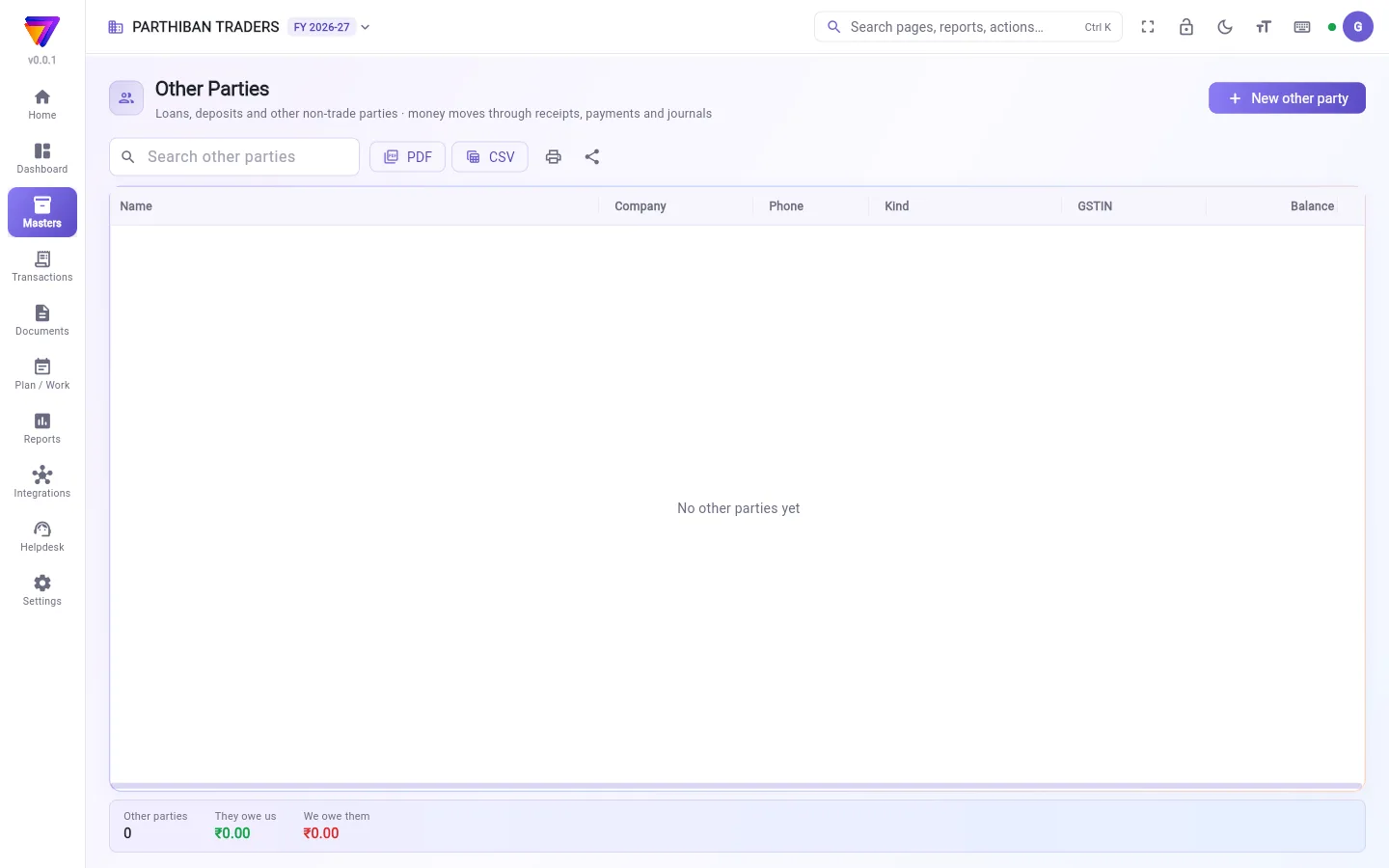
What you see
- A search box and PDF / CSV / print / share.
- A table with Name, Company, Phone, Kind, GSTIN and Balance.
- At the bottom: Other parties (how many), They owe us and We owe them.
- New other party at the top right.
Add an other party
- Click New other party.
- Type the Name.
- Pick the Kind (account group). See the list below.
- Fill in Company name, Phone, GSTIN and the address if you have them.
- Click Save.
You then see a message to set an opening balance in Accounts if there is one.
Kinds
- Loans & advances given (asset)
- Deposits paid (asset)
- Other debtors (owe us)
- Loans taken (liability)
- Secured loans taken (liability)
- Other liabilities
- Other creditors (we owe)
Receive or pay money
- Click a row to select it.
- Click Receive to open a receipt, or Pay to open a payment, with this party already filled in.
- Finish and save the voucher as usual.
To see every entry, select the row and click Statement.
Fields
| Field | What to enter |
|---|---|
| Name (required) | The person or firm. Save stays grey until there is a name. |
| Kind (account group) | Where the account sits in your books. |
| Company name | Their firm, if any. |
| Phone | Their number. |
| GSTIN | Their GST number, if any. |
| Address line 1 / Address line 2 | Their address. |
| Active | Shows when you edit. Untick to retire the party. |
Who can do what
- The Accountant role has full access to this page.
- Balance and the totals show only to people who can view Accounts.
- Receive and Pay need create access to Receipts and Payments.
Good to know
- Comes with the Pro plan and above.
- Choose the Kind (account group) with care. It cannot be changed after you save.
- Other parties have no bills and no GST. Use Client or Vendor for trade.
- There is no delete on this page. Untick Active instead.
Related
பிற தரப்பினர் என்பவர்கள் வாங்குதல், விற்றல் தவிர வேறு விஷயங்களில் நீங்க தொடர்பு வைத்திருக்கும் நபர்கள் அல்லது நிறுவனங்கள்: நீங்க கொடுத்த கடன், நீங்க வாங்கிய கடன், நீங்க செலுத்திய வைப்புத்தொகை. ஒவ்வொருவரும் உங்க கணக்குப் புத்தகத்தில் ஒரு கணக்கு. பணம் வழக்கம் போல வசூல், பணம் செலுத்துதல், குறிப்பேடு பதிவுகள் மூலம் நகரும்.
திரையில் என்ன தெரியும்
- ஒரு தேடல் பெட்டி, PDF / CSV / அச்சிடு / பகிர்.
- பெயர் (Name), நிறுவனம் (Company), தொலைபேசி (Phone), வகை (Kind), GSTIN, இருப்புத் தொகை (Balance) உள்ள ஒரு அட்டவணை.
- கீழே: பிற தரப்பினர் (Other parties) (எத்தனை பேர்), நமக்குத் தர வேண்டியது (They owe us), நாம் தர வேண்டியது (We owe them).
- மேலே வலது பக்கம் புதிய பிற தரப்பினர் (New other party).
பிற தரப்பினரைச் சேர்க்க
- புதிய பிற தரப்பினர் (New other party) கிளிக் செய்யுங்க.
- பெயர் (Name) டைப் செய்யுங்க.
- வகை (கணக்குக் குழு) (Kind (account group)) தேர்ந்தெடுங்க. கீழே உள்ள பட்டியலைப் பாருங்க.
- உங்களிடம் இருந்தால் நிறுவனப் பெயர் (Company name), தொலைபேசி (Phone), GSTIN, முகவரி நிரப்புங்க.
- சேமி (Save) கிளிக் செய்யுங்க.
தொடக்க இருப்புத் தொகை இருந்தால், அதைக் கணக்குகள் (Accounts)-இல் அமைக்கச் சொல்லி ஒரு செய்தி வரும்.
வகைகள்
- கொடுத்த கடன்கள் & முன்பணம் (சொத்து) (Loans & advances given (asset))
- செலுத்திய வைப்புத்தொகை (சொத்து) (Deposits paid (asset))
- பிற கடனாளிகள் (நமக்குத் தர வேண்டும்) (Other debtors (owe us))
- வாங்கிய கடன்கள் (பொறுப்பு) (Loans taken (liability))
- வாங்கிய பிணையக் கடன்கள் (பொறுப்பு) (Secured loans taken (liability))
- பிற பொறுப்புகள் (Other liabilities)
- பிற கடன் கொடுத்தோர் (நாம் தர வேண்டும்) (Other creditors (we owe))
பணம் பெற அல்லது செலுத்த
- ஒரு வரியைக் கிளிக் செய்து தேர்ந்தெடுங்க.
- வசூல் திறக்க பெறு (Receive), அல்லது பணம் செலுத்துதல் திறக்க செலுத்து (Pay) கிளிக் செய்யுங்க; இந்தத் தரப்பினர் ஏற்கனவே நிரப்பப்பட்டிருப்பார்.
- வழக்கம் போல வவுச்சரை முடித்துச் சேமியுங்க.
எல்லாப் பதிவுகளையும் பார்க்க, வரியைத் தேர்ந்தெடுத்து கணக்கு அறிக்கை (Statement) கிளிக் செய்யுங்க.
புலங்கள் (Fields)
| புலம் | என்ன நிரப்ப வேண்டும் |
|---|---|
| பெயர் (Name) (கட்டாயம்) | அந்த நபர் அல்லது நிறுவனம். பெயர் இல்லாத வரை சேமி (Save) சாம்பல் நிறத்தில் இருக்கும். |
| வகை (கணக்குக் குழு) (Kind (account group)) | உங்க கணக்குப் புத்தகத்தில் இந்தக் கணக்கு எங்கே வரும். |
| நிறுவனப் பெயர் (Company name) | அவர்களுடைய நிறுவனம், இருந்தால். |
| தொலைபேசி (Phone) | அவர்களுடைய எண். |
| GSTIN | அவர்களுடைய GST எண், இருந்தால். |
| முகவரி வரி 1 (Address line 1) / முகவரி வரி 2 (Address line 2) | அவர்களுடைய முகவரி. |
| செயலில் (Active) | திருத்தும்போது தெரியும். தரப்பினரை நிறுத்த டிக்கை எடுங்க. |
யார் என்ன செய்யலாம்
- கணக்காளர் (Accountant) பொறுப்புக்கு இந்தப் பக்கத்தில் முழு அணுகல் உண்டு.
- இருப்புத் தொகை (Balance), மொத்தங்கள் ஆகியவை கணக்குகள் (Accounts) பார்க்கும் அனுமதி உள்ளவர்களுக்கு மட்டுமே தெரியும்.
- பெறு (Receive), செலுத்து (Pay)-க்கு வசூல் (Receipts), பணம் செலுத்துதல்கள் (Payments)-இல் உருவாக்கும் அணுகல் வேண்டும்.
தெரிந்துகொள்ள வேண்டியது
- Pro பிளானிலும் அதற்கு மேலும் கிடைக்கும்.
- வகை (கணக்குக் குழு) (Kind (account group))-ஐ கவனமாகத் தேர்ந்தெடுங்க. சேமித்த பிறகு அதை மாற்ற முடியாது.
- பிற தரப்பினருக்கு பில்களும் இல்லை, GST-யும் இல்லை. வியாபாரத்துக்கு வாடிக்கையாளர் (Client) அல்லது சப்ளையர் (Vendor) பயன்படுத்துங்க.
- இந்தப் பக்கத்தில் நீக்கும் வசதி இல்லை. பதிலாக செயலில் (Active) டிக்கை எடுங்க.
தொடர்புடையவை
- கணக்குகள் (Accounts): தொடக்க இருப்புத் தொகையை அமைக்க.
- வசூல் (Receipt): உள்ளே வரும் பணம்.
- பணம் செலுத்துதல்கள் (Payments): வெளியே போகும் பணம்.
- குறிப்பேடு பதிவு (Journal): கணக்குகளுக்கு இடையே மாற்றங்கள்.