User manualபயனர் கையேடு · Score: the salesman appScore: சேல்ஸ்மேன் ஆப்
Returnsதிருப்பங்கள் (Returns)
Take goods back from a client, from one bill or any products, with the reason and a photo.வாடிக்கையாளரிடம் இருந்து சரக்கைத் திரும்ப எடுங்க, ஒரு பில்லில் இருந்தோ எந்தப் பொருளாக இருந்தாலும், காரணமும் போட்டோவும் சேர்த்து.
- Where to find itஎங்கே இருக்கிறது
- Score → Score → Clients → Return
- Who uses itயார் பயன்படுத்துவார்கள்
- Salesmen, delivery staffசேல்ஸ்மேன்கள், டெலிவரி பணியாளர்கள்
When a client gives goods back, record it in Score as a return. Score saves it as a sales return (credit note), the same as one made in the office.
Take goods back on one bill
Use this when you know which bill the goods came from.
- Go to Activity and find the bill.
- Tap the three-dot menu on the bill and choose Goods back on this bill.
- The page Goods back · … lists the bill's products. Each one shows Billed …, the most that can come back.
- Choose why under Why is it coming back?
- Under How much of each comes back, use the minus and plus buttons or type in Back. You cannot go over what was billed.
- Tap Photo of the goods, or the gallery button.
- Add a Note if you like.
- Tap Save the return.
You can also reach this from Update status (delivery, payment) on a bill, with Return.
Take goods back without a bill
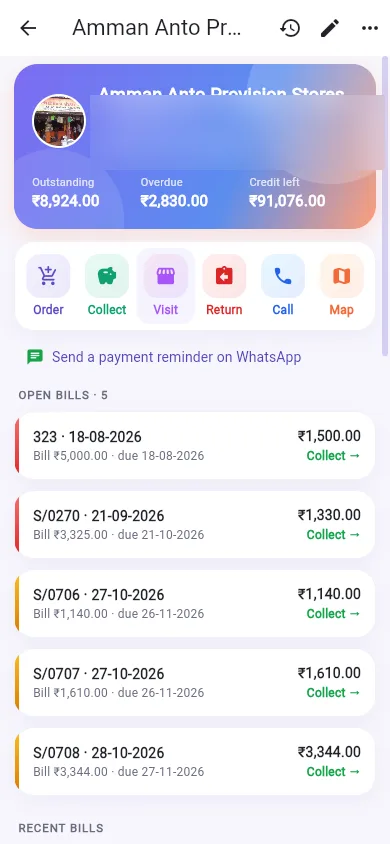
- Tap Return on a client card or client page.
- Choose why under Why is it coming back?
- Under Items coming back, type in Add a product… and tap the product.
- Set how many come back.
- Add a photo and a note.
- Tap Save the return.
The reasons
- Goods return (back to stock)
- Damage return
- Expiry return
- Load return (back unsold, nothing collected)
- Not ordered
Damage and expiry returns go to the damage store. Goods there are never sold.
After saving
The Return saved screen shows the number and total, with Print, Share PDF, WhatsApp and A4 / system print.
Good to know
- Lines with nothing coming back are left out when you save.
- With Photo proof in Score on, a return needs a photo of the goods. You see A photo of the goods is needed.
- Your office can show a damage box on each bill line (Score: show the damage (goods back) box on a bill). Damage you enter there is saved as its own damage return after the bill.
- With no network, the return is kept on the phone and sent later.
Related
- Activity: find the bill
- Delivery: goods that come back on delivery
- Sales Return: the return in Office
வாடிக்கையாளர் சரக்கைத் திருப்பிக் கொடுத்தால், அதை Score-இல் திருப்பமாகப் பதிவு செய்யுங்க. Score அதை அலுவலகத்தில் போடுவது போலவே விற்பனைத் திருப்பமாக (வரவுக் குறிப்பு) சேமிக்கும்.
ஒரு பில்லில் சரக்கைத் திரும்ப எடுத்தல்
சரக்கு எந்த பில்லில் போனது என்று தெரிந்தால் இதைப் பயன்படுத்துங்க.
- செயல்பாடு (Activity) போய் பில்லைக் கண்டுபிடிங்க.
- பில்லின் மூன்று-புள்ளி மெனுவைத் தட்டி இந்த பில்லில் பொருள் திரும்ப (Goods back on this bill) தேர்ந்தெடுங்க.
- பொருள் திரும்ப · … (Goods back · …) பக்கம் பில்லின் பொருட்களைப் பட்டியலிடும். ஒவ்வொன்றும் பில் செய்தது … (Billed …) காட்டும், அதுதான் அதிகபட்சம் திரும்ப வரக்கூடியது.
- ஏன் திரும்பி வருகிறது? (Why is it coming back?) கீழ் காரணத்தைத் தேர்ந்தெடுங்க.
- ஒவ்வொன்றும் எவ்வளவு திரும்ப வருகிறது (How much of each comes back) கீழ், மைனஸ், பிளஸ் பட்டன்களைப் பயன்படுத்துங்க அல்லது பின்செல் (Back) (திரும்பும் அளவு) இடத்தில் டைப் செய்யுங்க. பில் செய்ததை விட அதிகமாகப் போட முடியாது.
- பொருட்களின் புகைப்படம் (Photo of the goods) அல்லது கேலரி பட்டனைத் தட்டுங்க.
- விரும்பினால் குறிப்பு (Note) சேருங்க.
- திரும்பப் பெறுதலைச் சேமி (Save the return) தட்டுங்க.
ஒரு பில்லில் உள்ள நிலையைப் புதுப்பி (டெலிவரி, கட்டணம்) (Update status (delivery, payment)) மூலமும், திருப்பம் (Return) தேர்ந்தெடுத்து இங்கே வரலாம்.
பில் இல்லாமல் சரக்கைத் திரும்ப எடுத்தல்
- வாடிக்கையாளர் அட்டையில் அல்லது வாடிக்கையாளர் பக்கத்தில் திருப்பம் (Return) தட்டுங்க.
- ஏன் திரும்பி வருகிறது? (Why is it coming back?) கீழ் காரணத்தைத் தேர்ந்தெடுங்க.
- திரும்ப வரும் பொருட்கள் (Items coming back) கீழ், பொருள் சேர்… (Add a product…) இடத்தில் டைப் செய்து பொருளைத் தட்டுங்க.
- எத்தனை திரும்ப வருகிறது என்று போடுங்க.
- ஒரு போட்டோவும் குறிப்பும் சேருங்க.
- திரும்பப் பெறுதலைச் சேமி (Save the return) தட்டுங்க.
காரணங்கள்
- பொருள் திருப்பம் (இருப்புக்கு) (Goods return (back to stock))
- சேத திருப்பம் (Damage return)
- காலாவதி திருப்பம் (Expiry return)
- லோடு திருப்பம் (விற்காமல் திரும்பியது, வசூல் இல்லை) (Load return (back unsold, nothing collected))
- ஆர்டர் செய்யவில்லை (Not ordered)
சேத, காலாவதி திருப்பங்கள் சேதப் பொருள் ஸ்டோருக்குப் போகும். அங்கே உள்ள சரக்கு ஒருபோதும் விற்கப்படாது.
சேமித்த பிறகு
திரும்பப் பெறுதல் சேமிக்கப்பட்டது (Return saved) திரை எண்ணையும் மொத்தத்தையும் காட்டும், கூடவே அச்சிடு (Print), PDF பகிர் (Share PDF), WhatsApp, A4 / சாதாரண அச்சு (A4 / system print).
தெரிந்துகொள்ள வேண்டியது
- எதுவும் திரும்ப வராத வரிகள் சேமிக்கும் போது விடப்படும்.
- Score-இல் புகைப்பட ஆதாரம் (Photo proof in Score) ஆன் ஆக இருந்தால், திருப்பத்துக்குச் சரக்கின் போட்டோ கட்டாயம். பொருட்களின் புகைப்படம் தேவை (A photo of the goods is needed) என்று வரும்.
- ஒவ்வொரு பில் வரியிலும் ஒரு சேதப் பெட்டியைக் காட்டும்படி உங்கள் அலுவலகம் வைக்கலாம் (Score: பில்லில் சேதம் (திரும்பிய பொருட்கள்) பெட்டியைக் காட்டு (Score: show the damage (goods back) box on a bill)). அங்கே போடும் சேதம், பில்லுக்குப் பிறகு தனி சேத திருப்பமாகச் சேமிக்கப்படும்.
- நெட்வொர்க் இல்லை என்றால், திருப்பம் போனில் வைக்கப்பட்டு பிறகு அனுப்பப்படும்.
தொடர்புடையவை
- செயல்பாடு: பில்லைக் கண்டுபிடிக்க
- டெலிவரி: டெலிவரியின் போது திரும்ப வரும் சரக்கு
- விற்பனைத் திருப்பம்: Office-இல் திருப்பம்