User manualபயனர் கையேடு · Office: TransactionsOffice: பரிவர்த்தனைகள் (Transactions)
Purchase Returnகொள்முதல் திருப்பம் (Purchase Return)
Send goods back to a vendor, from their bill or on their own, and reduce what you owe them.பொருட்களை சப்ளையருக்குத் திருப்பி அனுப்புங்க — அவர்களின் பில்லிலிருந்தோ, தனியாகவோ — நீங்க தர வேண்டியதைக் குறையுங்க.
- Where to find itஎங்கே இருக்கிறது
- Office → Transactions → Purchase Return
- Who uses itயார் பயன்படுத்துவார்கள்
- Purchase staff, warehouse staff, accountantsகொள்முதல் ஊழியர்கள், கிடங்கு ஊழியர்கள், கணக்காளர்கள்
A purchase return records goods you send back to a vendor. Stock goes out, and you owe the vendor less.
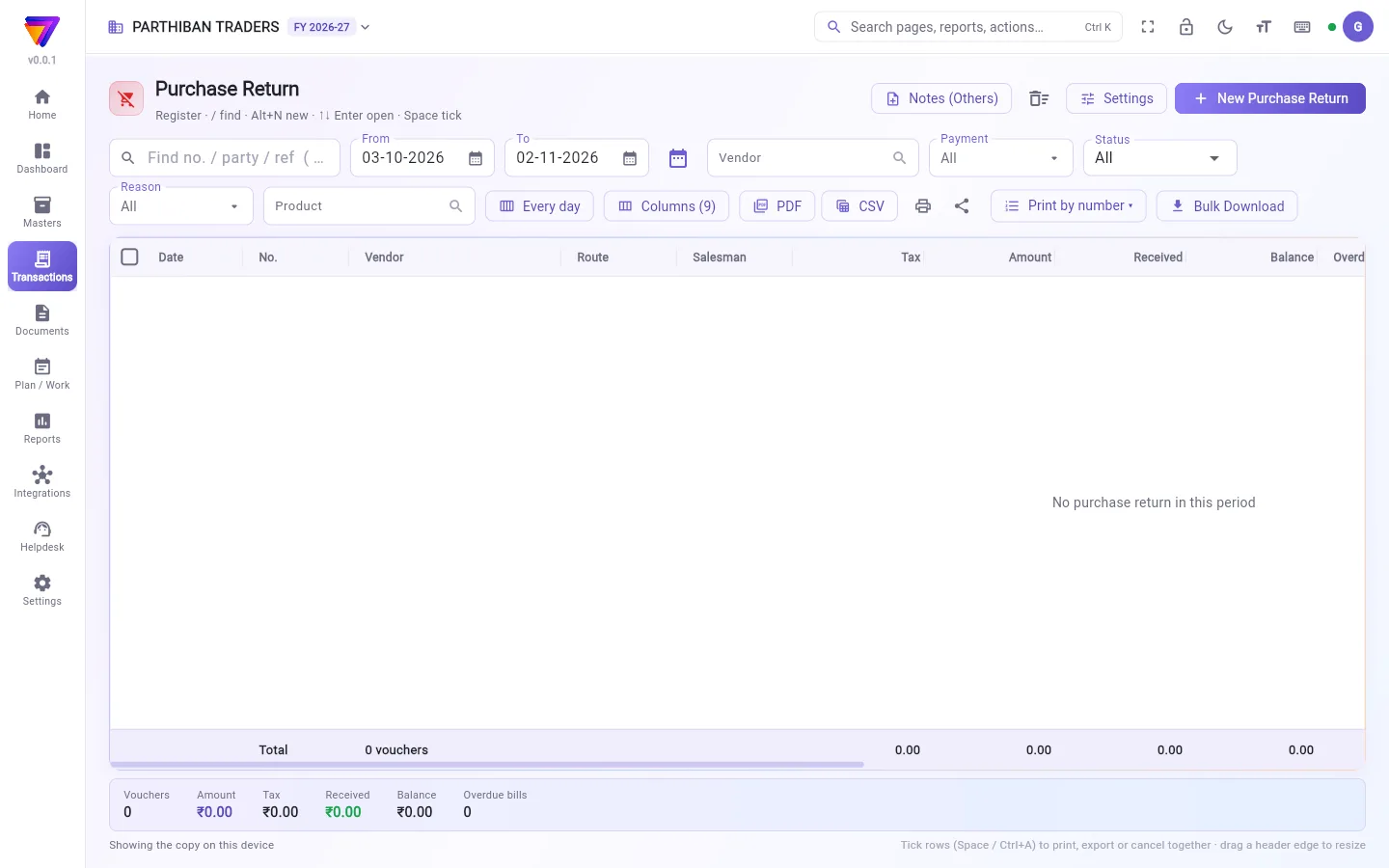
What you see
The register works like the Sales register. See The register: finding, filtering and exporting bills. It shows Vendor in place of client and has a Reason filter.
At the top are Notes (Others), the Trash icon, Settings and New Purchase Return.
Return goods from a purchase
- Open Transactions → Purchase.
- Tick the posted purchase and click Make return.
- The return opens with the vendor and lines of that purchase.
- Change the quantities to what you are sending back. Remove the other lines.
- Choose the Return type.
- Click Save (Ctrl+S).
The return is set against that purchase by itself.
Return goods without a purchase
- Click New Purchase Return.
- Choose the Vendor. A return always needs a vendor.
- Choose the Return type.
- Add the products and quantities. For products with batches, leave Batch on Auto (FIFO) to take the batch that expires first, or pick one.
- Click Set against bills to choose which of the vendor's open bills it reduces. If you set nothing, it stays on the vendor's account.
- Click Save (Ctrl+S).
Return types
| Return type | What happens |
|---|---|
| Goods return (back to stock) | Normal goods sent back. |
| Damage return | Damaged goods. They leave from the damage store. |
| Expiry return | Expired goods. They leave from the damage store. |
| Load return (back unsold, nothing collected) | Must come from one bill. |
| Not ordered | Goods you did not order. |
Reason and photo
Tick one return in the register and click Reason & photo. Choose the Reason, write a Note (e.g. batch, what was wrong) and add a Photo of the goods. Click Save.
Who can do what
The page has view, create, edit, cancel, export and print. There is no approval step.
Good to know
- Purchase Return is on every plan.
- A return of a purchase cannot send back more of a product than that purchase had, less earlier returns. The server checks this.
- Notes (Others) makes a Debit note (Others) or Credit note (Others): an amount on the vendor with no goods. You need permission to make journals.
- When you enter a new purchase from a vendor with debit notes not yet set against a bill, the purchase screen reminds you.
- Cancel and restore work as on Sales.
Related
கொள்முதல் திருப்பம், நீங்க சப்ளையருக்குத் திருப்பி அனுப்பும் பொருட்களைப் பதிவு செய்யும். இருப்பு வெளியே போகும், சப்ளையருக்கு நீங்க தர வேண்டியது குறையும்.
திரையில் என்ன தெரியும்
இந்தப் பதிவேடு விற்பனை பதிவேடு போலவே வேலை செய்யும். பார்க்க: பதிவேடு: பில்களைத் தேடுதல், வடிகட்டுதல், எக்ஸ்போர்ட் செய்தல். இதில் வாடிக்கையாளருக்குப் பதில் சப்ளையர் (Vendor) தெரியும்; காரணம் (Reason) வடிகட்டி உண்டு.
மேலே குறிப்புகள் (மற்றவை) (Notes (Others)), குப்பை (Trash) ஐகான், அமைப்புகள் (Settings), புதிய கொள்முதல் திருப்பம் (New Purchase Return) இருக்கும்.
கொள்முதலிலிருந்து பொருட்களைத் திருப்புவது
- பரிவர்த்தனைகள் → கொள்முதல் (Transactions → Purchase) திறங்க.
- பதிவான கொள்முதலை டிக் செய்து திருப்பம் உருவாக்கு (Make return) கிளிக் செய்யுங்க.
- அந்தக் கொள்முதலின் சப்ளையர், வரிகளுடன் திருப்பம் திறக்கும்.
- திருப்பி அனுப்பும் அளவுக்கு அளவுகளை மாற்றுங்க. மற்ற வரிகளை நீக்குங்க.
- திருப்ப வகை (Return type) தேர்ந்தெடுங்க.
- சேமி (Ctrl+S) (Save (Ctrl+S)) கிளிக் செய்யுங்க.
திருப்பம் தானாகவே அந்தக் கொள்முதலுக்கு எதிராக வைக்கப்படும்.
கொள்முதல் இல்லாமல் பொருட்களைத் திருப்புவது
- புதிய கொள்முதல் திருப்பம் (New Purchase Return) கிளிக் செய்யுங்க.
- சப்ளையர் (Vendor) தேர்ந்தெடுங்க. திருப்பத்துக்கு எப்போதும் சப்ளையர் தேவை.
- திருப்ப வகை (Return type) தேர்ந்தெடுங்க.
- பொருட்களையும் அளவுகளையும் சேருங்க. பேட்ச் உள்ள பொருட்களுக்கு, முதலில் காலாவதியாகும் பேட்சை எடுக்க பேட்ச் (Batch) பெட்டியை தானாக (FIFO) (Auto (FIFO)) என்றே விடுங்க, அல்லது ஒன்றைத் தேர்ந்தெடுங்க.
- சப்ளையரின் எந்தத் திறந்த பில்களை இது குறைக்க வேண்டும் என்று தேர்ந்தெடுக்க பில்களுக்கு எதிராக வை (Set against bills) கிளிக் செய்யுங்க. எதுவும் வைக்காவிட்டால், அது சப்ளையரின் கணக்கிலேயே இருக்கும்.
- சேமி (Ctrl+S) (Save (Ctrl+S)) கிளிக் செய்யுங்க.
திருப்ப வகைகள்
| திருப்ப வகை | என்ன நடக்கும் |
|---|---|
| பொருள் திருப்பம் (இருப்புக்கு) (Goods return (back to stock)) | சாதாரணப் பொருட்கள் திருப்பி அனுப்பப்படும். |
| சேத திருப்பம் (Damage return) | சேதமான பொருட்கள். அவை சேதக் கிடங்கிலிருந்து (damage store) வெளியேறும். |
| காலாவதி திருப்பம் (Expiry return) | காலாவதியான பொருட்கள். அவை சேதக் கிடங்கிலிருந்து வெளியேறும். |
| லோடு திருப்பம் (விற்காமல் திரும்பியது, வசூல் இல்லை) (Load return (back unsold, nothing collected)) | ஒரே பில்லிலிருந்து வர வேண்டும். |
| ஆர்டர் செய்யவில்லை (Not ordered) | நீங்க ஆர்டர் செய்யாத பொருட்கள். |
காரணமும் புகைப்படமும்
பதிவேட்டில் ஒரு திருப்பத்தை டிக் செய்து காரணம் & புகைப்படம் (Reason & photo) கிளிக் செய்யுங்க. காரணம் (Reason) தேர்ந்தெடுத்து, குறிப்பு (எ.கா. பேட்ச், என்ன தவறு) (Note (e.g. batch, what was wrong)) எழுதி, பொருட்களின் புகைப்படம் (Photo of the goods) சேருங்க. சேமி (Save) கிளிக் செய்யுங்க.
யார் என்ன செய்யலாம்
இந்தப் பக்கத்தில் பார்க்க, உருவாக்க, திருத்த, ரத்து செய்ய, எக்ஸ்போர்ட், அச்சு அனுமதிகள் உண்டு. ஒப்புதல் படி கிடையாது.
தெரிந்துகொள்ள வேண்டியது
- கொள்முதல் திருப்பம் எல்லா திட்டங்களிலும் (plan) உண்டு.
- ஒரு கொள்முதலின் திருப்பம், அந்தக் கொள்முதலில் இருந்த அளவை விட — முந்தைய திருப்பங்களைக் கழித்து — அதிகமாக ஒரு பொருளைத் திருப்பி அனுப்ப முடியாது. சர்வர் இதைச் சரிபார்க்கும்.
- குறிப்புகள் (மற்றவை) (Notes (Others)) ஒரு பற்றுக் குறிப்பு (மற்றவை) (Debit note (Others)) அல்லது வரவுக் குறிப்பு (மற்றவை) (Credit note (Others)) உருவாக்கும்: பொருட்கள் இல்லாமல், சப்ளையர் மேல் ஒரு தொகை மட்டும். இதற்கு ஜர்னல் (journal) போடும் அனுமதி தேவை.
- இன்னும் எந்த பில்லுக்கும் எதிராக வைக்காத பற்றுக் குறிப்புகள் உள்ள சப்ளையரிடமிருந்து புதிய கொள்முதல் உள்ளிடும்போது, கொள்முதல் திரை நினைவூட்டும்.
- ரத்தும் மீட்டெடுப்பும் விற்பனையில் போலவே வேலை செய்யும்.
தொடர்புடையவை
- கொள்முதல் (Purchase): பொருட்கள் வந்த பில்
- பணம் செலுத்துதல்கள் (Payments): மீதமுள்ளதைச் செலுத்த
- சப்ளையர் (Vendor): சப்ளையர் விவரங்கள்
- கிடங்கு (Warehouse): சேதக் கிடங்கு