User manualபயனர் கையேடு · Office: TransactionsOffice: பரிவர்த்தனைகள் (Transactions)
Contraகான்ட்ரா (Contra)
Move money between your cash and bank accounts, such as a cash deposit or a cash withdrawal.உங்கள் ரொக்கத்துக்கும் வங்கிக் கணக்குகளுக்கும் இடையே பணத்தை மாற்ற; உதாரணமாக ரொக்கத்தை வங்கியில் கட்டுவது அல்லது வங்கியிலிருந்து எடுப்பது.
- Where to find itஎங்கே இருக்கிறது
- Office → Transactions → Contra
- Who uses itயார் பயன்படுத்துவார்கள்
- Accountant, cashierகணக்காளர், காசாளர்
A contra moves money between your own cash and bank accounts. Use it when you deposit cash in the bank, withdraw cash, or move money from one bank to another. Only cash and bank accounts can be used.
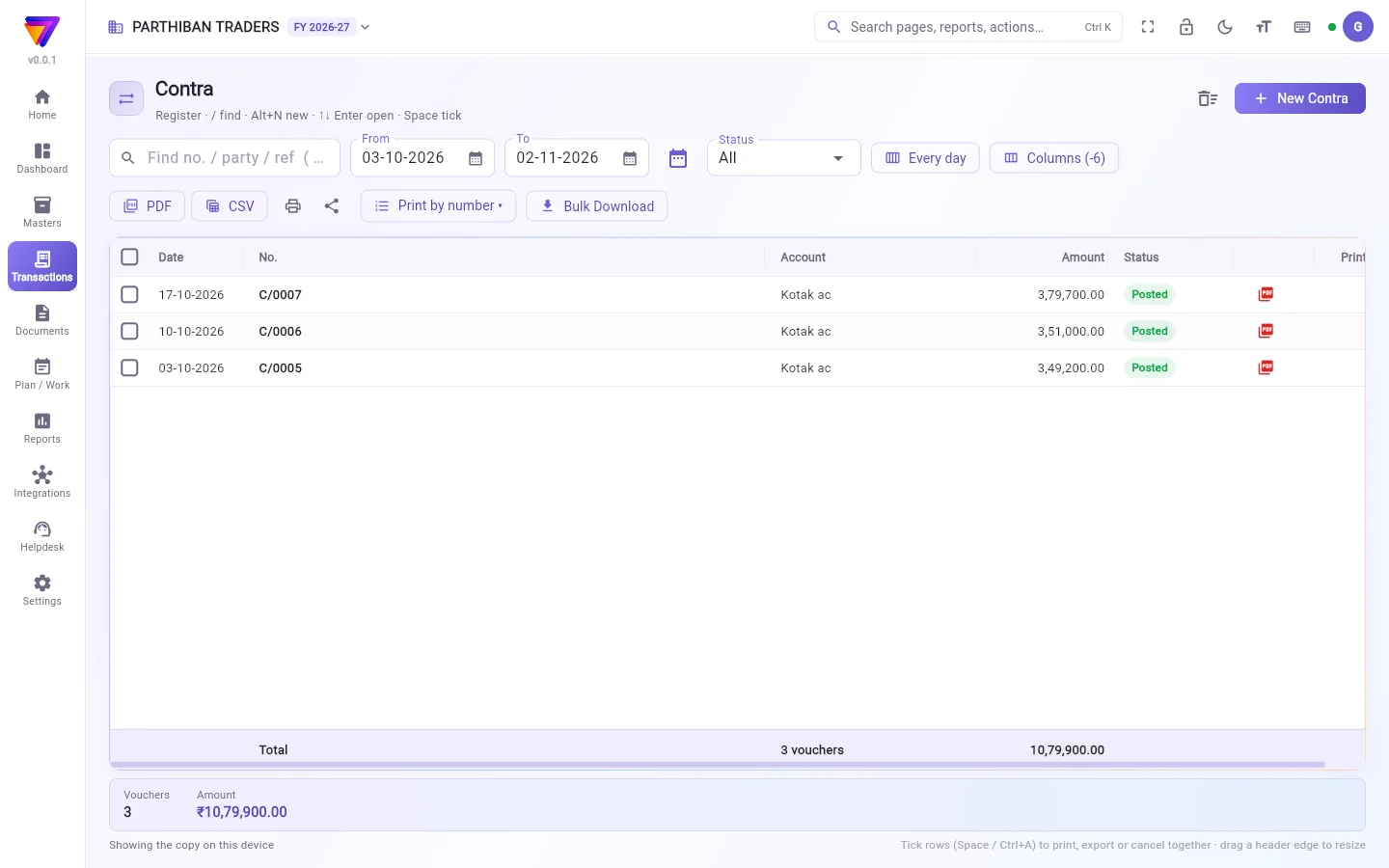
What you see
The register lists your contra vouchers, numbered C/0001, C/0002 and so on, with the Amount of each. It works like every other voucher register. See The register: finding, filtering and exporting bills.
Deposit cash in the bank
- Click New Contra. The editor starts with two lines: one Dr and one Cr.
- Check the Date. Enter a Reference if you want, such as the slip number.
- On the Dr line, choose the account the money goes into (for a deposit, the bank) and the Amount.
- On the Cr line, choose the account the money comes from (for a deposit, Cash). It takes the same amount.
- Check that Dr and Cr at the bottom are equal. If not, click Balance it.
- Add a Narration.
- Click Save (Ctrl+S).
For a cash withdrawal, swap them: Cash on the Dr line and the bank on the Cr line.
Fields
| Field | What to enter |
|---|---|
| Dr / Cr | The side of each line. Dr is where the money goes, Cr is where it comes from. |
| Account | A cash or bank account. Other accounts are not listed. |
| Amount | A figure above zero. |
| Date | The date of the deposit or withdrawal. |
| Reference | Optional, such as a slip or cheque number. |
| Narration | Optional text. |
Checks when you save
- There must be at least one debit and one credit.
- Debits and credits must be equal.
- Every line must be a cash or bank account. Otherwise: Contra is only between cash and bank accounts.
Good to know
- Available on Pro, Pro · Large Stockist and Enterprise.
- From Cash Closing, Deposit to bank opens a new contra with the lines filled in.
- To pay an expense from cash or bank, use Expenses, not Contra.
Related
- Cash Closing: count a salesman's cash and deposit it.
- Expenses: money spent from cash or bank.
- Journal Entry: adjustments between any accounts.
- Accounts: add a bank account.
கான்ட்ரா உங்கள் சொந்த ரொக்கம், வங்கிக் கணக்குகளுக்கு இடையே பணத்தை மாற்றும். ரொக்கத்தை வங்கியில் கட்டும்போது, ரொக்கம் எடுக்கும்போது, அல்லது ஒரு வங்கியிலிருந்து இன்னொரு வங்கிக்கு மாற்றும்போது இதைப் பயன்படுத்துங்க. ரொக்க, வங்கிக் கணக்குகளை மட்டுமே பயன்படுத்த முடியும்.
திரையில் என்ன தெரியும்
பதிவேட்டில் உங்கள் கான்ட்ரா வவுச்சர்கள் C/0001, C/0002 என்று எண்ணுடன், ஒவ்வொன்றின் தொகை (Amount)-யுடன் வரும். மற்ற எல்லா வவுச்சர் பதிவேடுகளையும் போலவே இதுவும் வேலை செய்யும். பார்க்க: பதிவேடு: பில்களைத் தேடுவது, வடிகட்டுவது, ஏற்றுமதி செய்வது.
ரொக்கத்தை வங்கியில் கட்டுவது
- New Contra (புதிய கான்ட்ரா) அழுத்துங்க. எடிட்டர் இரண்டு வரிகளுடன் தொடங்கும்: ஒன்று பற்று (Dr), ஒன்று வரவு (Cr).
- தேதி (Date)-ஐச் சரிபாருங்க. வேண்டுமென்றால் குறிப்பு எண் (Reference) உள்ளிடுங்க, உதாரணமாக சலான் (slip) எண்.
- பற்று (Dr) வரியில், பணம் போய்ச் சேரும் கணக்கை (வங்கியில் கட்டும்போது, வங்கி) தேர்ந்தெடுத்து தொகை (Amount) உள்ளிடுங்க.
- வரவு (Cr) வரியில், பணம் வரும் கணக்கை (வங்கியில் கட்டும்போது, ரொக்கம் (Cash)) தேர்ந்தெடுங்க. அதே தொகை தானாக வரும்.
- கீழே பற்று (Dr), வரவு (Cr) சமமாக இருக்கிறதா என்று பாருங்க. இல்லையென்றால் சமன் செய் (Balance it) அழுத்துங்க.
- விளக்கம் (Narration) சேருங்க.
- சேமி (Ctrl+S) (Save (Ctrl+S)) அழுத்துங்க.
ரொக்கம் எடுக்க, இதை மாற்றிப் போடுங்க: பற்று (Dr) வரியில் ரொக்கம் (Cash), வரவு (Cr) வரியில் வங்கி.
புலங்கள் (Fields)
| புலம் | என்ன உள்ளிட வேண்டும் |
|---|---|
| பற்று / வரவு (Dr / Cr) | ஒவ்வொரு வரியின் பக்கம். பற்று (Dr) என்பது பணம் போய்ச் சேரும் இடம், வரவு (Cr) என்பது பணம் வரும் இடம். |
| கணக்கு (Account) | ஒரு ரொக்க அல்லது வங்கிக் கணக்கு. மற்ற கணக்குகள் பட்டியலில் வராது. |
| தொகை (Amount) | பூஜ்யத்துக்கு மேல் ஒரு தொகை. |
| தேதி (Date) | பணம் கட்டிய அல்லது எடுத்த தேதி. |
| குறிப்பு எண் (Reference) | விருப்பம்; உதாரணமாக சலான் அல்லது காசோலை எண். |
| விளக்கம் (Narration) | விருப்ப உரை. |
சேமிக்கும்போது சரிபார்ப்புகள்
- குறைந்தது ஒரு பற்றும் ஒரு வரவும் இருக்க வேண்டும்.
- பற்றும் வரவும் சமமாக இருக்க வேண்டும்.
- ஒவ்வொரு வரியும் ரொக்க அல்லது வங்கிக் கணக்காக இருக்க வேண்டும். இல்லையென்றால்: கான்ட்ரா ரொக்க மற்றும் வங்கிக் கணக்குகளுக்கு இடையே மட்டுமே (Contra is only between cash and bank accounts).
தெரிந்துகொள்ள வேண்டியது
- Pro, Pro · பெரிய ஸ்டாக்கிஸ்ட், Enterprise பிளான்களில் கிடைக்கும்.
- ரொக்க முடிவில், வங்கியில் செலுத்து (Deposit to bank) வரிகள் நிரப்பப்பட்ட புதிய கான்ட்ராவைத் திறக்கும்.
- ரொக்கம் அல்லது வங்கியிலிருந்து ஒரு செலவைச் செலுத்த, கான்ட்ரா அல்ல, செலவுகள் பயன்படுத்துங்க.
தொடர்புடையவை
- ரொக்க முடிவு: விற்பனைப் பிரதிநிதியின் ரொக்கத்தை எண்ணி வங்கியில் கட்ட.
- செலவுகள்: ரொக்கம் அல்லது வங்கியிலிருந்து செலவான பணம்.
- குறிப்பேடு பதிவு: எந்தக் கணக்குகளுக்கு இடையேயும் சரிசெய்தல்கள்.
- கணக்குகள்: வங்கிக் கணக்கைச் சேர்க்க.