User manualபயனர் கையேடு · Office: DocumentsOffice: ஆவணங்கள் (Documents)
Quotationமதிப்பீடு (Quotation)
Send a client a price offer, then turn it into a sales order or a sale without typing the lines again.வாடிக்கையாளருக்கு விலை மதிப்பீடு அனுப்புங்க; பிறகு வரிகளை மறுபடி டைப் செய்யாமலேயே அதை விற்பனை ஆர்டராகவோ விற்பனையாகவோ மாற்றுங்க.
- Where to find itஎங்கே இருக்கிறது
- Office → Documents → Quotation
- Who uses itயார் பயன்படுத்துவார்கள்
- Salesmen, officeவிற்பனைப் பிரதிநிதிகள், அலுவலகம்
A quotation is a price offer to a client. It does not touch your stock or your books. When the client agrees, you turn it into a sales order or a sale.
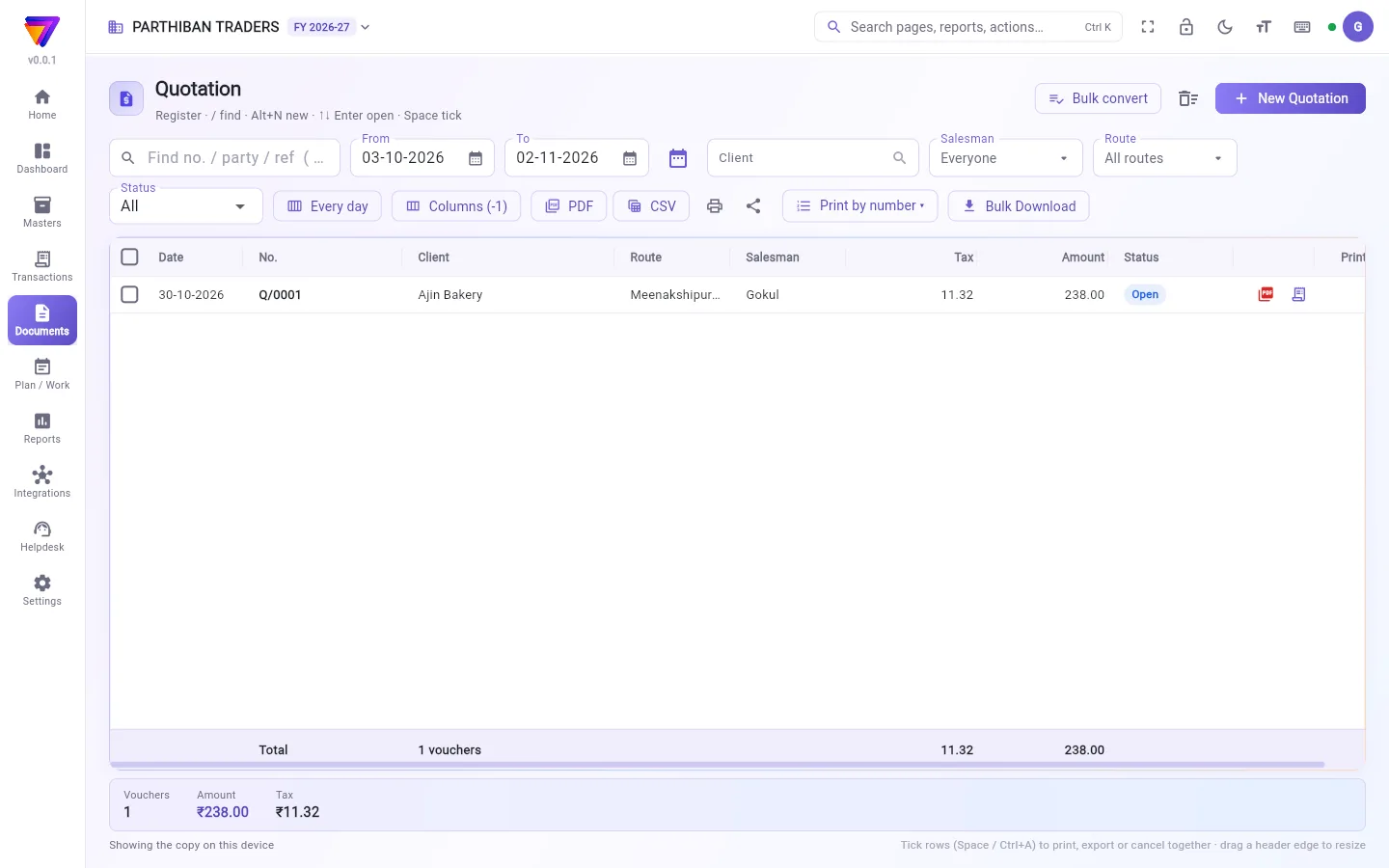
What you see
The register lists your quotations, numbered Q/0001, Q/0002 and so on. It works like every other voucher register. See The register: finding, filtering and exporting bills.
A saved quotation shows the status Open. Once a sale or sales order is made from it, it shows Billed.
Make a quotation
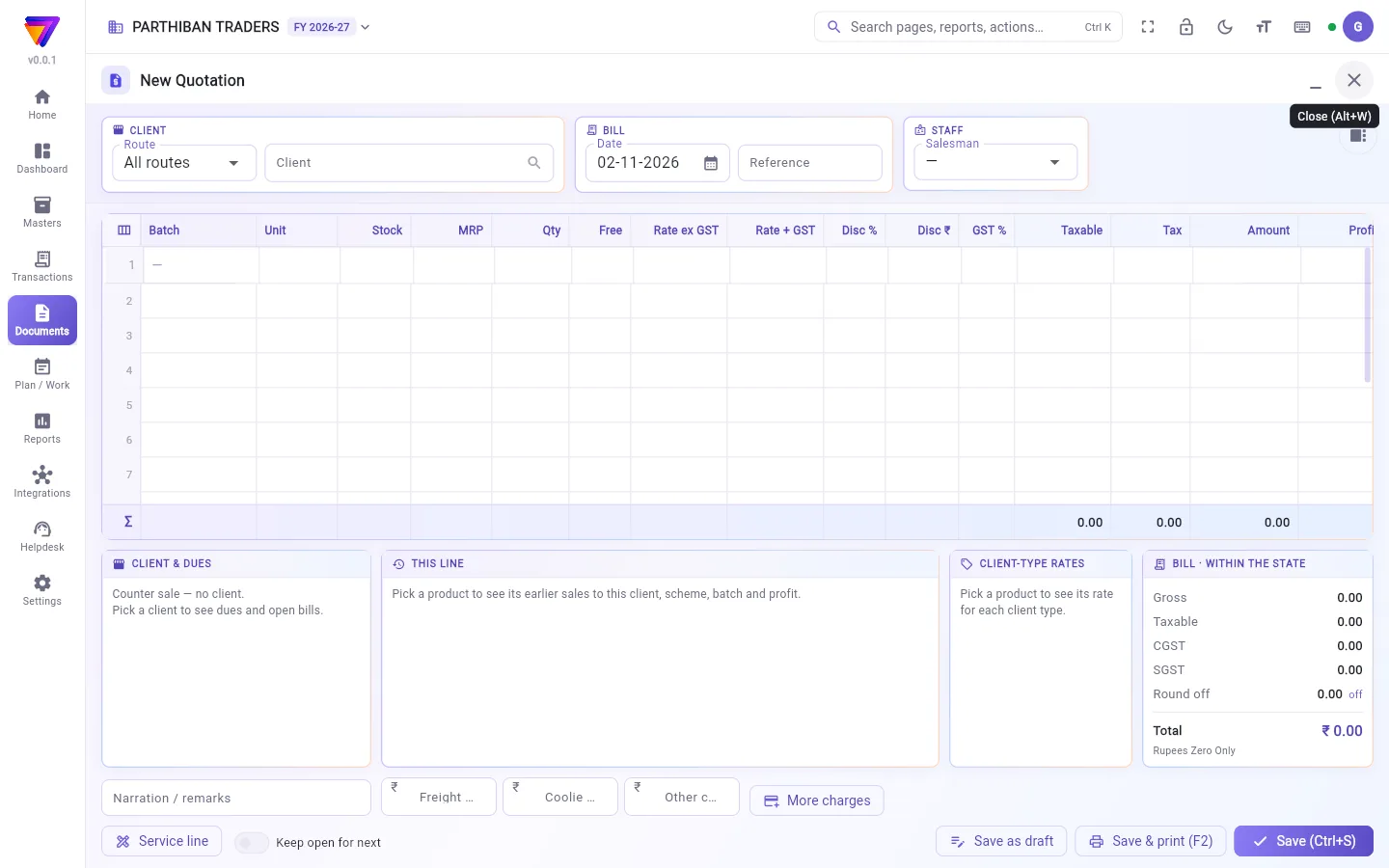
- Click New Quotation.
- Choose the Client. A quotation needs a client.
- Add the products, quantities and rates, as on a sale.
- Save.
You can also start from a sale: in the sale editor, click As quotation. It opens a new quotation with the same client and lines.
Turn a quotation into a sale or an order
For one quotation:
- Find the Open quotation in the register.
- Click the bill icon in its row (Convert to sale).
- A new sale opens with the client and lines. Check it and save.
For several, tick them, then click Convert to sale or Make sales order. One new entry opens for each.
When the new sale or sales order posts, the quotation closes. If you cancel that sale later, the quotation opens again.
Bulk convert
- Click Bulk convert. A full screen opens on today's open quotations.
- Use From, Till, Employee, Route or Find a client to narrow the list. From the start shows every date.
- Tick the quotations.
- Click Convert selected and confirm.
Each ticked quotation is saved as a sale with its own lines and rates. At the end you see how many were made and which were not, with the reason. The ones that failed stay open.
Who can do what
- The Sales role can do everything with quotations: make, change, cancel, print and export.
- Convert to sale and Bulk convert need permission to create sales. Make sales order needs permission to create sales orders.
Good to know
- Available on the Pro plan and above.
- Schemes apply to quotation lines, as on a sale.
- A quotation that is already billed cannot be changed. Cancel the bill first.
- The trash button next to Bulk convert shows cancelled and deleted quotations.
Related
- Sales Order: the next step for an agreed quotation.
- Sales: the bill, and the shared register.
- Scheme: offers that apply to quotation lines.
மதிப்பீடு என்பது வாடிக்கையாளருக்குத் தரும் விலை விவரம். இது உங்கள் இருப்பையோ கணக்குகளையோ தொடாது. வாடிக்கையாளர் ஒப்புக்கொண்டதும், அதை விற்பனை ஆர்டராகவோ விற்பனையாகவோ மாற்றலாம்.
திரையில் என்ன தெரியும்
பதிவேட்டில் உங்கள் மதிப்பீடுகள் Q/0001, Q/0002 என்று எண்ணிட்டுத் தெரியும். இது மற்ற எல்லா வவுச்சர் பதிவேடுகள் போலவே வேலை செய்யும். பதிவேடு: பில்களைத் தேடுவது, வடிகட்டுவது, பதிவிறக்குவது பாருங்க.
சேமித்த மதிப்பீடு நிலுவையில் (Open) என்ற நிலையில் இருக்கும். அதிலிருந்து விற்பனையோ விற்பனை ஆர்டரோ போட்டதும், பில் போட்டது (Billed) என்று காட்டும்.
மதிப்பீடு போடுவது
- புதிய மதிப்பீடு (New Quotation) கிளிக் செய்யுங்க.
- வாடிக்கையாளர் (Client) தேர்ந்தெடுங்க. மதிப்பீட்டுக்கு வாடிக்கையாளர் கட்டாயம்.
- விற்பனையில் போடுவது போலவே பொருட்கள், அளவுகள், விலைகளைச் சேருங்க.
- சேமியுங்க.
ஒரு விற்பனையிலிருந்தும் தொடங்கலாம்: விற்பனை எடிட்டரில் மதிப்பீடாக (As quotation) கிளிக் செய்யுங்க. அதே வாடிக்கையாளர், அதே வரிகளுடன் ஒரு புதிய மதிப்பீடு திறக்கும்.
மதிப்பீட்டை விற்பனையாகவோ ஆர்டராகவோ மாற்றுவது
ஒரு மதிப்பீட்டுக்கு:
- பதிவேட்டில் நிலுவையில் (Open) உள்ள மதிப்பீட்டைக் கண்டுபிடிங்க.
- அதன் வரிசையில் உள்ள பில் ஐகானைக் கிளிக் செய்யுங்க (விற்பனையாக மாற்று (Convert to sale)).
- வாடிக்கையாளர், வரிகளுடன் ஒரு புதிய விற்பனை திறக்கும். சரிபார்த்து சேமியுங்க.
பலவற்றுக்கு, அவற்றை டிக் செய்து, விற்பனையாக மாற்று (Convert to sale) அல்லது விற்பனை ஆர்டர் ஆக்கு (Make sales order) கிளிக் செய்யுங்க. ஒவ்வொன்றுக்கும் ஒரு புதிய பதிவு திறக்கும்.
புதிய விற்பனையோ விற்பனை ஆர்டரோ பதிவானதும், மதிப்பீடு மூடிவிடும். பிறகு அந்த விற்பனையை ரத்து செய்தால், மதிப்பீடு மீண்டும் திறந்துவிடும்.
மொத்தமாக மாற்றுவது
- மொத்த மாற்றம் (Bulk convert) கிளிக் செய்யுங்க. இன்றைய நிலுவை மதிப்பீடுகளுடன் ஒரு முழுத் திரை திறக்கும்.
- பட்டியலைக் குறைக்க முதல் (From), வரை (Till), பணியாளர் (Employee), வழித்தடம் (Route) அல்லது வாடிக்கையாளரைத் தேடு (Find a client) பயன்படுத்துங்க. தொடக்கத்திலிருந்து (From the start) எல்லாத் தேதிகளையும் காட்டும்.
- மதிப்பீடுகளை டிக் செய்யுங்க.
- தேர்ந்தவற்றை மாற்று (Convert selected) கிளிக் செய்து உறுதிப்படுத்துங்க.
டிக் செய்த ஒவ்வொரு மதிப்பீடும் அதன் சொந்த வரிகள், விலைகளுடன் விற்பனையாகச் சேமிக்கப்படும். கடைசியில் எத்தனை போட்டது, எவை போடவில்லை, ஏன் என்ற காரணத்துடன் தெரியும். தோல்வியடைந்தவை நிலுவையிலேயே இருக்கும்.
யார் என்ன செய்யலாம்
- விற்பனை (Sales) பொறுப்பு மதிப்பீடுகளில் எல்லாமே செய்யலாம்: போடுவது, மாற்றுவது, ரத்து செய்வது, அச்சிடுவது, பதிவிறக்குவது.
- விற்பனையாக மாற்று (Convert to sale), மொத்த மாற்றம் (Bulk convert) இரண்டுக்கும் விற்பனை உருவாக்கும் அனுமதி தேவை. விற்பனை ஆர்டர் ஆக்கு (Make sales order)-க்கு விற்பனை ஆர்டர் உருவாக்கும் அனுமதி தேவை.
தெரிந்துகொள்ள வேண்டியது
- Pro பிளானிலும் அதற்கு மேலும் கிடைக்கும்.
- விற்பனையில் போலவே மதிப்பீட்டு வரிகளுக்கும் திட்டங்கள் (schemes) பொருந்தும்.
- ஏற்கனவே பில் போட்ட மதிப்பீட்டை மாற்ற முடியாது. முதலில் பில்லை ரத்து செய்யுங்க.
- மொத்த மாற்றம் (Bulk convert) பக்கத்தில் உள்ள குப்பைத்தொட்டி பட்டன் ரத்தான, நீக்கிய மதிப்பீடுகளைக் காட்டும்.
தொடர்புடையவை
- விற்பனை ஆர்டர் (Sales Order): ஒப்புக்கொண்ட மதிப்பீட்டின் அடுத்த படி.
- விற்பனை (Sales): பில்லும், பொதுவான பதிவேடும்.
- திட்டம் (Scheme): மதிப்பீட்டு வரிகளுக்குப் பொருந்தும் ஆஃபர்கள்.