User manualபயனர் கையேடு · Office: MastersOffice: முதன்மைப் பதிவுகள் (Masters)
Accountsகணக்குகள் (Accounts)
See your chart of accounts, add accounts and groups, and enter opening balances, as in Tally.Tally-ல இருப்பது போலவே உங்க கணக்குகளின் பட்டியலைப் பார்க்க, கணக்குகளையும் குழுக்களையும் சேர்க்க, தொடக்க இருப்புத் தொகைகளை உள்ளிட.
- Where to find itஎங்கே இருக்கிறது
- Office → Masters → Accounts
- Who uses itயார் பயன்படுத்துவார்கள்
- Owner, Admin, Accountantஉரிமையாளர், நிர்வாகி, கணக்காளர்
The Accounts page shows your chart of accounts: groups, and the accounts under them, with opening balances. It follows Tally's groups, so your accountant will know it.
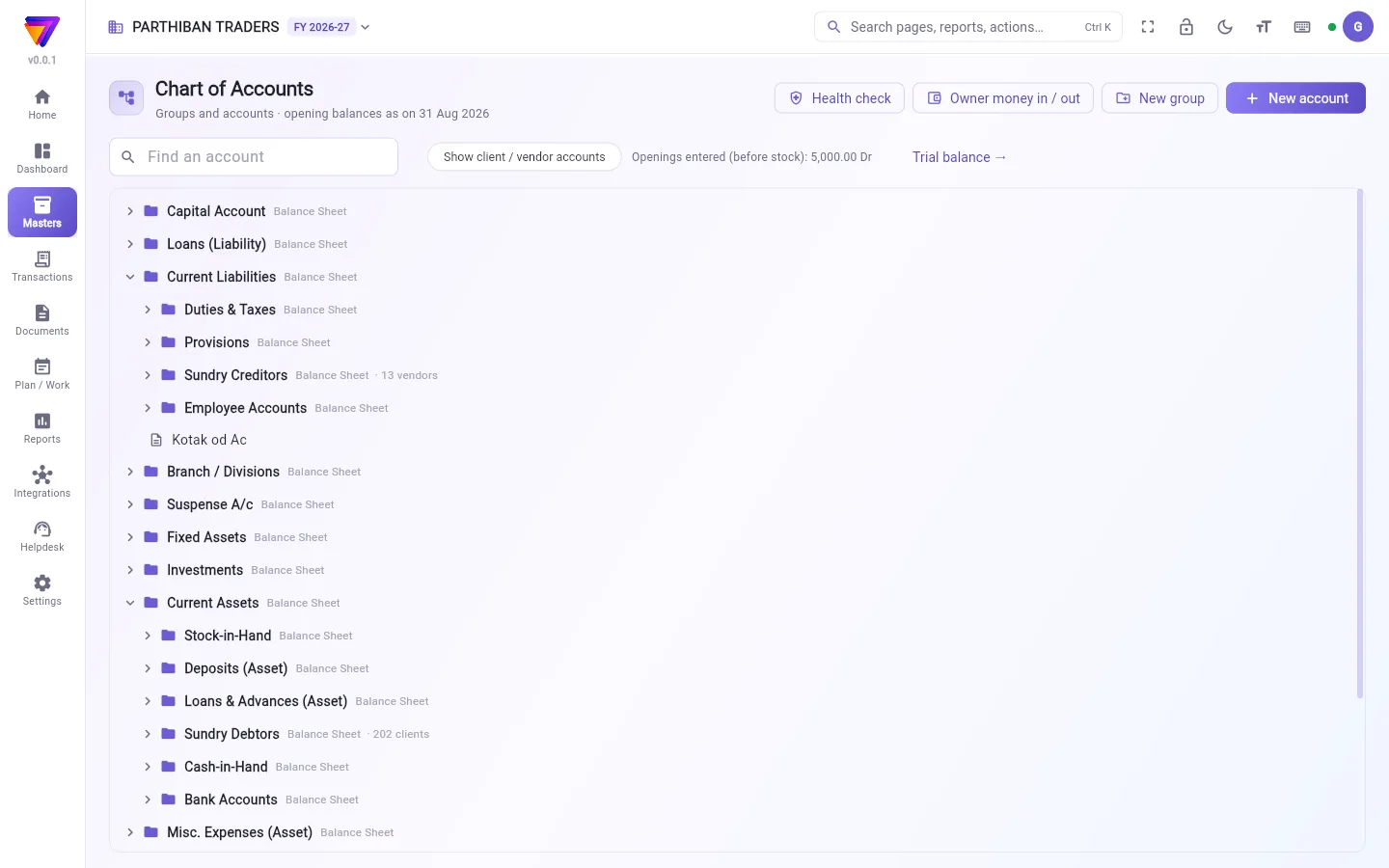
What you see
- The page title reads Chart of Accounts, with the date your opening balances are as on.
- Buttons: Health check, Owner money in / out, New group and New account.
- Find an account searches by name.
- Show client / vendor accounts adds each client and vendor account to the tree. When it is off, Sundry Debtors and Sundry Creditors show only a count, for example "202 clients".
- Openings entered (before stock) is the total of all opening balances. Trial balance → opens the report.
- Each group shows where it lands: Balance Sheet, Trading or Profit & Loss. Click a group to open or close it.
- Accounts marked system are used by bills to post. They cannot be renamed or deleted here.
Add an account
- Click New account.
- Type the Account name.
- Pick the group in Under group. Banks go under Bank Accounts (or Bank OD A/c for an overdraft). A new cash box goes under Cash-in-Hand.
- Click Save.
The name needs at least 2 letters, and no other account may have the same name.
Enter an opening balance
- Click the account. A menu opens.
- Click Opening balance.
- Type the Amount and pick Dr or Cr.
- Click Save.
This is the balance on the evening before your books start. To change an opening later, click Add to / reduce the opening (with a reason). Pick Add or Reduce, type the Amount, the Date of the change and a Reason, then click Save. The last changes show under Earlier changes.
Other things in the account menu
- Account ledger opens the account's statement.
- Rename / move / deactivate changes the name, the group or Active.
- Bank details (bank accounts only): Account number, IFSC, Bank, Branch, Account holder name and UPI ID. These print on bills for payment.
- Delete (only if never used).
Client and vendor accounts are changed from their own pages. Their opening balances are entered bill by bill there.
Add a group
- Click New group.
- Type the Group name and pick the group it goes Under.
- Click Save.
A new group takes its nature (asset, liability, income, expense) and where it shows from the group it is under.
Owner money in / out
- Click Owner money in / out.
- Pick Owner puts money in or Owner takes money out.
- Type the Amount, pick the cash or bank account and the Capital account, and the Date.
- Click Post. A journal entry is posted between the cash or bank account and capital.
Health check
Health check checks that every client and vendor has its own account in the right group, and that the accounts bills post to can be used. It compares Sundry Debtors with Client accounts, and Sundry Creditors with Vendor accounts. Tick the problems and click Fix to repair them.
Who can do what
- Change opening balances is needed for opening balances. Manage account groups is needed for New group and editing groups.
- The Accountant role can do everything here except delete accounts.
Good to know
- Accounts comes with the Pro, Pro · Large Stockist and Enterprise plans. It is not in Basic.
- Owner money in / out needs the right to create journal entries.
- An account that was used cannot be deleted. You are offered Make inactive instead.
Related
- Client: opening dues bill by bill
- Vendor: opening dues bill by bill
- Journal: the entries Owner money in / out makes
- Financial Year & Locks: close the year
கணக்குகள் பக்கம் உங்க கணக்குகளின் பட்டியலைக் காட்டும்: குழுக்கள், அவற்றின் கீழ் உள்ள கணக்குகள், தொடக்க இருப்புத் தொகைகளோட. இது Tally-யின் குழுக்களையே பின்பற்றுது, அதனால உங்க கணக்காளருக்கு எளிதா புரியும்.
திரையில் என்ன தெரியும்
- பக்கத் தலைப்பில் கணக்குகளின் பட்டியல் (Chart of Accounts) என்றும், உங்க தொடக்க இருப்புத் தொகைகள் எந்தத் தேதிப்படி என்றும் இருக்கும்.
- பொத்தான்கள்: சரிபார்ப்பு (Health check), உரிமையாளர் பணம் வரவு / எடுப்பு (Owner money in / out), புதிய குழு (New group), புதிய கணக்கு (New account).
- கணக்கைத் தேடு (Find an account) பெயர் வைத்துத் தேடும்.
- வாடிக்கையாளர் / சப்ளையர் கணக்குகளைக் காட்டு (Show client / vendor accounts) ஒவ்வொரு வாடிக்கையாளர், சப்ளையர் கணக்கையும் மரப் பட்டியலில் சேர்க்கும். இது ஆஃப்ல இருந்தா, பல்வகைக் கடனாளிகள் (Sundry Debtors), பல்வகைக் கடனீந்தோர் (Sundry Creditors) எண்ணிக்கையை மட்டும் காட்டும், உதாரணமா "202 clients".
- Openings entered (before stock) (உள்ளிட்ட தொடக்க இருப்புகள், இருப்புக்கு முன்) எல்லா தொடக்க இருப்புத் தொகைகளின் மொத்தம். இருப்பாய்வு → (Trial balance →) அந்த அறிக்கையைத் திறக்கும்.
- ஒவ்வொரு குழுவும் எங்கே போய்ச் சேரும்னு காட்டும்: இருப்புநிலைக் குறிப்பு (Balance Sheet), வியாபாரக் கணக்கு (Trading) அல்லது லாப நஷ்டக் கணக்கு (Profit & Loss). ஒரு குழுவைக் கிளிக் பண்ணா அது திறக்கும் அல்லது மூடும்.
- அமைப்பு (system) என்று குறிக்கப்பட்ட கணக்குகளைப் பில்கள் பதிவு செய்யப் பயன்படுத்துது. அவற்றை இங்கே பெயர் மாற்றவோ நீக்கவோ முடியாது.
ஒரு கணக்கைச் சேர்க்க
- புதிய கணக்கு (New account) கிளிக் பண்ணுங்க.
- கணக்கின் பெயர் (Account name) டைப் பண்ணுங்க.
- கீழ் உள்ள குழு (Under group)-இல் குழுவைத் தேர்ந்தெடுங்க. வங்கிகள் வங்கிக் கணக்குகள் (Bank Accounts) கீழ் போகும் (ஓவர்டிராஃப்ட்னா வங்கி OD கணக்கு (Bank OD A/c)). புதிய ரொக்கப் பெட்டி கையிருப்பு ரொக்கம் (Cash-in-Hand) கீழ் போகும்.
- சேமி (Save) கிளிக் பண்ணுங்க.
பெயரில் குறைந்தது 2 எழுத்துகள் வேணும், வேறு எந்தக் கணக்குக்கும் அதே பெயர் இருக்கக் கூடாது.
தொடக்க இருப்புத் தொகையை உள்ளிட
- கணக்கைக் கிளிக் பண்ணுங்க. ஒரு மெனு திறக்கும்.
- தொடக்க இருப்புத் தொகை (Opening balance) கிளிக் பண்ணுங்க.
- தொகை (Amount) டைப் பண்ணி பற்று (Dr) அல்லது வரவு (Cr) தேர்ந்தெடுங்க.
- சேமி (Save) கிளிக் பண்ணுங்க.
இது உங்க கணக்குகள் தொடங்குவதற்கு முந்தைய நாள் மாலை இருந்த இருப்புத் தொகை. பின்னால் தொடக்க இருப்பை மாற்றணும்னா, தொடக்க இருப்பைக் கூட்டு / குறை (காரணத்துடன்) (Add to / reduce the opening (with a reason)) கிளிக் பண்ணுங்க. சேர் (Add) அல்லது குறை (Reduce) தேர்ந்தெடுத்து, தொகை (Amount), மாற்றிய தேதி (Date of the change), ஒரு காரணம் (Reason) டைப் பண்ணி, சேமி (Save) கிளிக் பண்ணுங்க. கடைசி மாற்றங்கள் முந்தைய மாற்றங்கள் (Earlier changes) கீழ் தெரியும்.
கணக்கு மெனுவில் உள்ள மற்றவை
- கணக்குப் பேரேடு (Account ledger) அந்தக் கணக்கின் அறிக்கையைத் திறக்கும்.
- பெயர் மாற்று / இடம் மாற்று / செயலற்றதாக்கு (Rename / move / deactivate) பெயர், குழு அல்லது செயலில் (Active)-ஐ மாற்றும்.
- வங்கி விவரங்கள் (Bank details) (வங்கிக் கணக்குகளுக்கு மட்டும்): கணக்கு எண் (Account number), IFSC, வங்கி (Bank), கிளை (Branch), கணக்கு வைத்திருப்பவர் பெயர் (Account holder name), UPI ID. பணம் செலுத்துவதற்காக இவை பில்களில் அச்சாகும்.
- நீக்கு (பயன்படுத்தாதிருந்தால் மட்டும்) (Delete (only if never used)).
வாடிக்கையாளர், சப்ளையர் கணக்குகள் அவற்றின் சொந்தப் பக்கங்களிலிருந்துதான் மாற்றப்படும். அவற்றின் தொடக்க இருப்புத் தொகைகள் அங்கே பில் வாரியா உள்ளிடப்படும்.
ஒரு குழுவைச் சேர்க்க
- புதிய குழு (New group) கிளிக் பண்ணுங்க.
- குழுவின் பெயர் (Group name) டைப் பண்ணி, அது எந்தக் குழுவின் கீழ் (Under) போகணும்னு தேர்ந்தெடுங்க.
- சேமி (Save) கிளிக் பண்ணுங்க.
புதிய குழு, அது கீழே இருக்கும் குழுவிடமிருந்து அதன் தன்மையையும் (சொத்து, பொறுப்பு, வருமானம், செலவு) எங்கே காட்டப்படும் என்பதையும் எடுத்துக்கொள்ளும்.
உரிமையாளர் பணம் வரவு / எடுப்பு
- உரிமையாளர் பணம் வரவு / எடுப்பு (Owner money in / out) கிளிக் பண்ணுங்க.
- உரிமையாளர் பணம் போடுகிறார் (Owner puts money in) அல்லது உரிமையாளர் பணம் எடுக்கிறார் (Owner takes money out) தேர்ந்தெடுங்க.
- தொகை (Amount) டைப் பண்ணி, ரொக்க அல்லது வங்கிக் கணக்கு, மூலதனக் கணக்கு (Capital account), தேதி (Date) தேர்ந்தெடுங்க.
- பதிவு செய் (Post) கிளிக் பண்ணுங்க. ரொக்க அல்லது வங்கிக் கணக்குக்கும் மூலதனத்துக்கும் இடையே ஒரு குறிப்பேடு பதிவு (journal) பதியப்படும்.
சரிபார்ப்பு
சரிபார்ப்பு (Health check) ஒவ்வொரு வாடிக்கையாளருக்கும் சப்ளையருக்கும் சரியான குழுவில் தனிக் கணக்கு இருக்கான்னும், பில்கள் பதியும் கணக்குகளைப் பயன்படுத்த முடியுமான்னும் சரிபார்க்கும். இது பல்வகைக் கடனாளிகள் (Sundry Debtors)-ஐ வாடிக்கையாளர் கணக்குகள் (Client accounts) உடனும், பல்வகைக் கடனீந்தோர் (Sundry Creditors)-ஐ சப்ளையர் கணக்குகள் (Vendor accounts) உடனும் ஒப்பிடும். பிரச்சனைகளை டிக் பண்ணி சரிசெய் (Fix) கிளிக் பண்ணா அவை சரியாகும்.
யார் என்ன செய்யலாம்
- தொடக்க இருப்புத் தொகைகளுக்கு தொடக்க இருப்புகளை மாற்று (Change opening balances) அனுமதி வேணும். புதிய குழு (New group)-க்கும் குழுக்களைத் திருத்தவும் கணக்குக் குழுக்களை நிர்வகி (Manage account groups) அனுமதி வேணும்.
- கணக்காளர் பணிப்பொறுப்பு கணக்குகளை நீக்குவதைத் தவிர இங்கே எல்லாமே செய்யலாம்.
தெரிந்துகொள்ள வேண்டியது
- கணக்குகள் Pro, Pro · பெரிய ஸ்டாக்கிஸ்ட் (Pro · Large Stockist), என்டர்பிரைஸ் (Enterprise) பிளான்களில் வரும். Basic-இல் இல்லை.
- உரிமையாளர் பணம் வரவு / எடுப்பு (Owner money in / out)-க்கு குறிப்பேடு பதிவுகள் உருவாக்கும் அனுமதி வேணும்.
- பயன்படுத்திய கணக்கை நீக்க முடியாது. அதுக்குப் பதிலா செயலற்றதாக்கு (Make inactive) காட்டப்படும்.
தொடர்புடையவை
- வாடிக்கையாளர் (Client): பில் வாரியா தொடக்க நிலுவைகள்
- சப்ளையர் (Vendor): பில் வாரியா தொடக்க நிலுவைகள்
- குறிப்பேடு பதிவு (Journal): உரிமையாளர் பணம் வரவு / எடுப்பு (Owner money in / out) உருவாக்கும் பதிவுகள்
- நிதியாண்டு & பூட்டுகள் (Financial Year & Locks): ஆண்டை முடிக்க