User manualபயனர் கையேடு · Getting startedதொடங்குவது எப்படி
The appsஇரண்டு செயலிகள் (The apps)
Stockflow has two apps: Office for the office and godown, and Score for field staff. Both work on the same books.Stockflow-இல் இரண்டு செயலிகள் உண்டு: அலுவலகம், கிடங்குக்கு Office; களப் பணியாளர்களுக்கு Score. இரண்டும் ஒரே கணக்குகளில் வேலை செய்யும்.
- Where to find itஎங்கே இருக்கிறது
- Getting started → The apps
- Who uses itயார் பயன்படுத்துவார்கள்
- Everyoneஎல்லோரும்
Stockflow comes as two apps. Office is for billing, stock, accounts and reports. Score is for your salesmen and delivery staff on the road. Both apps use one company's books, so a bill made in one shows in the other.
What you see
Office
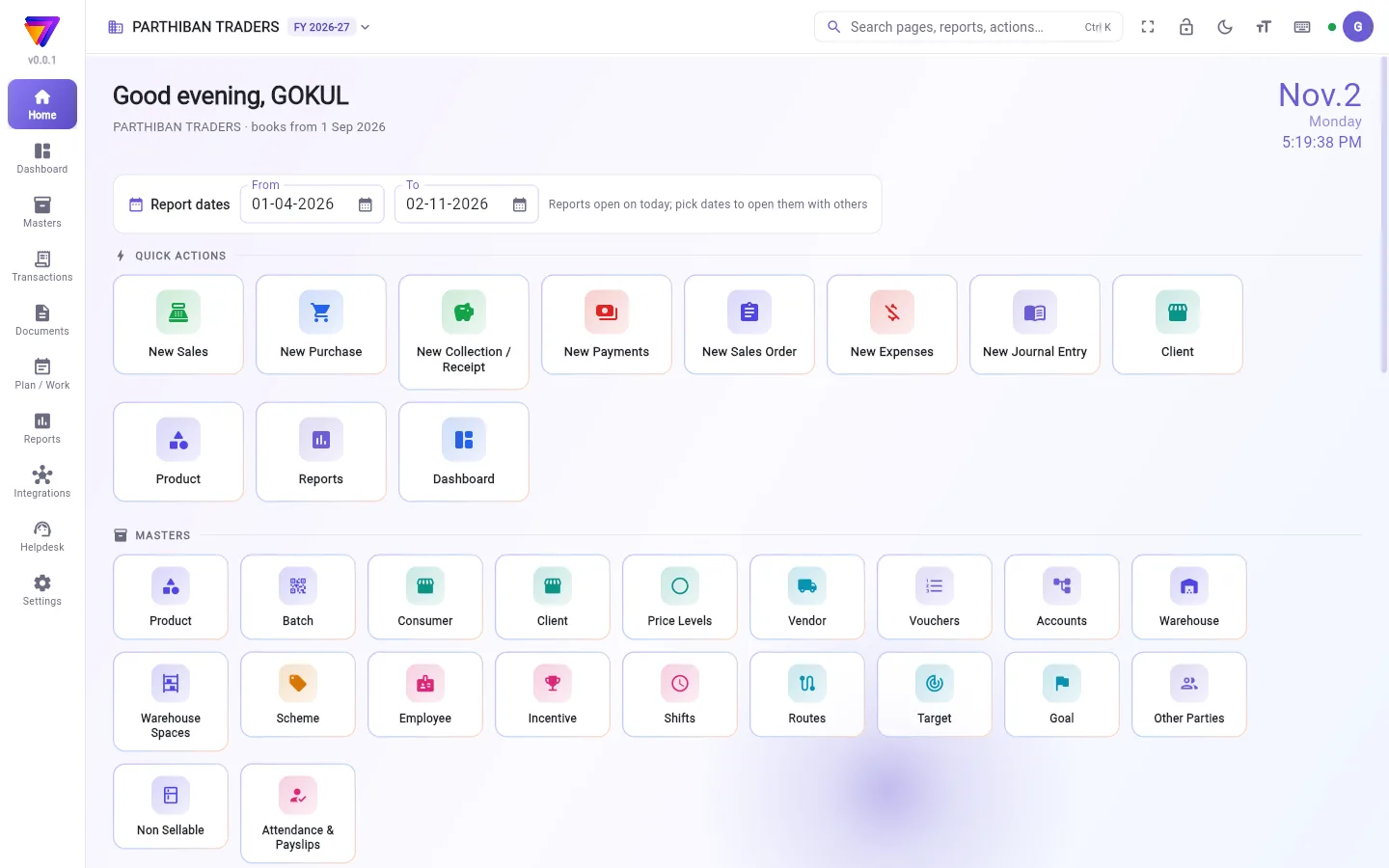
Office runs in a web browser at office.stockflow.co.in. It also runs as a Windows app and an Android app. On a computer you get a menu down the left side and a top bar. On a phone the sections sit in a menu at the top left and along the bottom, and a + button starts a new entry.
The owner, admin, accountant, billing staff and godown staff use Office. Each person sees only the pages their role allows. See Plans and roles.
In a browser, Office runs in one tab at a time. If you open it in a second tab, that tab says Office is open in another tab. Press Use here to move it to the new tab.
Score
Score is the phone app for field staff. Its tabs are Today, Clients, Order, Activity and Plans. Field staff use it for orders, collections, visits and deliveries.
Score signs in by mobile number only. The office must first put that number on the person's employee record (Masters → Employee in Office). Score then signs the person in to every company where the number is on an active employee.
How the two apps share the books
- There is one set of books for each company. Office and Score read and write the same bills, collections, clients and stock.
- When you save an entry, the server checks it and posts it to the books. The server gives it its number, so two people billing at the same time never get the same number.
- Both apps keep working when the connection drops. Entries made offline wait on the device and post when the connection comes back. See Finding your way for the online dot.
- Every Score login takes one login (seat) from your plan, the same as an Office user.
Tamil
Both apps can show the screens in Tamil. The choice is kept on each device.
- Office, computer: click your initial at the top right, then தமிழில் காட்டு. To go back, choose Show in English from the same menu. You can also pick English or தமிழ் on the Preferences page.
- Office, phone: open the menu at the top left and use Language.
- Score: open Profile (top right) and turn on தமிழ் (Tamil).
A word with no Tamil translation yet shows in English.
Good to know
- Your sign-in works for both apps. Which companies you see depends on where you are a member.
- A support ticket from the Helpdesk asks which app it is about: Office (this app) or Phone app (sales / delivery).
Related
- Sign in: how to open Office and choose a company
- Plans and roles: what each plan and role allows
- Getting around Score: the Score app in detail
Stockflow இரண்டு செயலிகளாக வருகிறது. Office பில், இருப்பு, கணக்குகள், அறிக்கைகளுக்கு. Score ரோட்டில் இருக்கும் உங்கள் விற்பனைப் பிரதிநிதிகள், டெலிவரி ஊழியர்களுக்கு. இரண்டு செயலிகளும் ஒரு நிறுவனத்தின் ஒரே கணக்குகளைப் பயன்படுத்துவதால், ஒன்றில் போட்ட பில் மற்றதிலும் தெரியும்.
திரையில் என்ன தெரியும்
Office
Office வெப் பிரவுசரில் office.stockflow.co.in முகவரியில் இயங்கும். Windows செயலியாகவும் Android செயலியாகவும் இயங்கும். கம்ப்யூட்டரில் இடது பக்கம் கீழ்நோக்கி ஒரு மெனுவும், மேலே ஒரு பட்டையும் இருக்கும். போனில் பகுதிகள் மேல் இடது மெனுவிலும் கீழ்ப் பட்டையிலும் இருக்கும்; + பட்டன் புதிய பதிவைத் தொடங்கும்.
உரிமையாளர், நிர்வாகி, கணக்காளர், பில்லிங் ஊழியர்கள், கிடங்கு ஊழியர்கள் Office பயன்படுத்துவாங்க. ஒவ்வொருவருக்கும் அவர் பொறுப்பு அனுமதிக்கும் பக்கங்கள் மட்டுமே தெரியும். பார்க்க: திட்டங்களும் பொறுப்புகளும்.
பிரவுசரில் Office ஒரு நேரத்தில் ஒரு தாவலில் (tab) மட்டுமே இயங்கும். இரண்டாவது தாவலில் திறந்தால், அந்தத் தாவல் Office வேறொரு தாவலில் திறந்துள்ளது (Office is open in another tab) என்று காட்டும். புதிய தாவலுக்கு மாற்ற இங்கே பயன்படுத்து (Use here) அழுத்துங்க.
Score
Score களப் பணியாளர்களுக்கான போன் செயலி. அதன் தாவல்கள்: இன்று (Today), வாடிக்கையாளர்கள் (Clients), ஆர்டர் (Order), செயல்பாடு (Activity), திட்டங்கள் (Plans). ஆர்டர், வசூல், சந்திப்பு, டெலிவரி எல்லாவற்றுக்கும் களப் பணியாளர்கள் இதைப் பயன்படுத்துவாங்க.
Score மொபைல் எண் மூலம் மட்டுமே உள்நுழையும். முதலில் அலுவலகம் அந்த எண்ணை அவருடைய பணியாளர் பதிவில் சேர்க்க வேண்டும் (Office-இல் முதன்மைப் பதிவுகள் → பணியாளர் (Masters → Employee)). அதன் பிறகு, அந்த எண் செயலில் உள்ள பணியாளராக இருக்கும் எல்லா நிறுவனங்களிலும் Score அவரை உள்நுழைய வைக்கும்.
இரண்டு செயலிகளும் கணக்குகளை எப்படிப் பகிர்கின்றன
- ஒவ்வொரு நிறுவனத்துக்கும் ஒரே ஒரு கணக்குத் தொகுப்பு. Office-உம் Score-உம் ஒரே பில்கள், வசூல்கள், வாடிக்கையாளர்கள், இருப்பைப் படித்து எழுதுகின்றன.
- ஒரு பதிவைச் சேமிக்கும்போது, சர்வர் அதைச் சரிபார்த்துக் கணக்கில் சேர்க்கும். எண்ணையும் சர்வரே கொடுக்கும், அதனால் இரண்டு பேர் ஒரே நேரத்தில் பில் போட்டாலும் ஒரே எண் வராது.
- இணைப்பு போனாலும் இரண்டு செயலிகளும் வேலை செய்யும். இணையம் இல்லாதபோது செய்த பதிவுகள் சாதனத்திலேயே காத்திருந்து, இணைப்பு திரும்பியதும் கணக்கில் சேரும். ஆன்லைன் புள்ளி பற்றி வழி கண்டறிதல் பார்க்கவும்.
- ஒவ்வொரு Score உள்நுழைவும், Office பயனரைப் போலவே, உங்கள் திட்டத்திலிருந்து ஒரு உள்நுழைவை (இடம் / seat) எடுக்கும்.
தமிழ்
இரண்டு செயலிகளும் திரைகளைத் தமிழில் காட்டும். இந்தத் தேர்வு ஒவ்வொரு சாதனத்திலும் தனியாக இருக்கும்.
- Office, கம்ப்யூட்டர் (Office, computer:): மேல் வலதுபுறம் உங்கள் பெயரின் முதல் எழுத்தைக் கிளிக் செய்து, தமிழில் காட்டு தேர்ந்தெடுங்க. ஆங்கிலத்துக்குத் திரும்ப, அதே மெனுவில் Show in English தேர்ந்தெடுங்க. விருப்பங்கள் (Preferences) பக்கத்திலும் English அல்லது தமிழ் தேர்ந்தெடுக்கலாம்.
- Office, போன் (Office, phone:): மேல் இடது மெனுவைத் திறந்து மொழி (Language) பயன்படுத்துங்க.
- Score: மேல் வலதுபுறம் சுயவிவரம் (Profile) திறந்து தமிழ் (Tamil) இயக்குங்க.
இன்னும் தமிழ் மொழிபெயர்ப்பு இல்லாத சொல் ஆங்கிலத்திலேயே தெரியும்.
தெரிந்துகொள்ள வேண்டியது
- உங்கள் உள்நுழைவு இரண்டு செயலிகளுக்கும் வேலை செய்யும். எந்த நிறுவனங்கள் தெரியும் என்பது நீங்கள் எங்கே உறுப்பினர் என்பதைப் பொறுத்தது.
- உதவி மையத்தில் (Helpdesk) போடும் ஆதரவு டிக்கெட், அது எந்தச் செயலி பற்றியது என்று கேட்கும்: Office (இந்தச் செயலி) (Office (this app)) அல்லது போன் செயலி (விற்பனை / டெலிவரி) (Phone app (sales / delivery)).
தொடர்புடையவை
- உள்நுழைவது: Office-ஐத் திறந்து நிறுவனத்தைத் தேர்ந்தெடுப்பது எப்படி
- திட்டங்களும் பொறுப்புகளும்: ஒவ்வொரு திட்டமும் பொறுப்பும் எதை அனுமதிக்கும்
- Score-இல் சுற்றி வருவது: Score செயலி விரிவாக