User manualபயனர் கையேடு · Score: the salesman appScore: சேல்ஸ்மேன் ஆப்
Activityசெயல்பாடு (Activity)
Find your bills, orders, collections, returns, expenses, deliveries and visits for any day, check their state, and print, share or change them.எந்த நாளுக்கும் உங்கள் பில்கள், ஆர்டர்கள், வசூல்கள், திருப்பங்கள், செலவுகள், டெலிவரிகள், சந்திப்புகளைக் கண்டுபிடிங்க, அவற்றின் நிலையைப் பாருங்க, அச்சிடுங்க, பகிருங்க அல்லது மாற்றுங்க.
- Where to find itஎங்கே இருக்கிறது
- Score → Score → Activity
- Who uses itயார் பயன்படுத்துவார்கள்
- Salesmen, delivery staff, collection staffசேல்ஸ்மேன்கள், டெலிவரி பணியாளர்கள், வசூல் பணியாளர்கள்
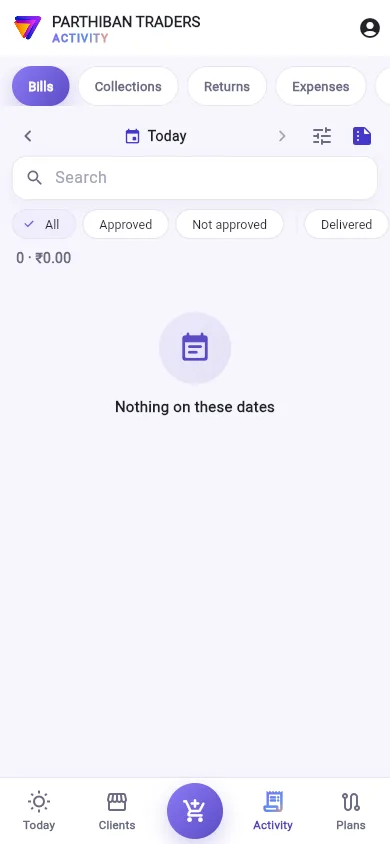
The Activity tab is your record of the day. It lists what you saved, its state, and what is still due, with buttons to print, share, collect or change.
What you see
- The tabs at the top: Bills, Collections, Returns, Expenses, Deliveries and Visits. You see the ones your role allows. Bills and Collections show today's count.
- The date bar: the arrows go a day back (Day before) or forward (Next day). Tap the date to open Dates: Today, Yesterday, Last 7 days, This month, or your own From and To, then Show.
- Filter: on Bills, choose Routes, Status, Delivery, Bill type and Payment. On Collections, choose Payment method. Tap Apply.
- Day summary: the button at the right of the date bar. See Printing.
- Search.
- On Bills, quick chips: All, Approved, Not approved, Delivered, Not delivered yet, Collected and Not collected.
- The count and total, and Print all, which makes one PDF of every numbered entry in the list.
The state of each entry
- On this phone: saved, not sent yet.
- Waiting for approval: the office must approve it.
- Waiting to be billed: an order the office has not billed yet. Billed when it has.
- Refused: the server did not post it.
- Cancelled.
- Saved: in the books.
A bill also shows Paid or Due ₹…, its delivery state, and your incentive on it.
Work with an entry
On each saved entry:
- Print / PDF: the Bluetooth printer, a PDF in a paper size, or Share PDF.
- Share PDF.
- The WhatsApp button: a message to the client with the number and amount.
- The three-dot menu (More):
- Collect against this bill
- Goods back on this bill
- Update status (delivery, payment)
- Change this bill
- Open in the office screen (cancel, history)
Change a bill
- Tap the three-dot menu on the bill.
- Tap Change this bill. The bill opens in the cart.
- Make your changes and save. The server posts the bill again.
Change this bill shows only if your role may edit bills, the bill is not cancelled, and an order is still waiting to be billed. Your office may also limit it:
- Score: a bill can be changed for: a number of hours after it was made.
- Score: a delivered bill cannot be changed.
The owner may always change a bill.
Deliveries and Visits
- Deliveries lists the bills you delivered on these dates, with Completed deliveries: … of …. A bill not delivered shows the reason.
- Visits lists your visits. Tap one for Visit details.
Good to know
- To cancel a bill, use Open in the office screen (cancel, history).
- With Colour bills by kind on, cash bills are green and credit bills red.
Related
- Take an order: the cart
- Collect money: collect against a bill
- Returns: goods back on a bill
- Printing: Bluetooth printing and the day summary
செயல்பாடு (Activity) டேப் தான் உங்கள் அன்றைய பதிவேடு. நீங்கள் சேமித்தவை, அவற்றின் நிலை, இன்னும் வர வேண்டியது எல்லாவற்றையும் பட்டியலிடும், அச்சிட, பகிர, வசூலிக்க அல்லது மாற்ற பட்டன்களுடன்.
திரையில் என்ன தெரியும்
- The tabs at the top (மேலே உள்ள டேப்கள்): பில்கள் (Bills), வசூல்கள் (Collections), திருப்பங்கள் (Returns), செலவுகள் (Expenses), டெலிவரிகள் (Deliveries), சந்திப்புகள் (Visits). உங்கள் பொறுப்புக்கு அனுமதி உள்ளவை தெரியும். பில்கள் (Bills), வசூல்கள் (Collections) இன்றைய எண்ணிக்கையைக் காட்டும்.
- The date bar (தேதிப் பட்டை): அம்புகள் ஒரு நாள் பின்னால் (முந்தைய நாள் (Day before)) அல்லது முன்னால் (அடுத்த நாள் (Next day)) போகும். தேதிகள் (Dates) திறக்க தேதியைத் தட்டுங்க: இன்று (Today), நேற்று (Yesterday), கடந்த 7 நாட்கள் (Last 7 days), இந்த மாதம் (This month), அல்லது உங்கள் சொந்த முதல் (From), வரை (To), பிறகு காட்டு (Show).
- வடிகட்டி (Filter): பில்கள் (Bills) இல், வழித்தடங்கள் (Routes), நிலை (Status), டெலிவரி (Delivery), பில் வகை (Bill type), பணம் செலுத்துதல் (Payment) தேர்ந்தெடுங்க. வசூல்கள் (Collections) இல், செலுத்தும் முறை (Payment method) தேர்ந்தெடுங்க. பயன்படுத்து (Apply) தட்டுங்க.
- நாள் சுருக்கம் (Day summary): தேதிப் பட்டையின் வலது பக்கம் உள்ள பட்டன். பாருங்க: அச்சிடுதல்.
- தேடு (Search).
- பில்கள் (Bills) இல், விரைவு சிப்கள்: அனைத்தும் (All), அங்கீகரிக்கப்பட்டது (Approved), அங்கீகரிக்கப்படவில்லை (Not approved), டெலிவரி ஆனது (Delivered), இன்னும் டெலிவரி இல்லை (Not delivered yet), வசூலானது (Collected), வசூலிக்கப்படவில்லை (Not collected).
- எண்ணிக்கையும் மொத்தமும், கூடவே அனைத்தையும் அச்சிடு (Print all), இது பட்டியலில் எண் உள்ள எல்லாப் பதிவுகளையும் ஒரே PDF ஆக்கும்.
ஒவ்வொரு பதிவின் நிலை
- இந்த போனில் (On this phone): சேமித்தது, இன்னும் அனுப்பவில்லை.
- அனுமதிக்குக் காத்திருக்கிறது (Waiting for approval): அலுவலகம் அங்கீகரிக்க வேண்டும்.
- பில் போடக் காத்திருக்கிறது (Waiting to be billed): அலுவலகம் இன்னும் பில் போடாத ஆர்டர். பில் போட்டதும் பில் போட்டது (Billed).
- மறுக்கப்பட்டது (Refused): சர்வர் அதைப் பதிவு செய்யவில்லை.
- ரத்து செய்யப்பட்டது (Cancelled).
- சேமிக்கப்பட்டது (Saved): கணக்கில் ஏறிவிட்டது.
ஒரு பில் செலுத்தப்பட்டது (Paid) அல்லது நிலுவை ₹… (Due ₹…), அதன் டெலிவரி நிலை, அதில் உங்கள் ஊக்கத்தொகையையும் காட்டும்.
ஒரு பதிவில் வேலை செய்தல்
சேமித்த ஒவ்வொரு பதிவிலும்:
- அச்சு / PDF (Print / PDF): புளூடூத் பிரிண்டர், ஒரு காகித அளவில் PDF, அல்லது PDF பகிர் (Share PDF).
- PDF பகிர் (Share PDF).
- WhatsApp பட்டன்: எண், தொகையுடன் வாடிக்கையாளருக்கு ஒரு செய்தி.
- மூன்று-புள்ளி மெனு (மேலும் (More)):
- இந்த பில்லுக்கு வசூல் (Collect against this bill)
- இந்த பில்லில் பொருள் திரும்ப (Goods back on this bill)
- நிலையைப் புதுப்பி (டெலிவரி, கட்டணம்) (Update status (delivery, payment))
- இந்த பில்லை மாற்று (Change this bill)
- அலுவலகத் திரையில் திற (ரத்து, வரலாறு) (Open in the office screen (cancel, history))
பில்லை மாற்றுதல்
- பில்லின் மூன்று-புள்ளி மெனுவைத் தட்டுங்க.
- இந்த பில்லை மாற்று (Change this bill) தட்டுங்க. பில் கார்டில் திறக்கும்.
- மாற்றங்களைச் செய்து சேமியுங்க. சர்வர் பில்லை மறுபடியும் பதிவு செய்யும்.
உங்கள் பொறுப்புக்கு பில்லைத் திருத்த அனுமதி இருந்து, பில் ரத்து ஆகாமல் இருந்து, ஆர்டர் என்றால் இன்னும் பில் போடக் காத்திருந்தால் மட்டுமே இந்த பில்லை மாற்று (Change this bill) தெரியும். உங்கள் அலுவலகம் இதை மேலும் கட்டுப்படுத்தலாம்:
- Score: பில்லை மாற்றக்கூடிய நேரம் (Score: a bill can be changed for): பில் போட்ட பிறகு சில மணி நேரம் வரை.
- Score: டெலிவரி ஆன பில்லை மாற்ற முடியாது (Score: a delivered bill cannot be changed).
உரிமையாளர் எப்போதும் பில்லை மாற்றலாம்.
டெலிவரிகள், சந்திப்புகள்
- டெலிவரிகள் (Deliveries) இந்தத் தேதிகளில் நீங்கள் டெலிவரி செய்த பில்களைப் பட்டியலிடும், முடிந்த டெலிவரிகள்: …-இல் … (Completed deliveries: … of …) உடன். டெலிவரி ஆகாத பில் காரணத்தைக் காட்டும்.
- சந்திப்புகள் (Visits) உங்கள் சந்திப்புகளைப் பட்டியலிடும். வருகை விவரம் (Visit details) பார்க்க ஒன்றைத் தட்டுங்க.
தெரிந்துகொள்ள வேண்டியது
- பில்லை ரத்து செய்ய, அலுவலகத் திரையில் திற (ரத்து, வரலாறு) (Open in the office screen (cancel, history)) பயன்படுத்துங்க.
- வகையின்படி பில்களுக்கு நிறம் (Colour bills by kind) ஆன் ஆக இருந்தால், ரொக்க பில்கள் பச்சையிலும் கடன் பில்கள் சிவப்பிலும் தெரியும்.
தொடர்புடையவை
- ஆர்டர் எடுத்தல்: கார்ட்
- பணம் வசூலித்தல்: ஒரு பில்லுக்கு எதிராக வசூலிக்க
- திருப்பங்கள்: ஒரு பில்லில் சரக்கு திரும்ப
- அச்சிடுதல்: புளூடூத் அச்சிடுதல், நாள் சுருக்கம்