User manualபயனர் கையேடு · Office: TransactionsOffice: பரிவர்த்தனைகள் (Transactions)
Collection / Receiptவசூல் (Collection / Receipt)
Record money a client pays you, set it against their bills, handle cheques, discounts and approvals.வாடிக்கையாளர் கொடுக்கும் பணத்தைப் பதிவு செய்து அவர்களின் பில்களுக்கு எதிராக வையுங்க. காசோலை, தள்ளுபடி, ஒப்புதல் எல்லாம் இங்கே.
- Where to find itஎங்கே இருக்கிறது
- Office → Transactions → Collection / Receipt
- Who uses itயார் பயன்படுத்துவார்கள்
- Cashiers, accountants, sales and delivery staffகாசாளர்கள், கணக்காளர்கள், விற்பனை மற்றும் டெலிவரி ஊழியர்கள்
A collection (receipt) records money that comes in from a client. You set it against their open bills, and their balance goes down.
What you see
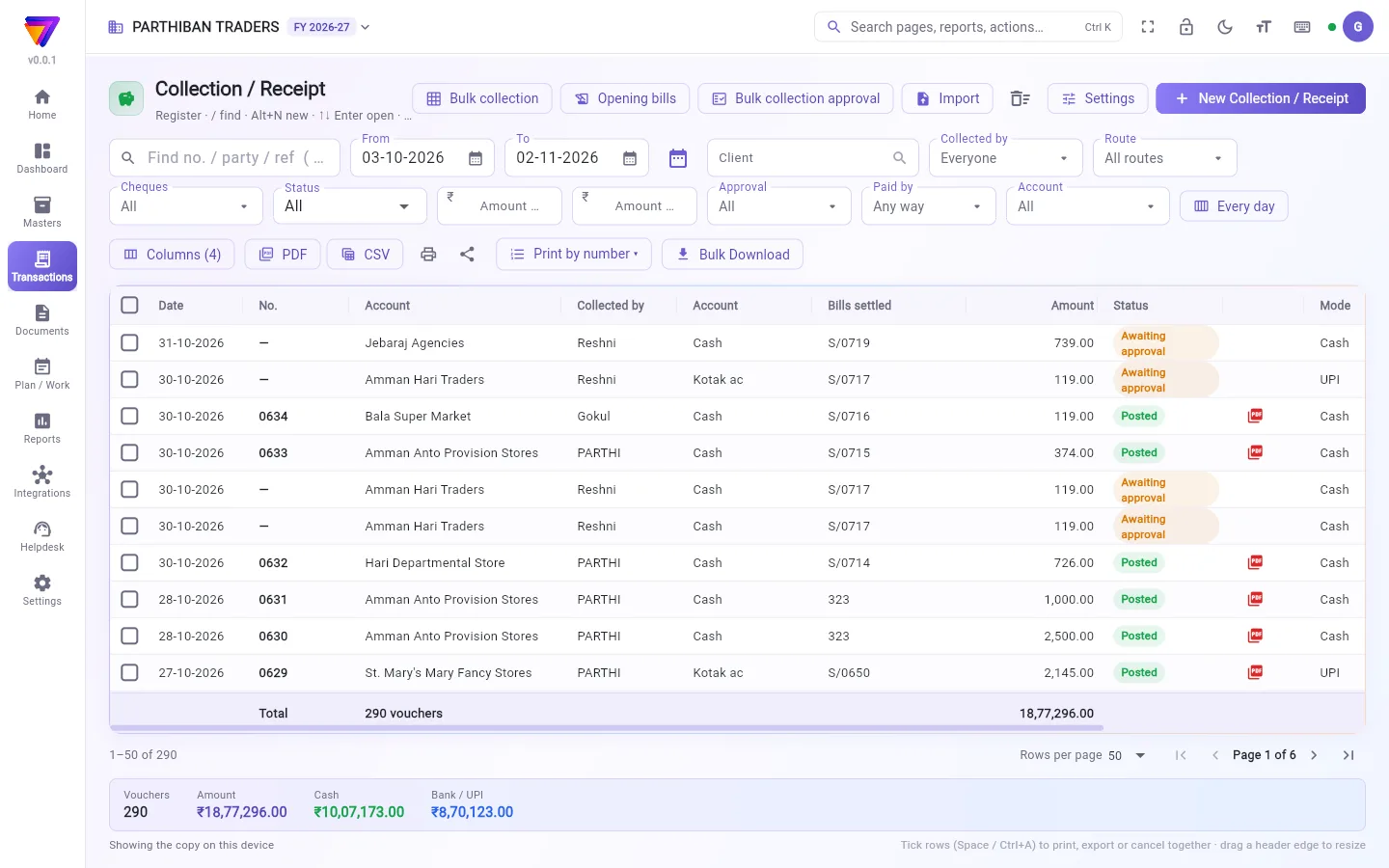
The register works like the Sales register. See The register: finding, filtering and exporting bills.
The columns include Collected by, Account, Bills settled, Mode and Cheque. Extra filters are Cheques, Amount from, Amount up to, Approval, Paid by and Account. The strip at the bottom splits the total into Cash and Bank / UPI.
At the top are Bulk collection, Opening bills, Bulk collection approval, Import, the Trash icon, Settings and New Collection / Receipt.
Record a collection
- Click New Collection / Receipt.
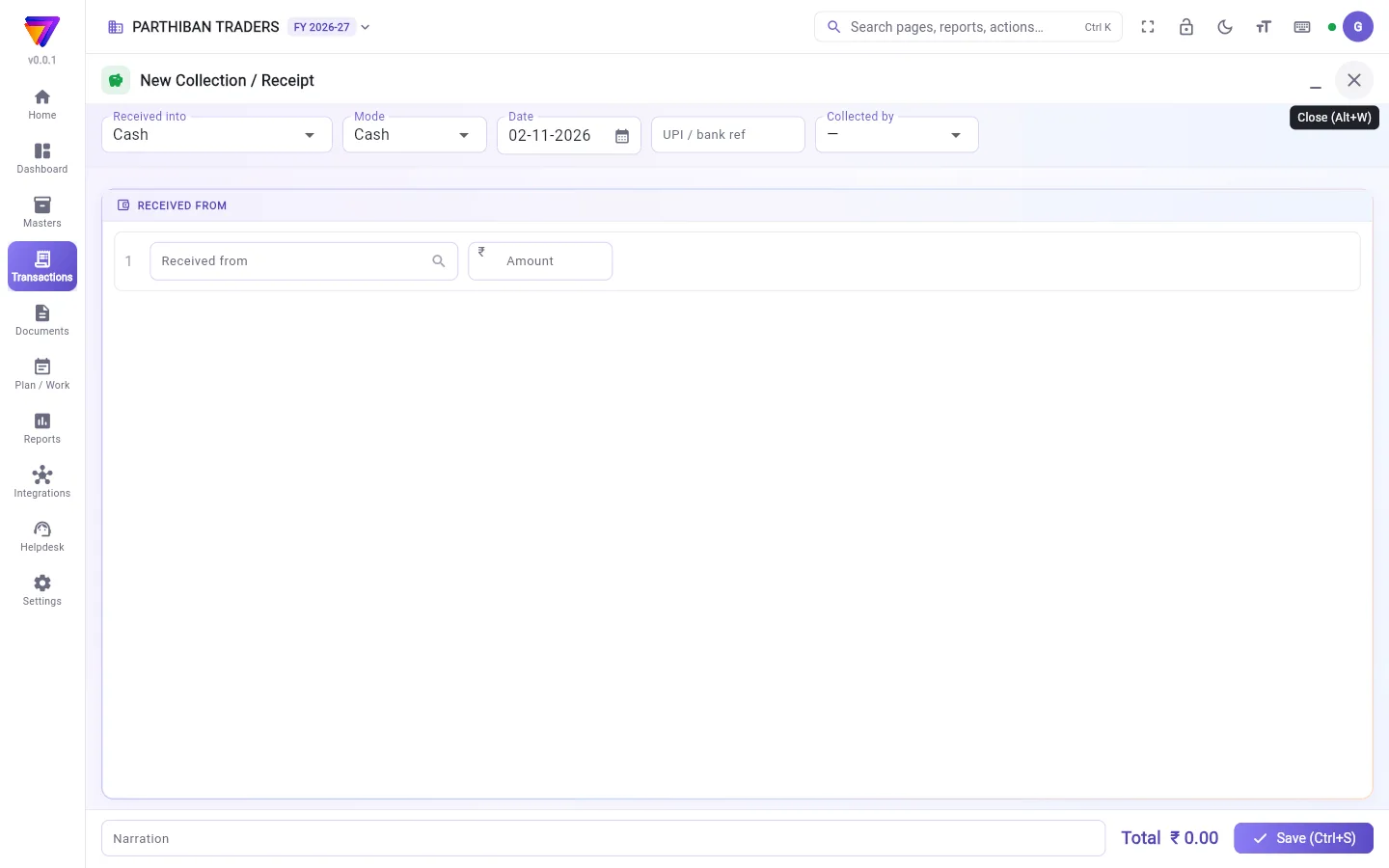
- Choose Received into: the cash or bank account the money went into.
- Choose the Mode: Cash, UPI, Bank transfer, Cheque or Card.
- Check the Date. Type the UPI / bank ref if you have one.
- Choose Collected by if a staff member took the money.
- In Received from, choose the client and type the Amount.
- Click Against bills. Tick the bills this money pays, or click Oldest first. What is not set against a bill stays on the client's account.
- Click Save (Ctrl+S).
You can also start from the Sales register: tick unpaid bills and click Collect. The collection opens with those bills set.
Cheques
- Choose Cheque as the Mode.
- Type the Cheque no. (needed), Cheque date and Drawn on (bank).
- Save.
Later, in the register, tick the cheque and click:
- Cheques cleared, then fill Cleared in the bank on and click Mark cleared.
- Bounced, then fill Returned on and Reason (e.g. insufficient funds). You can add a Bounce charge to the client (optional). Click Mark bounced. The collection is cancelled and its bills open again.
- Cheque details to correct the cheque number, date or bank.
How a new cheque goes into the books is set in Settings → Company under A cheque received: Into the bank at once, Client reduced now, into Cheques in hand; to the bank when cleared, or Waits (not posted, no number) until cleared.
Discount on a collection
- With one client line filled, type Discount given.
- Type the Reason for the discount.
- Save. The discount is posted as a separate discount journal against the same bills.
Wallet
On a new collection, a strip under the client line shows their Wallet: money on account. All to wallet puts the whole amount on account. Use wallet sets money already in the wallet against bills.
Bulk collection
Bulk collection opens a grid of clients (or, with Bill by bill, their bills). Type Cash, UPI, Net banking, Cheque or Discount on each row. Tap a due amount to take it all in cash. Click Save all (Ctrl+S). Each amount is set against the oldest open bills, or against its own bill.
Approval
If Collections need approval is on, a collection saved by someone who cannot approve waits as Awaiting approval, with no number. An approver uses Bulk collection approval, or ticks it in the register and clicks Approve.
Who can do what
| Permission | What it allows |
|---|---|
| Clear / bounce cheques | Use Cheques cleared and Bounced. |
| Collection on a past date | Save a collection dated before today. Without it, the server refuses it. |
| Give discount on a collection | Type Discount given. You also need permission to make journals. |
The page also has view, create, edit, cancel, approve, export and print.
Good to know
- Collection / Receipt is on every plan.
- If a collection from the same client is already entered for that date, a warning shows. Check it is not the same money.
- Opening bills lists client bills carried in from before your books started.
- The usual account is set in your company defaults.
Related
- Sales: the bills you collect against
- Client: balance and credit limit
- Collect in Score: collections taken in the field
- Cash Closing: a salesman's cash at day end
- Company: cheque and approval settings
வசூல் (receipt), வாடிக்கையாளரிடமிருந்து வரும் பணத்தைப் பதிவு செய்யும். அதை அவர்களின் திறந்த பில்களுக்கு எதிராக வைப்பீர்கள்; அவர்களின் நிலுவை குறையும்.
திரையில் என்ன தெரியும்
இந்தப் பதிவேடு விற்பனை பதிவேடு போலவே வேலை செய்யும். பார்க்க: பதிவேடு: பில்களைத் தேடுதல், வடிகட்டுதல், எக்ஸ்போர்ட் செய்தல்.
நெடுவரிசைகளில் வசூலித்தவர் (Collected by), கணக்கு (Account), தீர்த்த பில்கள் (Bills settled), முறை (Mode), காசோலை (Cheque) இருக்கும். கூடுதல் வடிகட்டிகள்: காசோலைகள் (Cheques), தொகை முதல் (Amount from), தொகை வரை (Amount up to), ஒப்புதல் (Approval), செலுத்திய முறை (Paid by), கணக்கு (Account). அடியில் உள்ள பட்டை மொத்தத்தை ரொக்கம் (Cash), வங்கி / UPI (Bank / UPI) என்று பிரித்துக் காட்டும்.
மேலே மொத்த வசூல் (Bulk collection), தொடக்க பில்கள் (Opening bills), மொத்த வசூல் ஒப்புதல் (Bulk collection approval), இறக்குமதி (Import), குப்பை (Trash) ஐகான், அமைப்புகள் (Settings), புதிய வசூல் (New Collection / Receipt) இருக்கும்.
வசூல் பதிவு செய்வது
- புதிய வசூல் (New Collection / Receipt) கிளிக் செய்யுங்க.
- வரவு வைத்த கணக்கு (Received into) தேர்ந்தெடுங்க: பணம் போன ரொக்கம் அல்லது வங்கிக் கணக்கு.
- முறை (Mode) தேர்ந்தெடுங்க: ரொக்கம் (Cash), UPI, வங்கிப் பரிமாற்றம் (Bank transfer), காசோலை (Cheque) அல்லது கார்டு (Card).
- தேதி (Date) சரிபாருங்க. இருந்தால் UPI / வங்கி குறிப்பு எண் (UPI / bank ref) டைப் செய்யுங்க.
- ஒரு ஊழியர் பணம் வாங்கியிருந்தால் வசூலித்தவர் (Collected by) தேர்ந்தெடுங்க.
- பெற்றது யாரிடமிருந்து (Received from) பெட்டியில் வாடிக்கையாளரைத் தேர்ந்தெடுத்து தொகை (Amount) டைப் செய்யுங்க.
- பில்களுக்கு எதிராக (Against bills) கிளிக் செய்யுங்க. இந்தப் பணம் எந்த பில்களுக்கு என்று டிக் செய்யுங்க, அல்லது பழையது முதலில் (Oldest first) கிளிக் செய்யுங்க. எந்த பில்லுக்கும் வைக்காத தொகை வாடிக்கையாளரின் கணக்கிலேயே இருக்கும்.
- சேமி (Ctrl+S) (Save (Ctrl+S)) கிளிக் செய்யுங்க.
விற்பனை பதிவேட்டிலிருந்தும் தொடங்கலாம்: செலுத்தாத பில்களை டிக் செய்து வசூலி (Collect) கிளிக் செய்யுங்க. அந்த பில்கள் வைக்கப்பட்ட நிலையில் வசூல் திறக்கும்.
காசோலைகள்
- முறை (Mode) ஆக காசோலை (Cheque) தேர்ந்தெடுங்க.
- காசோலை எண் (Cheque no.) (கட்டாயம்), காசோலை தேதி (Cheque date), காசோலை வங்கி (Drawn on (bank)) டைப் செய்யுங்க.
- சேமியுங்க.
பிறகு, பதிவேட்டில் காசோலையை டிக் செய்து இவற்றில் ஒன்றைக் கிளிக் செய்யுங்க:
- தீர்வான காசோலைகள் (Cheques cleared), பிறகு வங்கியில் தீர்வான தேதி (Cleared in the bank on) நிரப்பி தீர்வானது எனக் குறி (Mark cleared) கிளிக் செய்யுங்க.
- திரும்பியது (Bounced), பிறகு திரும்பிய தேதி (Returned on), காரணம் (எ.கா. போதிய பணமில்லை) (Reason (e.g. insufficient funds)) நிரப்புங்க. வாடிக்கையாளருக்கு காசோலை திரும்பல் கட்டணம் (விருப்பம்) (Bounce charge to the client (optional)) சேர்க்கலாம். திரும்பியது எனக் குறி (Mark bounced) கிளிக் செய்யுங்க. வசூல் ரத்தாகும், அதன் பில்கள் மீண்டும் திறக்கும்.
- காசோலை எண், தேதி அல்லது வங்கியைத் திருத்த காசோலை விவரங்கள் (Cheque details).
புதிய காசோலை கணக்கில் எப்படிச் சேரும் என்பது அமைப்புகள் → நிறுவனம் (Settings → Company) பக்கத்தில் பெறப்பட்ட காசோலை (A cheque received) கீழ் அமைக்கப்படும்: உடனே வங்கிக்கு (Into the bank at once), வாடிக்கையாளர் நிலுவை இப்போதே குறையும், கையிலுள்ள காசோலைகளுக்கு; கிளியர் ஆனதும் வங்கிக்கு (Client reduced now, into Cheques in hand; to the bank when cleared), அல்லது கிளியர் ஆகும் வரை காத்திருக்கும் (பதிவு இல்லை, எண் இல்லை) (Waits (not posted, no number) until cleared).
வசூலில் தள்ளுபடி
- ஒரு வாடிக்கையாளர் வரி நிரப்பிய பின், கொடுத்த தள்ளுபடி (Discount given) டைப் செய்யுங்க.
- தள்ளுபடிக்கான காரணம் (Reason for the discount) டைப் செய்யுங்க.
- சேமியுங்க. தள்ளுபடி அதே பில்களுக்கு எதிராக ஒரு தனி தள்ளுபடி ஜர்னலாகப் பதிவாகும்.
வாலட்
புதிய வசூலில், வாடிக்கையாளர் வரிக்குக் கீழே ஒரு பட்டை அவர்களின் வாலட் (Wallet) காட்டும்: கணக்கில் இருக்கும் பணம். முழுவதும் வாலட்டுக்கு (All to wallet) முழுத் தொகையையும் கணக்கில் வைக்கும். வாலட்டைப் பயன்படுத்து (Use wallet) வாலட்டில் ஏற்கனவே உள்ள பணத்தை பில்களுக்கு எதிராக வைக்கும்.
மொத்த வசூல்
மொத்த வசூல் (Bulk collection) வாடிக்கையாளர்களின் ஒரு கட்டத்தைத் (grid) திறக்கும் (அல்லது, பில் வாரியாக (Bill by bill) இருந்தால், அவர்களின் பில்களை). ஒவ்வொரு வரிசையிலும் ரொக்கம் (Cash), UPI, நெட் பேங்கிங் (Net banking), காசோலை (Cheque) அல்லது தள்ளுபடி (Discount) டைப் செய்யுங்க. நிலுவைத் தொகையைத் தொட்டால் முழுவதையும் ரொக்கமாக எடுக்கும். அனைத்தையும் சேமி (Ctrl+S) (Save all (Ctrl+S)) கிளிக் செய்யுங்க. ஒவ்வொரு தொகையும் பழைய திறந்த பில்களுக்கு, அல்லது அதன் சொந்த பில்லுக்கு எதிராக வைக்கப்படும்.
ஒப்புதல்
வசூலுக்கு ஒப்புதல் தேவை (Collections need approval) இயக்கத்தில் இருந்தால், ஒப்புதல் கொடுக்க அனுமதி இல்லாதவர் சேமிக்கும் வசூல் எண் இல்லாமல் ஒப்புதலுக்குக் காத்திருக்கிறது (Awaiting approval) நிலையில் நிற்கும். ஒப்புதல் கொடுப்பவர் மொத்த வசூல் ஒப்புதல் (Bulk collection approval) பயன்படுத்தலாம், அல்லது பதிவேட்டில் டிக் செய்து அங்கீகரி (Approve) கிளிக் செய்யலாம்.
யார் என்ன செய்யலாம்
| அனுமதி | என்ன செய்யலாம் |
|---|---|
| காசோலைகளைத் தீர்வு / திரும்பியதாகக் குறி (Clear / bounce cheques) | தீர்வான காசோலைகள் (Cheques cleared), திரும்பியது (Bounced) பயன்படுத்தலாம். |
| முந்தைய தேதியில் வசூல் (Collection on a past date) | இன்றைக்கு முந்தைய தேதியில் வசூல் சேமிக்கலாம். இது இல்லையென்றால் சர்வர் ஏற்காது. |
| வசூலில் தள்ளுபடி கொடு (Give discount on a collection) | கொடுத்த தள்ளுபடி (Discount given) டைப் செய்யலாம். ஜர்னல் போடும் அனுமதியும் தேவை. |
இந்தப் பக்கத்தில் பார்க்க, உருவாக்க, திருத்த, ரத்து செய்ய, ஒப்புதல் கொடுக்க, எக்ஸ்போர்ட், அச்சு அனுமதிகளும் உண்டு.
தெரிந்துகொள்ள வேண்டியது
- வசூல் எல்லா திட்டங்களிலும் (plan) உண்டு.
- அதே வாடிக்கையாளரிடமிருந்து அதே தேதிக்கு ஏற்கனவே ஒரு வசூல் உள்ளிடப்பட்டிருந்தால், ஒரு எச்சரிக்கை வரும். அது அதே பணம் இல்லை என்று சரிபாருங்க.
- தொடக்க பில்கள் (Opening bills) உங்க கணக்குகள் தொடங்குவதற்கு முன்பிருந்து கொண்டுவந்த வாடிக்கையாளர் பில்களைக் காட்டும்.
- வழக்கமான கணக்கு உங்க நிறுவன இயல்புநிலைகளில் (company defaults) அமைக்கப்படும்.
தொடர்புடையவை
- விற்பனை (Sales): நீங்க வசூலிக்கும் பில்கள்
- வாடிக்கையாளர் (Client): நிலுவையும் கடன் வரம்பும்
- Score-இல் வசூல் (Collect in Score): களத்தில் வாங்கிய வசூல்கள்
- ரொக்க முடிவு (Cash Closing): நாள் முடிவில் விற்பனைப் பிரதிநிதியின் ரொக்கம்
- நிறுவனம் (Company): காசோலை, ஒப்புதல் அமைப்புகள்