User manualபயனர் கையேடு · Office: MastersOffice: முதன்மைப் பதிவுகள் (Masters)
Batchபேட்ச் (Batch)
Keep batch numbers, expiry dates, batch rates and stock in hand for the products you track by batch.பேட்ச் வாரியா கண்காணிக்கும் பொருட்களுக்கு பேட்ச் எண்கள், காலாவதி தேதிகள், பேட்ச் விலைகள், கையிருப்பை வைத்திருக்க.
- Where to find itஎங்கே இருக்கிறது
- Office → Masters → Batch
- Who uses itயார் பயன்படுத்துவார்கள்
- Owner, Admin, Warehouse staffஉரிமையாளர், நிர்வாகி, கிடங்கு ஊழியர்கள்
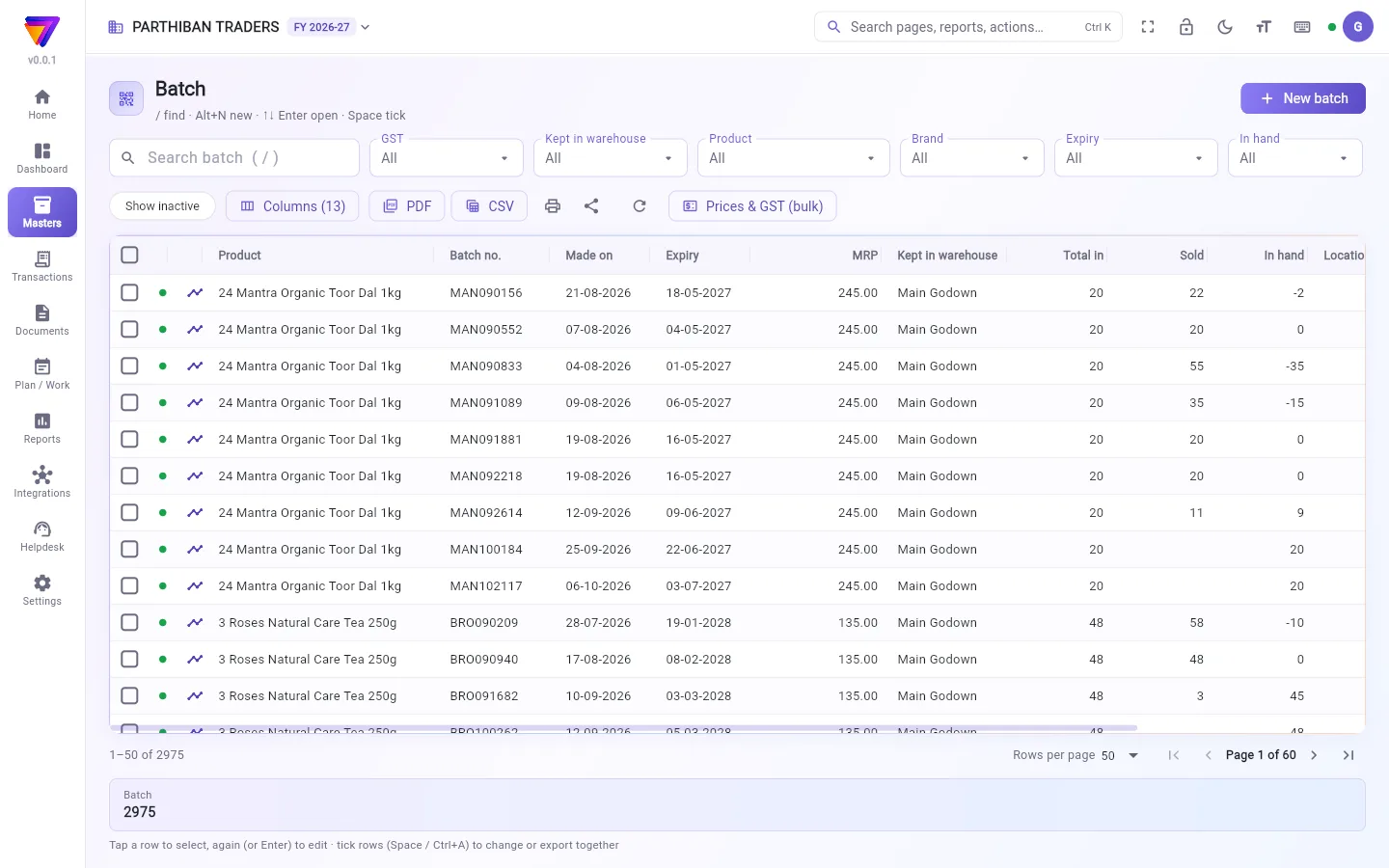
A batch is one lot of a product, with its own batch number, expiry and rates. This page lists every batch with what came in, what was sold and what is in hand.
What you see
- New batch at the top right.
- Filters: GST, Kept in warehouse, Product, Brand, Expiry (Expired, Within 30 days, Later, No expiry) and In hand (Has stock, Zero stock).
- The refresh button reloads the batch totals. Prices & GST (bulk) opens a grid to change many batches at once.
- Columns include Product, Batch no., Made on, Expiry, MRP, Kept in warehouse, Total in, Sold, In hand and Location (space). Use Columns to show Returned, Days to expiry, Selling rate with GST and more.
- The search box finds a batch by its number or by its product's name.
Add a batch
- Click New batch.
- Pick the Product and type the Batch no. Both are required.
- Fill in Made on, Expiry and MRP.
- Type the selling rate, either before GST or with GST. The other one follows.
- Click Add batch.
Fields
| Field | What to enter |
|---|---|
| Product * | The product this batch belongs to. |
| Batch no. * | The batch number on the pack. |
| Made on, Expiry | Manufacturing and expiry dates. |
| MRP | The MRP printed on this batch. |
| Selling rate before GST / with GST | This batch's selling rate. |
| Selling rate by client type | A rate for each client type. |
| Purchase rate before GST / with GST | What you paid for this batch. |
| GST (empty: the product's), HSN (empty: the product's) | Leave empty to use the product's GST and HSN. |
| Barcode | The barcode of this batch. |
| Kept in warehouse | Where the batch is kept. |
| Active | Off hides the batch from pickers and lists. |
Check or correct one batch
Click a batch row to select it. Then:
- Batch ledger shows every movement of the batch, with Opening, In, Out and Closing. Tap a line to open its voucher.
- Location places or moves the batch in a warehouse space.
- Reconcile lets you type the physical count per warehouse. The difference is posted as a stock adjustment.
- Delete removes a batch that was never used.
Who can do what
- The Warehouse role can do everything on this page. The Sales role can only view batches.
- Selling rate by client type needs Change rates. The purchase rate needs See purchase rate.
- Location needs batch edit or space edit. Reconcile needs the right to create stock adjustments.
Good to know
- Batch is part of every plan, including Basic.
- In hand can go below zero. The switch A batch's stock may go below 0 in Settings → Company is on unless you turn it off. With it off, a sale cannot take more from a batch than it holds.
- The switch Use the batch's selling rate for every client decides whether a client with a client type gets the batch rate or the product's client-type rate. It is on unless you turn it off.
- A batch that was used cannot be deleted. You are offered Make inactive instead.
Related
- Product: switch on Track batches and expiry
- Warehouse Spaces: racks and shelves for Location
- Company: the batch switches under Billing rules
ஒரு பேட்ச் என்பது ஒரு பொருளின் ஒரு தொகுப்பு — அதுக்குன்னு தனி பேட்ச் எண், காலாவதி, விலைகள் இருக்கும். இந்தப் பக்கம் ஒவ்வொரு பேட்ச்சையும், எவ்வளவு வந்தது, எவ்வளவு விற்றது, கையில் எவ்வளவு இருக்குன்னு காட்டும்.
திரையில் என்ன தெரியும்
- மேல் வலது மூலையில் புதிய பேட்ச் (New batch).
- வடிகட்டிகள்: GST, வைத்திருக்கும் கிடங்கு (Kept in warehouse), பொருள் (Product), பிராண்ட் (Brand), காலாவதி (Expiry) (காலாவதியானது (Expired), 30 நாட்களுக்குள் (Within 30 days), பின்னர் (Later), காலாவதி இல்லை (No expiry)), கையிருப்பு (In hand) (இருப்பு உள்ளது (Has stock), இருப்பு பூஜ்ஜியம் (Zero stock)).
- ரெஃப்ரெஷ் பொத்தான் பேட்ச் மொத்தங்களை மீண்டும் ஏற்றும். விலைகள் & GST (மொத்தமாக) (Prices & GST (bulk)) ஒரே நேரத்தில் பல பேட்ச்களை மாற்ற ஒரு கட்டத்தைத் திறக்கும்.
- நெடுவரிசைகளில் பொருள் (Product), பேட்ச் எண் (Batch no.), தயாரித்த தேதி (Made on), காலாவதி (Expiry), MRP, வைத்திருக்கும் கிடங்கு (Kept in warehouse), மொத்த வரவு (Total in), விற்றது (Sold), கையிருப்பு (In hand), இருப்பிடம் (இடம்) (Location (space)) இருக்கும். திரும்பியது (Returned), காலாவதிக்கு நாட்கள் (Days to expiry), GST உடன் விற்பனை விலை (Selling rate with GST) போன்றவற்றைக் காட்ட நெடுவரிசைகள் (Columns) பயன்படுத்துங்க.
- தேடல் பெட்டியில் பேட்ச் எண் அல்லது அதன் பொருள் பெயரை வைத்துத் தேடலாம்.
ஒரு பேட்ச் சேர்க்க
- புதிய பேட்ச் (New batch) கிளிக் பண்ணுங்க.
- பொருள் (Product) தேர்ந்தெடுத்து பேட்ச் எண் (Batch no.) டைப் பண்ணுங்க. இரண்டும் கட்டாயம்.
- தயாரித்த தேதி (Made on), காலாவதி (Expiry), MRP நிரப்புங்க.
- விற்பனை விலையை GST-க்கு முன் அல்லது GST உடன் — ஏதாவது ஒன்றில் டைப் பண்ணுங்க. மற்றது தானா வரும்.
- பேட்ச் சேர் (Add batch) கிளிக் பண்ணுங்க.
புலங்கள் (Fields)
| புலம் | என்ன உள்ளிடணும் |
|---|---|
| பொருள் (Product) * | இந்த பேட்ச் எந்தப் பொருளுடையது. |
| பேட்ச் எண் (Batch no.) * | பேக்கில் உள்ள பேட்ச் எண். |
| தயாரித்த தேதி (Made on), காலாவதி (Expiry) | தயாரிப்பு, காலாவதி தேதிகள். |
| MRP | இந்த பேட்ச்சில் அச்சிடப்பட்ட MRP. |
| GST க்கு முன் விற்பனை விலை (Selling rate before GST) / GST உடன் (with GST) | இந்த பேட்ச்சின் விற்பனை விலை. |
| வாடிக்கையாளர் வகைப்படி விற்பனை விலை (Selling rate by client type) | ஒவ்வொரு வாடிக்கையாளர் வகைக்கும் ஒரு விலை. |
| GST க்கு முன் கொள்முதல் விலை (Purchase rate before GST) / GST உடன் (with GST) | இந்த பேட்ச்சுக்கு நீங்க கொடுத்த விலை. |
| GST (காலியாக இருந்தால்: பொருளுடையது) (GST (empty: the product's)), HSN (காலியாக இருந்தால்: பொருளுடையது) (HSN (empty: the product's)) | பொருளின் GST, HSN-ஐயே பயன்படுத்த காலியா விடுங்க. |
| பார்கோடு (Barcode) | இந்த பேட்ச்சின் பார்கோடு. |
| வைத்திருக்கும் கிடங்கு (Kept in warehouse) | பேட்ச் எங்கே வைக்கப்பட்டிருக்கு. |
| செயலில் (Active) | ஆஃப் பண்ணா, தேர்வுப் பட்டியல்களிலும் பட்டியல்களிலும் பேட்ச் மறைஞ்சிடும். |
ஒரு பேட்ச்சைச் சரிபார்க்க அல்லது திருத்த
ஒரு பேட்ச் வரியைக் கிளிக் பண்ணித் தேர்ந்தெடுங்க. பிறகு:
- பேட்ச் பேரேடு (Batch ledger) அந்த பேட்ச்சின் ஒவ்வொரு நகர்வையும் தொடக்க இருப்பு (Opening), வரவு (In), வெளியே (Out), இறுதி இருப்பு (Closing) உடன் காட்டும். ஒரு வரியைத் தட்டினா அதன் வவுச்சர் திறக்கும்.
- இருப்பிடம் (Location) பேட்ச்சை ஒரு கிடங்கு இடத்தில் வைக்கும் அல்லது நகர்த்தும்.
- சரிபார் (Reconcile) மூலம் ஒவ்வொரு கிடங்கிலும் உண்மையா எண்ணிய அளவை டைப் பண்ணலாம். வித்தியாசம் ஒரு இருப்புச் சரிசெய்தலாகப் பதியப்படும்.
- நீக்கு (Delete) ஒருபோதும் பயன்படுத்தாத பேட்ச்சை நீக்கும்.
யார் என்ன செய்யலாம்
- கிடங்கு பணிப்பொறுப்பு இந்தப் பக்கத்தில் எல்லாமே செய்யலாம். விற்பனை பணிப்பொறுப்பு பேட்ச்களைப் பார்க்க மட்டும் முடியும்.
- வாடிக்கையாளர் வகைப்படி விற்பனை விலை (Selling rate by client type)-க்கு விலைகளை மாற்று (Change rates) அனுமதி வேணும். கொள்முதல் விலைக்கு கொள்முதல் விலையைப் பார் (See purchase rate) அனுமதி வேணும்.
- இருப்பிடம் (Location)-க்கு பேட்ச் திருத்தம் அல்லது இடம் திருத்தம் அனுமதி வேணும். சரிபார் (Reconcile)-க்கு இருப்புச் சரிசெய்தல் உருவாக்கும் அனுமதி வேணும்.
தெரிந்துகொள்ள வேண்டியது
- Basic உட்பட எல்லா பிளான்களிலும் பேட்ச் பக்கம் இருக்கு.
- கையிருப்பு (In hand) பூஜ்ஜியத்துக்குக் கீழே போகலாம். அமைப்புகள் → நிறுவனம் (Settings → Company)-இல் உள்ள ஒரு தொகுதியின் இருப்பு 0-க்குக் கீழ் போகலாம் (A batch's stock may go below 0) சுவிட்ச் நீங்க ஆஃப் பண்ணாத வரை ஆன்ல இருக்கும். அது ஆஃப்ல இருந்தா, ஒரு பேட்ச்சில் இருப்பதை விட அதிகமா விற்பனை எடுக்க முடியாது.
- எல்லா வாடிக்கையாளர்களுக்கும் பேட்சின் விற்பனை விலையைப் பயன்படுத்து (Use the batch's selling rate for every client) சுவிட்ச், வாடிக்கையாளர் வகை உள்ள ஒரு வாடிக்கையாளருக்கு பேட்ச் விலை போகணுமா, பொருளின் வாடிக்கையாளர் வகை விலை போகணுமான்னு முடிவு செய்யும். நீங்க ஆஃப் பண்ணாத வரை இது ஆன்ல இருக்கும்.
- பயன்படுத்திய பேட்ச்சை நீக்க முடியாது. அதுக்குப் பதிலா செயலற்றதாக்கு (Make inactive) காட்டப்படும்.
தொடர்புடையவை
- பொருள் (Product): பேட்ச் மற்றும் காலாவதியைக் கண்காணி (Track batches and expiry) ஆன் பண்ண
- கிடங்கு இடங்கள் (Warehouse Spaces): இருப்பிடம் (Location)-க்கான ரேக்குகள், அலமாரிகள்
- நிறுவனம் (Company): பில் விதிகள் (Billing rules) கீழ் உள்ள பேட்ச் சுவிட்சுகள்