User manualபயனர் கையேடு · Office: Plan / WorkOffice: திட்டம் / வேலை (Plan / Work)
Collection Planவசூல் திட்டம் (Collection Plan)
Put open bills on a cashier for a day, then see what was collected, what is left, and the visits where nothing came.ஒரு நாளுக்கு நிலுவை பில்களை ஒரு காசாளரிடம் கொடுங்க; பிறகு என்ன வசூலானது, என்ன மீதி, எதுவும் வராத சந்திப்புகள் எவை என்று பாருங்க.
- Where to find itஎங்கே இருக்கிறது
- Office → Plan / Work → Collection Plan
- Who uses itயார் பயன்படுத்துவார்கள்
- Owner, Admin; cashiers see their bills in Scoreஉரிமையாளர், நிர்வாகி; காசாளர்கள் தங்கள் பில்களை Score-இல் பார்க்கலாம்
A collection plan gives a cashier a list of open bills to collect on one day. The bills show in Score under Bills to collect for that person. The plan then shows what came in against each bill.
What you see
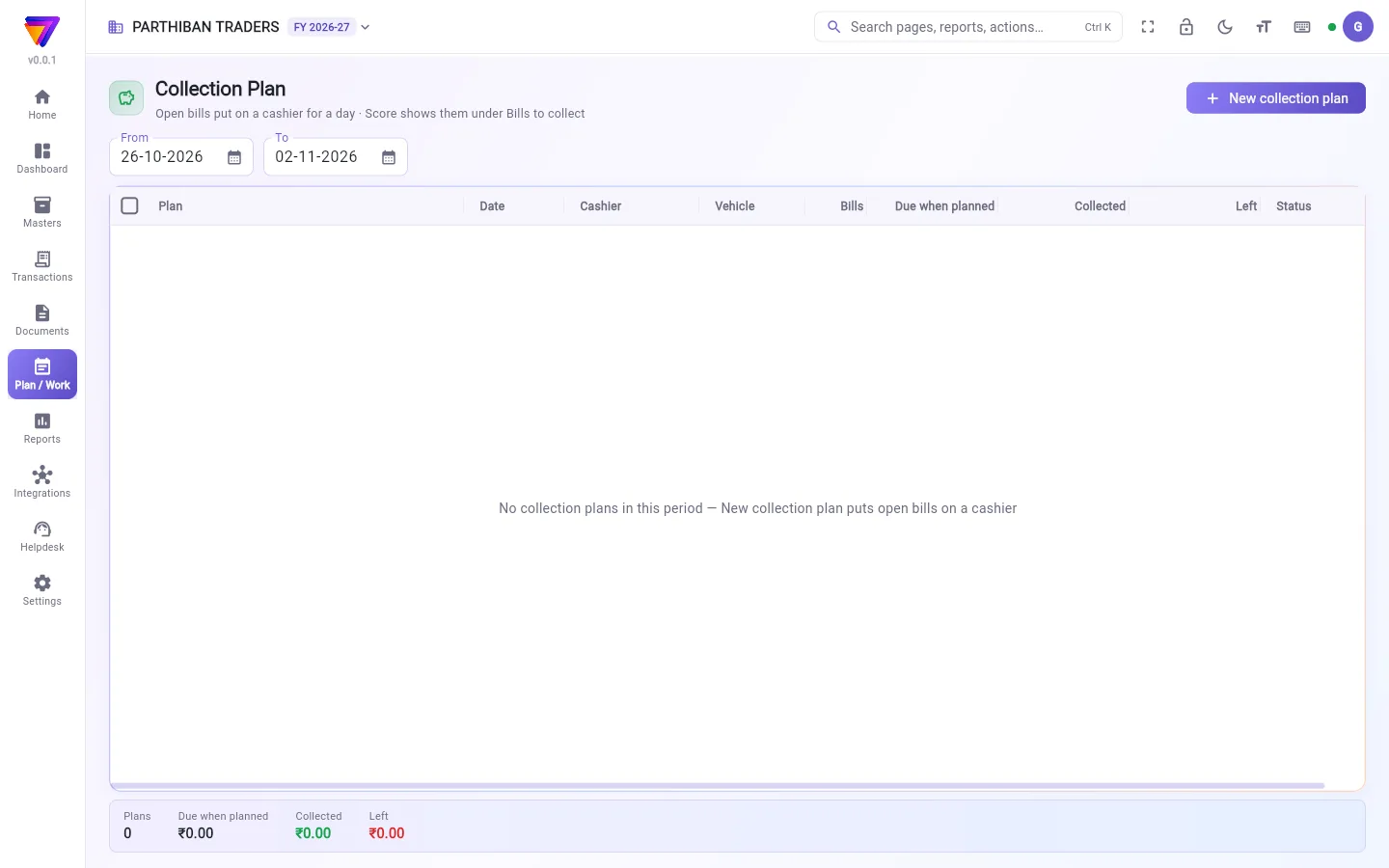
- From and To: the plan dates shown.
- The table: Plan, Date, Cashier, Vehicle, Bills, Due when planned, Collected, Left and Status.
- The strip at the bottom adds up Plans, Due when planned, Collected and Left.
- Summary, PDF, CSV, print and share appear once there are plans. Tick plans to sum up only those.
A plan's status is Collected, Part collected, Not collected or No bills.
Make a collection plan
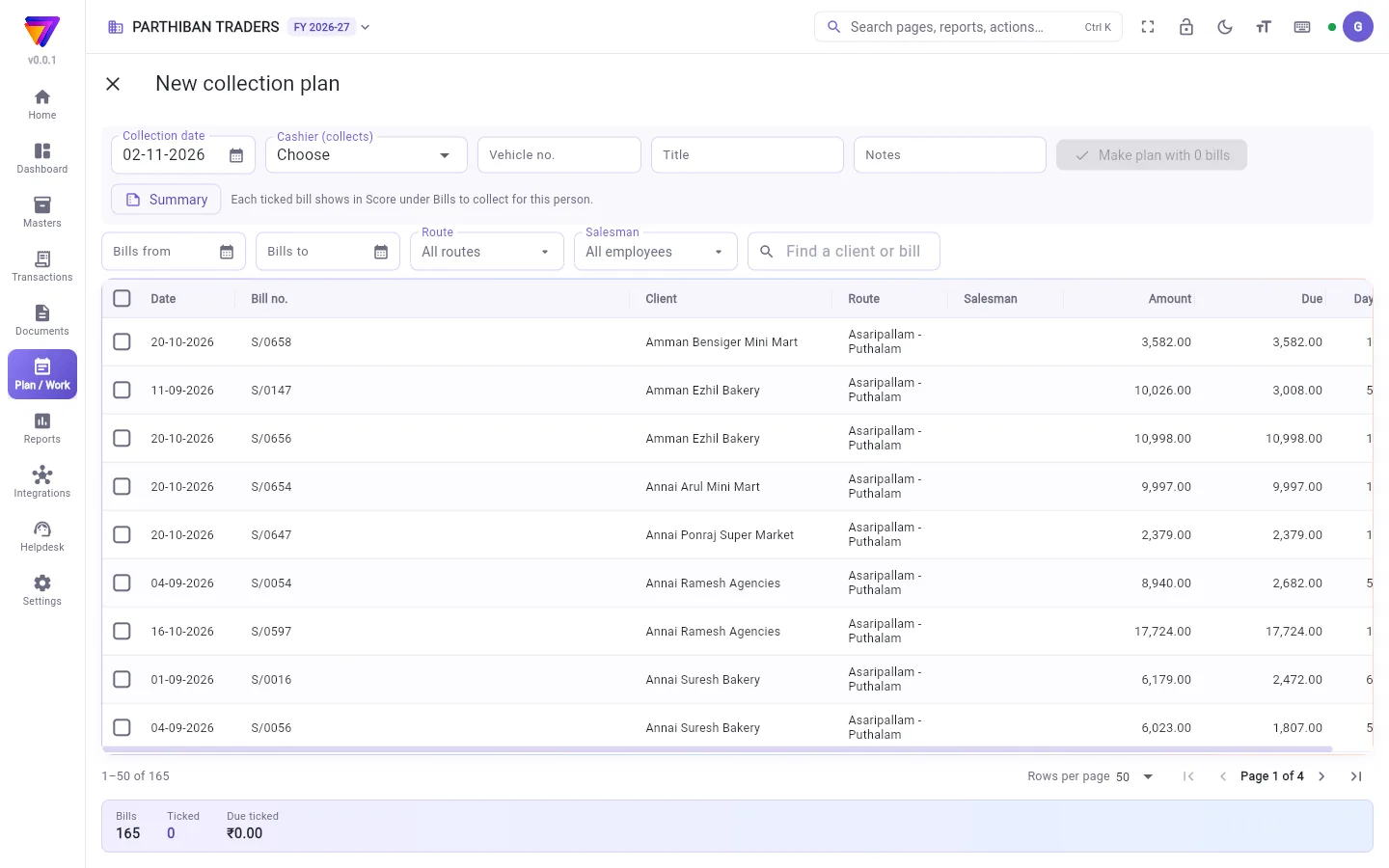
- Click New collection plan.
- Set the Collection date.
- Choose the Cashier (collects). This is required.
- Add Vehicle no., Title and Notes if you want. An empty title becomes the cashier's name and the date.
- Narrow the open bills with Bills from, Bills to, Route, Salesman and the search box.
- Tick the bills. The table shows each bill's Due and its age in Days.
- Click Make plan with N bills.
Only open sales bills are listed. Fully paid bills and bills with goods returned are left out.
See how a plan is going
Click a plan to open it. The top line reads, for example, "₹X collected of ₹Y · ₹Z left". The table shows, for each bill:
- Due when planned, Collected and Left.
- Status: Collected, Part collected or Not collected.
- Last collection (time · by · mode) and Times.
- Last visit: the shop's visit since the plan started, when nothing was collected.
The buttons are Bills / collector (change the bills or the cashier), Summary, Print and the delete icon.
Change or delete a plan
- Bills / collector opens the same screen as a new plan. Untick a bill to take it off. That bill leaves the cashier's Bills to collect.
- The delete icon deletes the plan. The bills stay as they are; they leave the cashier's Bills to collect.
Who can do what
- Create gives New collection plan.
- Edit gives Bills / collector.
- Cancel gives the delete icon.
- The Delivery role can view collection plans.
Good to know
- Collection Plan comes with the Pro · Large Stockist and Enterprise plans.
- Collected is worked out from how much each bill's balance has gone down since it was planned.
- Summary opens the Order, Load or Collection report for the plan's bills.
Related
- Delivery Plan: bills on a vehicle, with delivery and collection.
- Receipt: the collections that reduce a bill's balance.
- Delivery in Score: where the cashier sees Bills to collect.
- Reports: Receivables and the Collection Report.
வசூல் திட்டம் ஒரு காசாளருக்கு ஒரு நாளில் வசூலிக்க வேண்டிய நிலுவை பில்களின் பட்டியலைக் கொடுக்கும். அந்த நபருக்கு Score-இல் வசூலிக்க வேண்டிய பில்கள் (Bills to collect)-இன் கீழ் பில்கள் தெரியும். ஒவ்வொரு பில்லுக்கும் என்ன வந்தது என்று திட்டம் பிறகு காட்டும்.
திரையில் என்ன தெரியும்
- முதல் (From), வரை (To): காட்டப்படும் திட்டத் தேதிகள்.
- அட்டவணை: திட்டம் (Plan), தேதி (Date), காசாளர் (Cashier), வாகனம் (Vehicle), பில்கள் (Bills), திட்டமிட்டபோது நிலுவை (Due when planned), வசூலானது (Collected), Left (மீதி), நிலை (Status).
- கீழே உள்ள பட்டை திட்டங்கள் (Plans), திட்டமிட்டபோது நிலுவை (Due when planned), வசூலானது (Collected), Left (மீதி) ஆகியவற்றைக் கூட்டும்.
- திட்டங்கள் இருந்தால் சுருக்கம் (Summary), PDF, CSV, அச்சிடுதல், பகிர்தல் தெரியும். சிலவற்றை மட்டும் கூட்ட, அந்தத் திட்டங்களை டிக் செய்யுங்க.
ஒரு திட்டத்தின் நிலை வசூலானது (Collected), பகுதி வசூல் (Part collected), வசூலிக்கப்படவில்லை (Not collected) அல்லது பில்கள் இல்லை (No bills).
வசூல் திட்டம் போடுவது
- புதிய வசூல் திட்டம் (New collection plan) கிளிக் செய்யுங்க.
- வசூல் தேதி (Collection date) அமையுங்க.
- காசாளர் (வசூலிப்பவர்) (Cashier (collects)) தேர்ந்தெடுங்க. இது கட்டாயம்.
- வேண்டுமென்றால் வாகன எண் (Vehicle no.), தலைப்பு (Title), குறிப்புகள் (Notes) சேருங்க. தலைப்பு காலியாக இருந்தால், காசாளரின் பெயரும் தேதியும் தலைப்பாகும்.
- பில்கள் முதல் (Bills from), பில்கள் வரை (Bills to), வழித்தடம் (Route), விற்பனைப் பிரதிநிதி (Salesman), தேடல் பெட்டி கொண்டு நிலுவை பில்களைக் குறையுங்க.
- பில்களை டிக் செய்யுங்க. அட்டவணை ஒவ்வொரு பில்லின் செலுத்த வேண்டியது (Due), நாட்கள் (Days)-இல் அதன் வயது காட்டும்.
- N பில்களுடன் திட்டம் உருவாக்கு (Make plan with N bills) கிளிக் செய்யுங்க.
நிலுவையில் உள்ள விற்பனை பில்கள் மட்டுமே பட்டியலில் வரும். முழுதும் செலுத்திய பில்களும், சரக்கு திரும்பிய பில்களும் விடப்படும்.
திட்டம் எப்படிப் போகிறது என்று பார்ப்பது
ஒரு திட்டத்தைத் திறக்க அதைக் கிளிக் செய்யுங்க. மேல் வரி உதாரணமாக "₹Y-இல் ₹X வசூல் · ₹Z மீதம்" ("₹X collected of ₹Y · ₹Z left") என்று சொல்லும். அட்டவணை ஒவ்வொரு பில்லுக்கும் காட்டுவது:
- திட்டமிட்டபோது நிலுவை (Due when planned), வசூலானது (Collected), Left (மீதி).
- நிலை (Status): வசூலானது (Collected), பகுதி வசூல் (Part collected) அல்லது வசூலிக்கப்படவில்லை (Not collected).
- கடைசி வசூல் (நேரம் · யார் · முறை) (Last collection (time · by · mode)), தடவைகள் (Times).
- கடைசி வருகை (Last visit): எதுவும் வசூலாகாத போது, திட்டம் தொடங்கிய பின் அந்தக் கடைக்குச் சென்ற சந்திப்பு.
பட்டன்கள்: பில்கள் / வசூலிப்பவர் (Bills / collector) (பில்களை அல்லது காசாளரை மாற்ற), சுருக்கம் (Summary), அச்சிடு (Print), நீக்கும் ஐகான்.
திட்டத்தை மாற்றுவது அல்லது நீக்குவது
- பில்கள் / வசூலிப்பவர் (Bills / collector) புதிய திட்டத்தின் அதே திரையைத் திறக்கும். ஒரு பில்லை எடுக்க அதை அன்டிக் செய்யுங்க. அந்த பில் காசாளரின் வசூலிக்க வேண்டிய பில்கள் (Bills to collect)-இலிருந்து போய்விடும்.
- நீக்கும் ஐகான் திட்டத்தை நீக்கும். பில்கள் அப்படியே இருக்கும்; அவை காசாளரின் வசூலிக்க வேண்டிய பில்கள் (Bills to collect)-இலிருந்து போய்விடும்.
யார் என்ன செய்யலாம்
- உருவாக்கு (Create) அனுமதி புதிய வசூல் திட்டம் (New collection plan) தரும்.
- திருத்து (Edit) அனுமதி பில்கள் / வசூலிப்பவர் (Bills / collector) தரும்.
- ரத்து (Cancel) அனுமதி நீக்கும் ஐகானைத் தரும்.
- டெலிவரி (Delivery) பொறுப்பு வசூல் திட்டங்களைப் பார்க்கலாம்.
தெரிந்துகொள்ள வேண்டியது
- வசூல் திட்டம் Pro · பெரிய ஸ்டாக்கிஸ்ட், என்டர்பிரைஸ் பிளான்களில் வரும்.
- வசூலானது (Collected) என்பது, திட்டமிட்ட பிறகு ஒவ்வொரு பில்லின் மீதித் தொகை எவ்வளவு குறைந்தது என்பதிலிருந்து கணக்கிடப்படும்.
- சுருக்கம் (Summary) திட்டத்தின் பில்களுக்கான ஆர்டர், லோடு அல்லது வசூல் அறிக்கையைத் திறக்கும்.
தொடர்புடையவை
- டெலிவரி திட்டம் (Delivery Plan): டெலிவரியும் வசூலும் சேர்ந்து, வண்டியில் பில்கள்.
- வசூல் (Receipt): பில்லின் மீதியைக் குறைக்கும் வசூல்கள்.
- Score-இல் டெலிவரி (Delivery in Score): காசாளர் வசூலிக்க வேண்டிய பில்கள் (Bills to collect) பார்க்கும் இடம்.
- அறிக்கைகள் (Reports): வர வேண்டியவை (Receivables), வசூல் அறிக்கை (Collection Report).