User manualபயனர் கையேடு · Office: MastersOffice: முதன்மைப் பதிவுகள் (Masters)
Clientவாடிக்கையாளர் (Client)
Add the shops you sell to, with route, client type, credit terms, and opening dues; see what each one owes.நீங்க விற்கும் கடைகளை வழித்தடம், வாடிக்கையாளர் வகை, கடன் நிபந்தனைகள், தொடக்க நிலுவைகளோட சேர்க்க; ஒவ்வொருவரும் எவ்வளவு தரணும்னு பார்க்க.
- Where to find itஎங்கே இருக்கிறது
- Office → Masters → Client
- Who uses itயார் பயன்படுத்துவார்கள்
- Owner, Admin, Sales staff (Accountant can look)உரிமையாளர், நிர்வாகி, விற்பனை ஊழியர்கள் (கணக்காளர் பார்க்க மட்டும் முடியும்)
A client is a shop or business you sell to. This page holds each client's details and shows what they owe you right now.
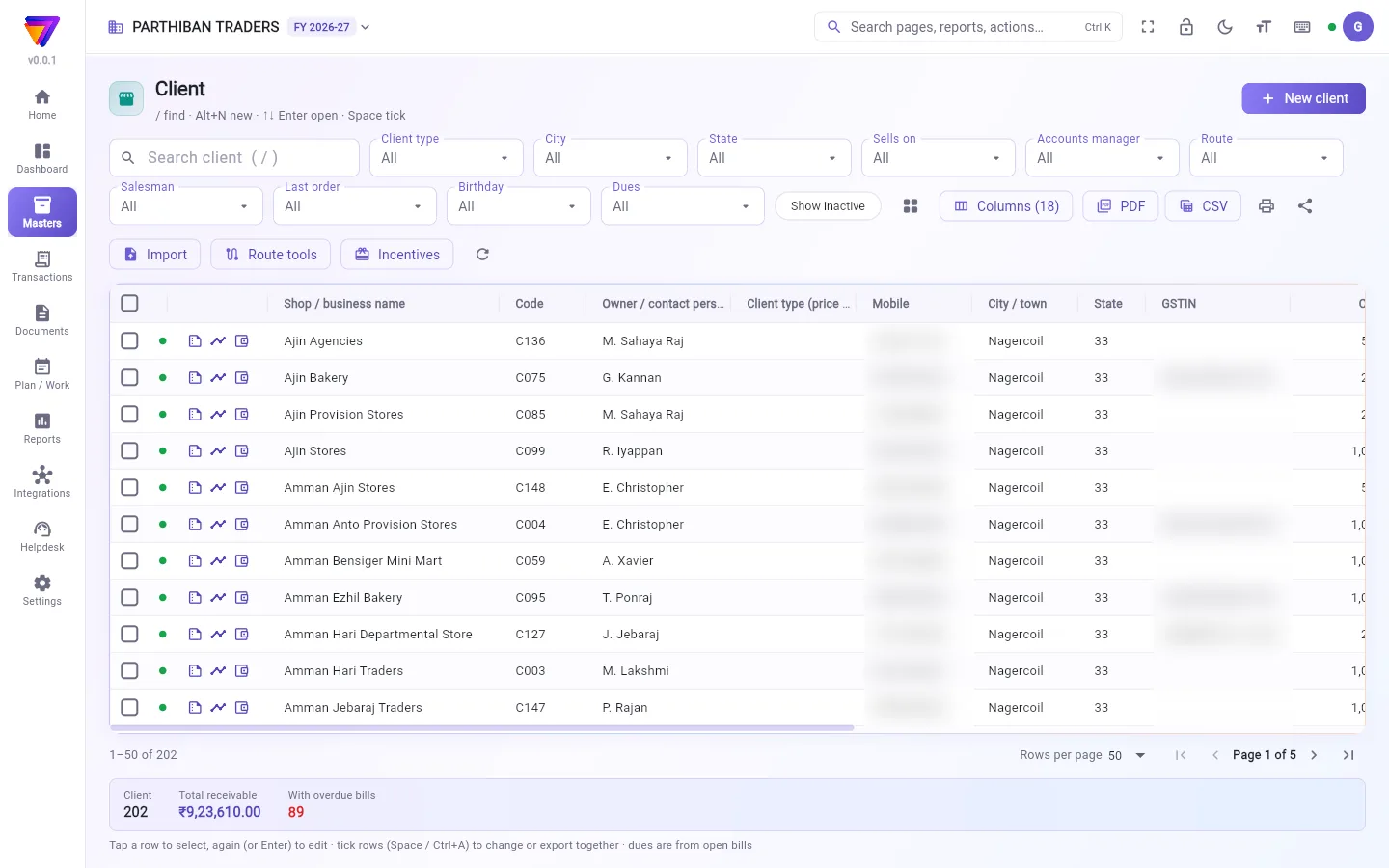
What you see
- New client at the top right.
- Filters: Client type, City, State, Sells on, Accounts manager, Route, Salesman, Last order, Birthday, Dues (Owes us, Overdue, Over credit limit) and Tag once you use tags.
- Import, Route tools, Incentives and a refresh button for last orders.
- Next to each name are three buttons: Summary, Ledger and Wallet.
- Columns include Shop / business name, Code, Owner / contact person, Client type (price level), Mobile, City / town, State, GSTIN, Receivable, Open bills, Overdue days and Last order (days). Use Columns for more.
- The strip at the bottom shows the count, Total receivable and With overdue bills. Dues come from open bills.
Add a client
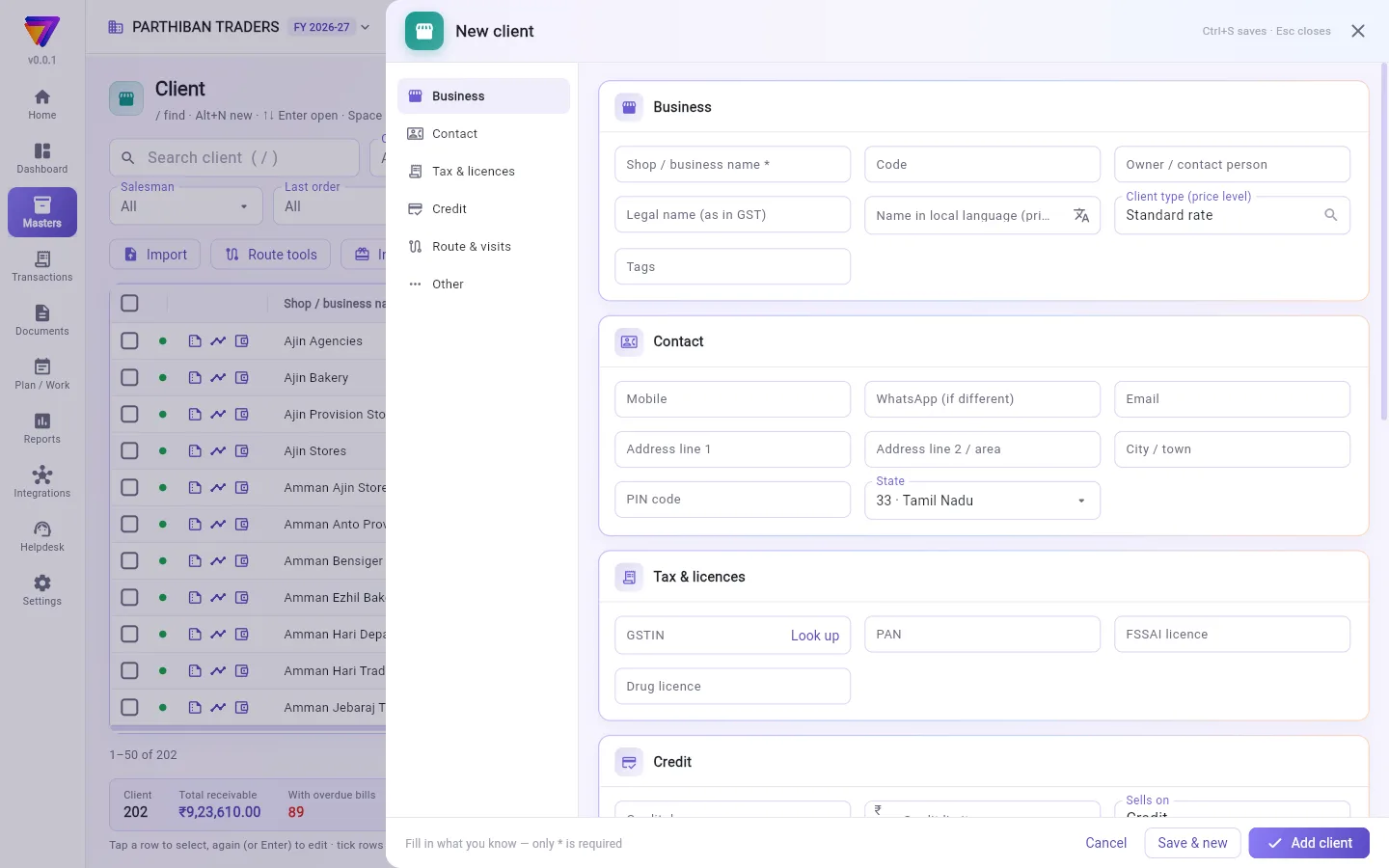
- Click New client (or press Alt+N).
- Type the Shop / business name. It is the only required field in Office.
- If the client has GST, type the full 15-character GSTIN and click Look up. Empty fields such as the name, legal name and address fill in from the GST record. What you already typed is not changed.
- Pick the Client type (price level) and the Route.
- Fill in Credit days and Credit limit under Credit.
- Click Add client. To add another one straight away, click Save & new.
If the mobile number or GSTIN is already on another client, you see Looks like a duplicate. Click Save anyway only if it really is a different client.
Fields
| Field | What to enter |
|---|---|
| Shop / business name * | The name printed on bills. |
| Code, Owner / contact person, Legal name (as in GST) | Business details. |
| Name in local language (printed) | Fills in by itself as you type the name. |
| Client type (price level) | Decides which product rate the client gets. New client type adds one. |
| Tags | Comma separated, for example wholesale, school. |
| Mobile, WhatsApp (if different), Email | Contact details. |
| Address line 1, Address line 2 / area, City / town, PIN code, State | The address. PIN code is 6 digits. |
| GSTIN, PAN | A GSTIN sets the State and fills an empty PAN. |
| FSSAI licence, Drug licence | Licence numbers. |
| Credit days | Days until a bill is due. A new bill's due date is counted from this. |
| Credit limit | The most this client may owe. |
| Sells on | Credit or Cash only. |
| Discount % on every bill line | Filled in on the bill. A product's own discount comes first. |
| Accounts manager (follows up dues) | The employee who collects. |
| TCS applies to this client | Switch on if TCS is collected. |
| Route, Salesman, Order on route (1 = first visit), Visit days, Map location | How and when the client is visited. |
| Owner's birthday | For the Birthday filter. |
| Shop / office photo, Remarks | Optional. |
| No SMS (payment reminders, cash received) | Stops SMS to this client. |
| Active | Off hides the client from pickers and lists. |
Enter opening dues
Use this for bills that were unpaid before your books start in Stockflow.
- Click the client's row once to select it.
- Click Opening balance.
- Click Add bill for each unpaid bill. Type the Bill no., Bill date and Pending amount.
- Leave Side on Balance. Pick Wallet for money the client paid in advance.
- Click Save.
A line needs a Bill no. and a Pending amount. Lines without a bill number are not saved.
Other actions on a selected client
- Edit, Statement, Collect (opens a new collection), Map, Order on route and Delete.
- WhatsApp: Payment reminder (dues, overdue days) or Statement PDF link.
- More: Summary (bills paid / part / unpaid), Loyalty points & wallet, Wallet — set against bills / pay back, Credit note, Debit note, Cheque return, Use advance on bills, Refund advance and Correct balance.
Tick several rows to use Set route, WhatsApp reminders, Change a field, Make active or Make inactive on all of them.
Who can do what
- See balance: without it, a login does not see Receivable, the dues columns or the Dues filter.
- Change credit limit: without it, a login does not see the Credit limit field.
- The Sales role can view, add and change clients and see balances. The Accountant role can view, export and see balances. Opening balance needs Change opening balances.
Good to know
- Client is part of every plan, including Basic. Opening balance, Credit note, Debit note, Correct balance and the Wallet column use the Accounts module, which is not in Basic.
- The credit limit only acts on bills if you choose so in Settings → Company → A bill that takes a client over the credit limit: Allow it, Warn, then allow or Stop it (checked by the server).
- In the Score app, a new client also needs a Route and a Client type (price level), unless the switch Score: a new client needs a route and a client type is off.
- Delete works only for a client that was never used. Otherwise you are offered Make inactive.
- Walk-in customers go under Consumer, not here.
Related
- Price Levels: the client types
- Consumer: walk-in and home customers
- Collection / Receipt: record money from a client
- Company: credit limit and billing rules
வாடிக்கையாளர் என்பது நீங்க விற்கும் ஒரு கடை அல்லது வணிகம். இந்தப் பக்கத்தில் ஒவ்வொரு வாடிக்கையாளரின் விவரங்களும், அவங்க இப்போ உங்களுக்கு எவ்வளவு தரணும் என்பதும் இருக்கும்.
திரையில் என்ன தெரியும்
- மேல் வலது மூலையில் புதிய வாடிக்கையாளர் (New client).
- வடிகட்டிகள்: வாடிக்கையாளர் வகை (Client type), ஊர் (City), மாநிலம் (State), விற்பனை முறை (Sells on), கணக்கு மேலாளர் (Accounts manager), வழித்தடம் (Route), விற்பனைப் பிரதிநிதி (Salesman), கடைசி ஆர்டர் (Last order), பிறந்தநாள் (Birthday), நிலுவைகள் (Dues) (நமக்குத் தர வேண்டும் (Owes us), காலம் கடந்தது (Overdue), கடன் வரம்பைத் தாண்டியவை (Over credit limit)), குறிச்சொற்கள் பயன்படுத்தத் தொடங்கியதும் குறிச்சொல் (Tag).
- இறக்குமதி (Import), வழித்தடக் கருவிகள் (Route tools), ஊக்கத்தொகைகள் (Incentives), கடைசி ஆர்டர்களுக்கான ஒரு ரெஃப்ரெஷ் பொத்தான்.
- ஒவ்வொரு பெயருக்கும் பக்கத்தில் மூன்று பொத்தான்கள்: சுருக்கம் (Summary), பேரேடு (Ledger), வாலட் (Wallet).
- நெடுவரிசைகளில் கடை / வணிகப் பெயர் (Shop / business name), குறியீடு (Code), உரிமையாளர் / தொடர்பு நபர் (Owner / contact person), வாடிக்கையாளர் வகை (விலை நிலை) (Client type (price level)), மொபைல் (Mobile), நகரம் / ஊர் (City / town), மாநிலம் (State), GSTIN, வர வேண்டியது (Receivable), நிலுவை பில்கள் (Open bills), காலம் கடந்த நாட்கள் (Overdue days), கடைசி ஆர்டர் (நாட்கள்) (Last order (days)) இருக்கும். இன்னும் வேணும்னா நெடுவரிசைகள் (Columns) பயன்படுத்துங்க.
- கீழே உள்ள பட்டையில் எண்ணிக்கை, மொத்தம் வர வேண்டியது (Total receivable), காலம் கடந்த பில்கள் உள்ளவை (With overdue bills) தெரியும். நிலுவைகள் திறந்த பில்களிலிருந்து கணக்கிடப்படும்.
ஒரு வாடிக்கையாளரைச் சேர்க்க
- புதிய வாடிக்கையாளர் (New client) கிளிக் பண்ணுங்க (அல்லது Alt+N அழுத்துங்க).
- கடை / வணிகப் பெயர் (Shop / business name) டைப் பண்ணுங்க. Office-இல் கட்டாயம் தேவைப்படும் புலம் இது மட்டும்தான்.
- வாடிக்கையாளருக்கு GST இருந்தா, முழு 15 எழுத்து GSTIN டைப் பண்ணி தேடிப் பார் (Look up) கிளிக் பண்ணுங்க. பெயர், சட்டப்பூர்வ பெயர், முகவரி போன்ற காலியான புலங்கள் GST பதிவிலிருந்து நிரம்பும். நீங்க ஏற்கனவே டைப் பண்ணதை மாற்றாது.
- வாடிக்கையாளர் வகை (விலை நிலை) (Client type (price level)), வழித்தடம் (Route) தேர்ந்தெடுங்க.
- கடன் (Credit) கீழ் கடன் நாட்கள் (Credit days), கடன் வரம்பு (Credit limit) நிரப்புங்க.
- வாடிக்கையாளரைச் சேர் (Add client) கிளிக் பண்ணுங்க. உடனே இன்னொருவரைச் சேர்க்கணும்னா சேமித்து புதியது (Save & new) கிளிக் பண்ணுங்க.
மொபைல் எண் அல்லது GSTIN ஏற்கனவே வேறொரு வாடிக்கையாளரிடம் இருந்தா, ஏற்கனவே உள்ளது போல் தெரிகிறது (Looks like a duplicate) வரும். அது உண்மையிலேயே வேற வாடிக்கையாளர்னா மட்டும் பரவாயில்லை, சேமி (Save anyway) கிளிக் பண்ணுங்க.
புலங்கள் (Fields)
| புலம் | என்ன உள்ளிடணும் |
|---|---|
| கடை / வணிகப் பெயர் (Shop / business name) * | பில்லில் அச்சாகும் பெயர். |
| குறியீடு (Code), உரிமையாளர் / தொடர்பு நபர் (Owner / contact person), சட்டப்பூர்வ பெயர் (GST-இல் உள்ளபடி) (Legal name (as in GST)) | வணிக விவரங்கள். |
| உள்ளூர் மொழியில் பெயர் (அச்சில் வரும்) (Name in local language (printed)) | பெயரை டைப் பண்ணும்போதே தானா நிரம்பும். |
| வாடிக்கையாளர் வகை (விலை நிலை) (Client type (price level)) | வாடிக்கையாளருக்கு எந்தப் பொருள் விலை போகும்னு முடிவு செய்யும். புதிய வாடிக்கையாளர் வகை (New client type) புதுசா ஒன்றைச் சேர்க்கும். |
| குறிச்சொற்கள் (Tags) | காற்புள்ளியால் பிரித்து, உதாரணமா wholesale, school. |
| மொபைல் (Mobile), WhatsApp (வேறு எண் என்றால்) (WhatsApp (if different)), மின்னஞ்சல் (Email) | தொடர்பு விவரங்கள். |
| முகவரி வரி 1 (Address line 1), முகவரி வரி 2 / பகுதி (Address line 2 / area), நகரம் / ஊர் (City / town), PIN குறியீடு (PIN code), மாநிலம் (State) | முகவரி. PIN குறியீடு 6 இலக்கங்கள். |
| GSTIN, PAN | GSTIN கொடுத்தா மாநிலம் (State) அமைஞ்சிடும், காலியான PAN நிரம்பிடும். |
| FSSAI உரிமம் (FSSAI licence), மருந்து உரிமம் (Drug licence) | உரிம எண்கள். |
| கடன் நாட்கள் (Credit days) | ஒரு பில் கெடு தேதிக்கு எத்தனை நாட்கள். புதிய பில்லின் கெடு தேதி இதிலிருந்து கணக்கிடப்படும். |
| கடன் வரம்பு (Credit limit) | இந்த வாடிக்கையாளர் அதிகபட்சம் எவ்வளவு தரவேண்டியிருக்கலாம். |
| விற்பனை முறை (Sells on) | கடன் (Credit) அல்லது ரொக்கம் மட்டும் (Cash only). |
| ஒவ்வொரு பில் வரிக்கும் தள்ளுபடி % (Discount % on every bill line) | பில்லில் தானா நிரம்பும். பொருளுக்குன்னு தனித் தள்ளுபடி இருந்தா அதுதான் முதலில். |
| கணக்கு மேலாளர் (நிலுவையைப் பின்தொடர்பவர்) (Accounts manager (follows up dues)) | வசூல் செய்யும் ஊழியர். |
| இந்த வாடிக்கையாளருக்கு TCS பொருந்தும் (TCS applies to this client) | TCS வசூலிக்கப்பட்டா ஆன் பண்ணுங்க. |
| வழித்தடம் (Route), விற்பனைப் பிரதிநிதி (Salesman), வழித்தடத்தில் வரிசை (1 = முதல் சந்திப்பு) (Order on route (1 = first visit)), சந்திப்பு நாட்கள் (Visit days), வரைபட இருப்பிடம் (Map location) | வாடிக்கையாளரை எப்படி, எப்போ சந்திக்கணும். |
| உரிமையாளர் பிறந்தநாள் (Owner's birthday) | பிறந்தநாள் (Birthday) வடிகட்டிக்கு. |
| கடை / அலுவலகப் புகைப்படம் (Shop / office photo), குறிப்புகள் (Remarks) | விருப்பப்பட்டால். |
| SMS வேண்டாம் (பணம் நினைவூட்டல், பணம் பெறப்பட்டது) (No SMS (payment reminders, cash received)) | இந்த வாடிக்கையாளருக்கு SMS அனுப்புவதை நிறுத்தும். |
| செயலில் (Active) | ஆஃப் பண்ணா, தேர்வுப் பட்டியல்களிலும் பட்டியல்களிலும் வாடிக்கையாளர் மறைஞ்சிடுவார். |
தொடக்க நிலுவைகளை உள்ளிட
Stockflow-இல் உங்க கணக்குகள் தொடங்குவதற்கு முன்பே செலுத்தப்படாம இருந்த பில்களுக்கு இதைப் பயன்படுத்துங்க.
- வாடிக்கையாளரின் வரியை ஒரு தடவை கிளிக் பண்ணித் தேர்ந்தெடுங்க.
- தொடக்க இருப்புத் தொகை (Opening balance) கிளிக் பண்ணுங்க.
- செலுத்தாத ஒவ்வொரு பில்லுக்கும் பில் சேர் (Add bill) கிளிக் பண்ணுங்க. பில் எண் (Bill no.), பில் தேதி (Bill date), நிலுவையில் (Pending) தொகையை டைப் பண்ணுங்க.
- பக்கம் (Side)-ஐ இருப்புத் தொகை (Balance)-லேயே விடுங்க. வாடிக்கையாளர் முன்பணமா கொடுத்த பணத்துக்கு வாலட் (Wallet) தேர்ந்தெடுங்க.
- சேமி (Save) கிளிக் பண்ணுங்க.
ஒவ்வொரு வரிக்கும் பில் எண் (Bill no.), நிலுவையில் (Pending) தொகை இரண்டும் வேணும். பில் எண் இல்லாத வரிகள் சேமிக்கப்படாது.
தேர்ந்தெடுத்த வாடிக்கையாளரில் மற்ற செயல்கள்
- திருத்து (Edit), கணக்கு அறிக்கை (Statement), வசூலி (Collect) (புதிய வசூலைத் திறக்கும்), வரைபடம் (Map), வழித்தட வரிசை (Order on route), நீக்கு (Delete).
- WhatsApp: பணம் நினைவூட்டல் (நிலுவை, கெடு தாண்டிய நாட்கள்) (Payment reminder (dues, overdue days)) அல்லது கணக்கு அறிக்கை PDF இணைப்பு (Statement PDF link).
- மேலும் (More): சுருக்கம் (செலுத்திய / பகுதி / செலுத்தாத பில்கள்) (Summary (bills paid / part / unpaid)), லாயல்டி புள்ளிகள் & வாலட் (Loyalty points & wallet), வாலட் — பில்களுக்கு எதிராக வை / திருப்பிக் கொடு (Wallet — set against bills / pay back), வரவுக் குறிப்பு (Credit note), பற்றுக் குறிப்பு (Debit note), காசோலை திருப்பம் (Cheque return), பில்களுக்கு முன்பணத்தைப் பயன்படுத்து (Use advance on bills), முன்பணத்தைத் திருப்பிக் கொடு (Refund advance), மீதத்தைத் திருத்து (Correct balance).
பல வரிகளை டிக் பண்ணி, எல்லாவற்றிலும் ஒரே நேரத்தில் வழித்தடம் அமை (Set route), WhatsApp நினைவூட்டல்கள் (WhatsApp reminders), ஒரு புலத்தை மாற்று (Change a field), செயலில் ஆக்கு (Make active) அல்லது செயலற்றதாக்கு (Make inactive) பயன்படுத்தலாம்.
யார் என்ன செய்யலாம்
- நிலுவையைப் பார் (See balance): இந்த அனுமதி இல்லாத லாகினுக்கு வர வேண்டியது (Receivable), நிலுவை நெடுவரிசைகள், நிலுவைகள் (Dues) வடிகட்டி தெரியாது.
- கடன் வரம்பை மாற்று (Change credit limit): இந்த அனுமதி இல்லாத லாகினுக்கு கடன் வரம்பு (Credit limit) புலம் தெரியாது.
- விற்பனை பணிப்பொறுப்பு வாடிக்கையாளர்களைப் பார்க்கலாம், சேர்க்கலாம், மாற்றலாம், நிலுவைகளையும் பார்க்கலாம். கணக்காளர் பணிப்பொறுப்பு பார்க்கலாம், ஏற்றுமதி செய்யலாம், நிலுவைகளைப் பார்க்கலாம். தொடக்க இருப்புத் தொகை (Opening balance)-க்கு தொடக்க இருப்புகளை மாற்று (Change opening balances) அனுமதி வேணும்.
தெரிந்துகொள்ள வேண்டியது
- Basic உட்பட எல்லா பிளான்களிலும் வாடிக்கையாளர் பக்கம் இருக்கு. தொடக்க இருப்புத் தொகை (Opening balance), வரவுக் குறிப்பு (Credit note), பற்றுக் குறிப்பு (Debit note), மீதத்தைத் திருத்து (Correct balance), வாலட் (Wallet) நெடுவரிசை கணக்குகள் (Accounts) தொகுதியைப் பயன்படுத்துது; அது Basic-இல் இல்லை.
- அமைப்புகள் → நிறுவனம் → வாடிக்கையாளரைக் கடன் வரம்பைத் தாண்ட வைக்கும் பில் (Settings → Company → A bill that takes a client over the credit limit)-இல் நீங்க தேர்ந்தெடுத்தா மட்டுமே கடன் வரம்பு பில்களில் வேலை செய்யும்: அனுமதி (Allow it), எச்சரித்து, பின் அனுமதி (Warn, then allow) அல்லது தடு (சர்வர் சரிபார்க்கும்) (Stop it (checked by the server)).
- Score செயலியில், புதிய வாடிக்கையாளருக்கு வழித்தடம் (Route), வாடிக்கையாளர் வகை (விலை நிலை) (Client type (price level)) இரண்டும் வேணும் — Score: புதிய வாடிக்கையாளருக்கு ரூட்டும் வாடிக்கையாளர் வகையும் தேவை (Score: a new client needs a route and a client type) சுவிட்ச் ஆஃப்ல இருந்தா தவிர.
- ஒருபோதும் பயன்படுத்தாத வாடிக்கையாளருக்கு மட்டும் நீக்கு (Delete) வேலை செய்யும். இல்லைன்னா செயலற்றதாக்கு (Make inactive) காட்டப்படும்.
- நேரில் வந்து வாங்குபவர்கள் இங்கே இல்லை, நுகர்வோர் (Consumer) கீழ் போவாங்க.
தொடர்புடையவை
- விலை நிலைகள் (Price Levels): வாடிக்கையாளர் வகைகள்
- நுகர்வோர் (Consumer): நேரில் வந்து வாங்குபவர்களும் வீட்டு வாடிக்கையாளர்களும்
- வசூல் (Collection / Receipt): வாடிக்கையாளரிடமிருந்து வந்த பணத்தைப் பதிய
- நிறுவனம் (Company): கடன் வரம்பு, பில் விதிகள்