Distributor management system for FMCG stockistsFMCG ஸ்டாக்கிஸ்ட்டுகளுக்கான டிஸ்ட்ரிபியூட்டர் மேனேஜ்மென்ட் சிஸ்டம்
Stockflow is a DMS that runs the whole distributorship: what you bought, what is in the godown, what each shop owes, what your salesmen sold and collected. One dashboard, updated with every bill.Stockflow முழு டிஸ்ட்ரிபியூஷனையும் இயக்கும் DMS: வாங்கியது, கிடங்கில் உள்ளது, ஒவ்வொரு கடையும் தர வேண்டியது, சேல்ஸ்மேன்கள் விற்றதும் வசூலித்ததும். ஒவ்வொரு பில்லுக்கும் மாறும் ஒரே டாஷ்போர்டு.
Start the day with what needs doingசெய்ய வேண்டியவற்றுடன் நாளைத் தொடங்குங்கள்
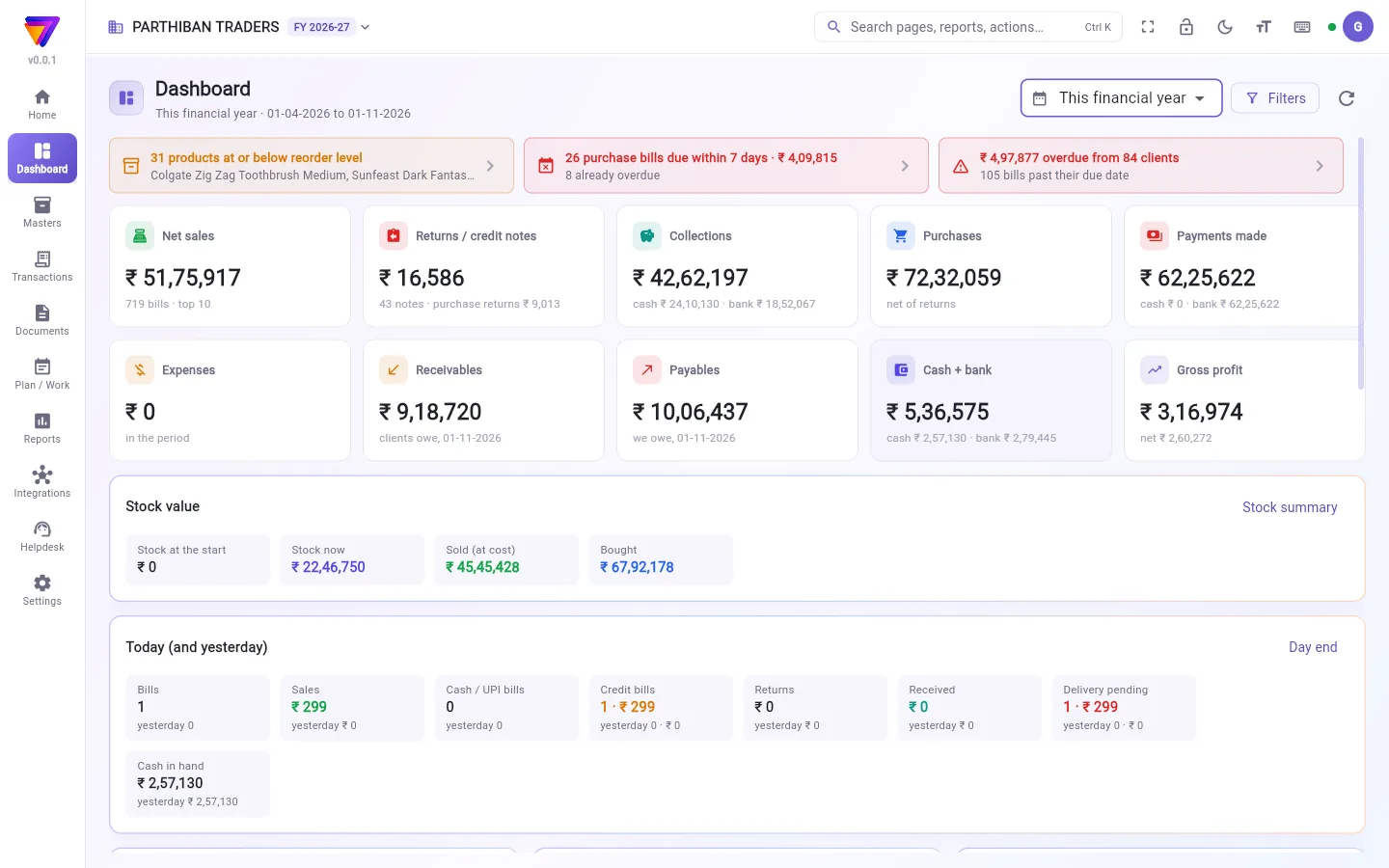
When you open Office it shows the purchase bills falling due and the products running below their reorder level, so the calls you have to make are in front of you before the first bill.Office-ஐத் திறந்ததும் கட்ட வேண்டிய பர்சேஸ் பில்களும், மறு-ஆர்டர் அளவுக்குக் கீழே போன பொருட்களும் தெரியும்; முதல் பில்லுக்கு முன்பே செய்ய வேண்டிய அழைப்புகள் உங்கள் முன்.
- Purchase bills due this week, and what is already overdueஇந்த வாரம் கட்ட வேண்டிய பர்சேஸ் பில்கள், ஏற்கெனவே தாமதமானவை
- Low-stock list against each product's reorder levelஒவ்வொரு பொருளின் மறு-ஆர்டர் அளவுக்கு எதிரான குறைந்த ஸ்டாக் பட்டியல்
- Reorder suggestions from your own salesஉங்கள் சொந்த விற்பனையிலிருந்து மறு-ஆர்டர் பரிந்துரைகள்
Dues and collections, shop by shopகடை வாரியாக நிலுவையும் வசூலும்
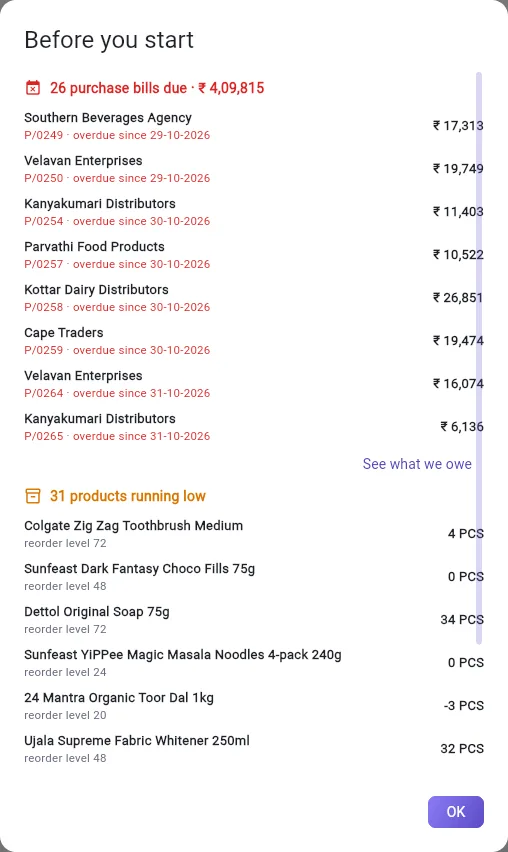
Receivables show every shop's pending amount split by age: 0–30, 31–60, 61–90 and over 90 days. Filter by route, open a party statement, and see which bills are still open.ஒவ்வொரு கடையின் நிலுவையும் காலவாரியாக: 0–30, 31–60, 61–90, 90 நாளுக்கு மேல். ரூட் வாரியாக வடிகட்டி, கட்சி அறிக்கையைத் திறந்து, எந்த பில்கள் இன்னும் திறந்துள்ளன என்று பாருங்கள்.
- Credit limits checked at the time of billingபில் போடும்போதே கடன் வரம்பு சரிபார்ப்பு
- Collections from Score settle against bills in OfficeScore-ல் வரும் வசூல் Office-ல் பில்களுடன் சரிசெய்யப்படும்
- Supplier payables tracked the same wayசப்ளையர் நிலுவையும் அதே முறையில்
Stock you can trust before you billபில் போடும் முன் நம்பக்கூடிய ஸ்டாக்
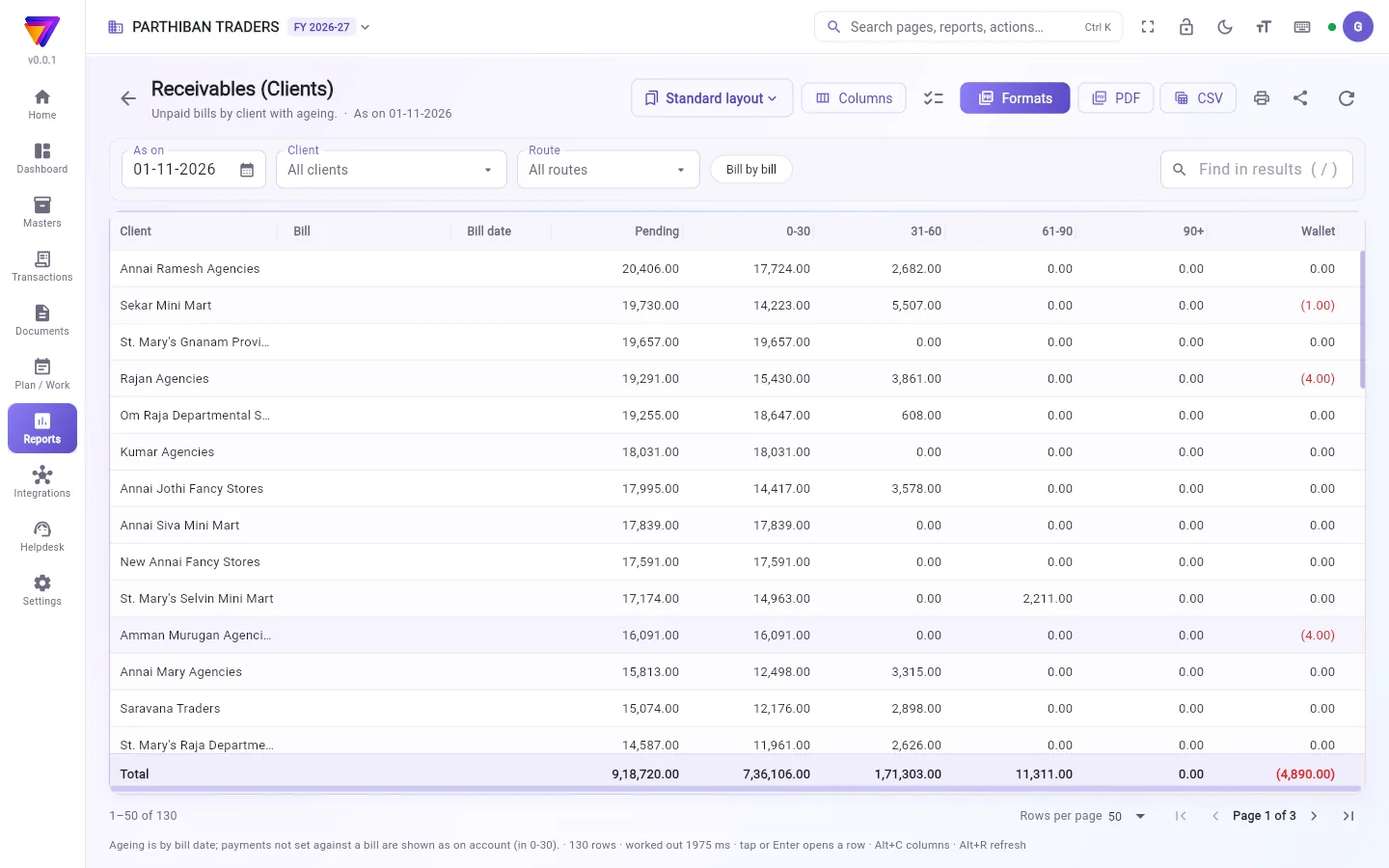
Purchases add stock and every bill takes it away, so the stock summary is always current. Track batches and expiry, keep stock across warehouses, move it between them and load vans for the route.பர்சேஸ் ஸ்டாக்கைச் சேர்க்கும், ஒவ்வொரு பில்லும் குறைக்கும்; ஸ்டாக் சுருக்கம் எப்போதும் சரியாக இருக்கும். பேட்ச், காலாவதி கண்காணிப்பு, பல கிடங்குகள், அவற்றுக்கிடையே மாற்றம், ரூட்டுக்கு வேன் லோடிங்.
- Stock summary by product, warehouse and brandபொருள், கிடங்கு, பிராண்ட் வாரியான ஸ்டாக் சுருக்கம்
- Batch expiry and damage reportsபேட்ச் காலாவதி, சேத அறிக்கைகள்
- Stock transfer, stock adjustment and van loadingஸ்டாக் மாற்றம், ஸ்டாக் சரிசெய்தல், வேன் லோடிங்
Schemes, salesmen and routes in the same systemதிட்டங்கள், சேல்ஸ்மேன்கள், ரூட்கள் — அதே சிஸ்டத்தில்
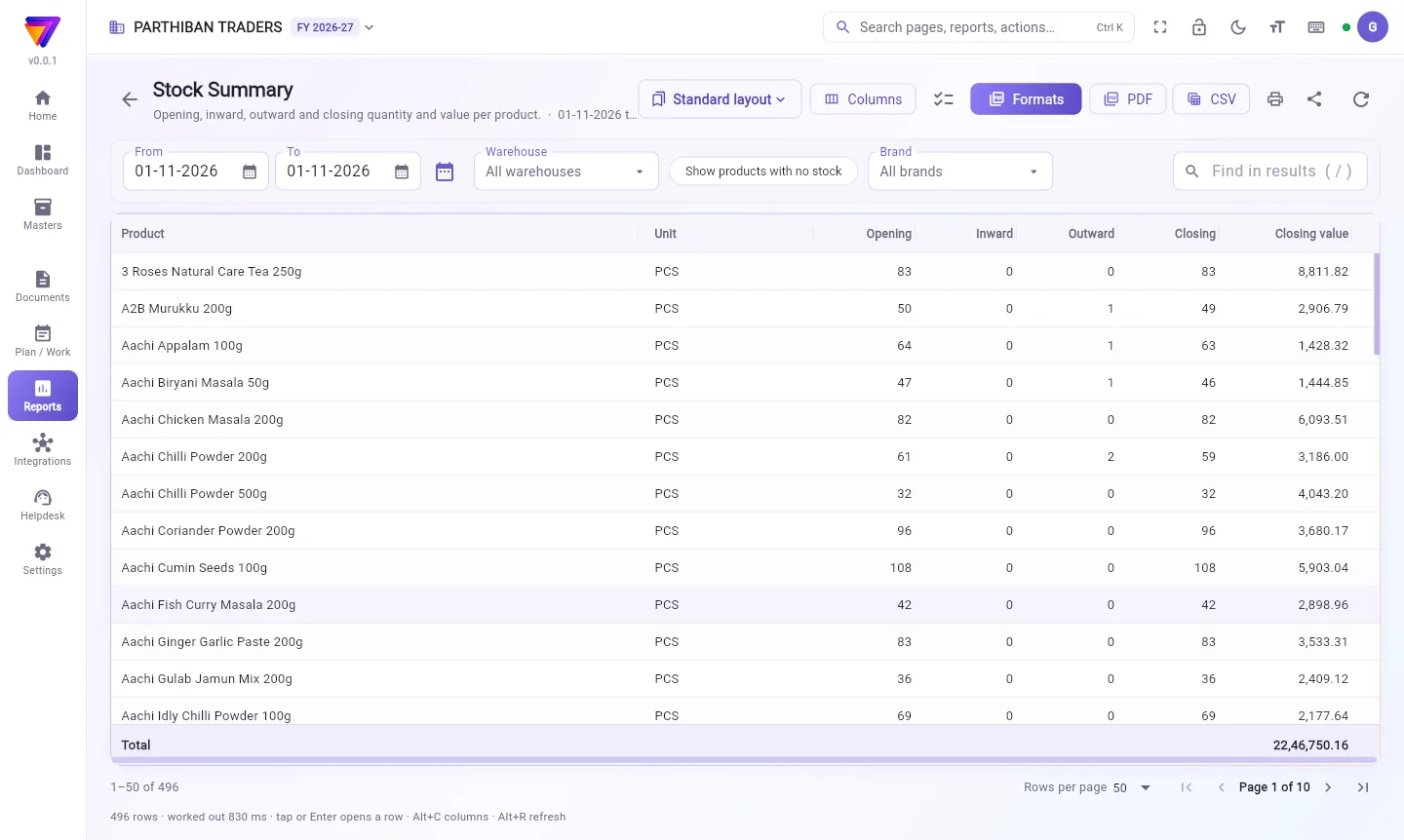
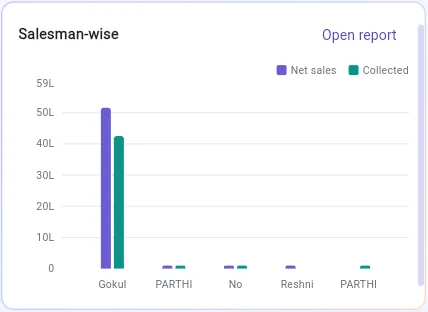
Set up schemes and settle them, pay incentives and salaries, and see sales by salesman and by route. The salesman's orders and collections come in from Score, so there is nothing to re-enter.திட்டங்களை அமைத்து செட்டில் செய்யுங்கள், ஊக்கத்தொகை, சம்பளம் கொடுங்கள், சேல்ஸ்மேன், ரூட் வாரியாக விற்பனையைப் பாருங்கள். சேல்ஸ்மேனின் ஆர்டர்களும் வசூலும் Score-லிருந்து வரும்; மீண்டும் பதிய வேண்டியதில்லை.
Get the appsஆப்களைப் பெறுங்கள்
Stockflow Office
Billing, stock, dues and reports. Android, or any browser on desktop and iPhone.பில்லிங், ஸ்டாக், நிலுவை, அறிக்கைகள். Android, அல்லது டெஸ்க்டாப், iPhone-ல் எந்த பிரவுசரிலும்.
Stockflow Score
The salesman app: orders, collections and attendance on the beat, with or without signal.சேல்ஸ்மேன் ஆப்: பீட்டில் ஆர்டர், வசூல், வருகைப் பதிவு — சிக்னல் இருந்தாலும் இல்லாவிட்டாலும்.
Before you switchமாறும் முன்
What is a distributor management system (DMS)?டிஸ்ட்ரிபியூட்டர் மேனேஜ்மென்ட் சிஸ்டம் (DMS) என்றால் என்ன?
A DMS is the software a distributor or stockist runs the business on: purchase, stock, billing, dues, collections, schemes and the sales team. Stockflow does all of these in Office, with the Score app for salesmen.DMS என்பது டிஸ்ட்ரிபியூட்டர் அல்லது ஸ்டாக்கிஸ்ட் தன் தொழிலை நடத்தும் சாஃப்ட்வேர்: பர்சேஸ், ஸ்டாக், பில்லிங், நிலுவை, வசூல், திட்டங்கள், விற்பனைக் குழு. Stockflow இவை அனைத்தையும் Office-லும், சேல்ஸ்மேன்களுக்கு Score ஆப்பிலும் செய்கிறது.
Is this the DMS my company asks me to use?என் கம்பெனி பயன்படுத்தச் சொல்லும் DMS இதுவா?
No. Stockflow is your own DMS, for your whole distributorship across every company you stock. You can keep using a company's portal for that company's claims.இல்லை. Stockflow உங்கள் சொந்த DMS — நீங்கள் வைத்திருக்கும் எல்லாக் கம்பெனிகளுக்கும் சேர்த்து உங்கள் முழுத் தொழிலுக்கும். ஒரு கம்பெனியின் க்ளெய்ம்களுக்கு அதன் போர்ட்டலைத் தொடர்ந்து பயன்படுத்தலாம்.
Can a brand see my data?ஒரு பிராண்ட் என் டேட்டாவைப் பார்க்க முடியுமா?
Only if you choose to share, and only that brand's own products. Brand visibility is part of Central, which is coming soon.நீங்கள் பகிர விரும்பினால் மட்டுமே, அதுவும் அந்தப் பிராண்டின் சொந்தப் பொருட்கள் மட்டுமே. பிராண்ட் பார்வை Central-ன் பகுதி; அது விரைவில் வரும்.
Does it handle more than one godown?ஒன்றுக்கு மேற்பட்ட கிடங்குகளைக் கையாளுமா?
Yes. Pro and Enterprise keep stock by warehouse, with stock transfers between them and batch and expiry tracking.ஆம். Pro, Enterprise-ல் கிடங்கு வாரியாக ஸ்டாக், அவற்றுக்கிடையே மாற்றம், பேட்ச், காலாவதி கண்காணிப்பு உண்டு.
How long does it take to start?தொடங்க எவ்வளவு நாள் ஆகும்?
It depends on your data. Our team loads your products, shops, opening stock and dues, checks them against your current books, and trains your staff before you go live.உங்கள் டேட்டாவைப் பொறுத்தது. எங்கள் குழு உங்கள் பொருட்கள், கடைகள், தொடக்க ஸ்டாக், நிலுவைகளை ஏற்றி, தற்போதைய கணக்குடன் ஒப்பிட்டு, நேரலைக்கு முன் உங்கள் ஊழியர்களுக்குப் பயிற்சி தரும்.
How do I get help?உதவி எப்படிப் பெறுவது?
Raise a ticket from Helpdesk inside the app. Type what happened, and add a photo, a screenshot or a voice note in Tamil or English. Every ticket shows its status, the expected days to fix and our written reply, and you are told when we answer. No phone queue, and nothing gets lost between calls.ஆப்பிலுள்ள Helpdesk-லிருந்து டிக்கெட் போடுங்கள். என்ன நடந்தது என்று தட்டச்சு செய்து, புகைப்படம், ஸ்கிரீன்ஷாட் அல்லது தமிழிலோ ஆங்கிலத்திலோ குரல் குறிப்பைச் சேருங்கள். ஒவ்வொரு டிக்கெட்டிலும் நிலை, சரிசெய்ய ஆகும் நாட்கள், எங்கள் எழுத்துப் பதில் தெரியும்; நாங்கள் பதில் அளித்ததும் உங்களுக்குத் தெரிவிக்கப்படும். போன் காத்திருப்பு இல்லை, அழைப்புகளுக்கு இடையே எதுவும் தொலையாது.
Several godowns or a large sales team?பல கிடங்குகள் அல்லது பெரிய விற்பனைக் குழுவா? Book a demo and we will set it up with you.டெமோ புக் செய்யுங்கள்; உங்களுடன் சேர்ந்து அமைப்போம்.