User manualபயனர் கையேடு · Office: Plan / WorkOffice: திட்டம் / வேலை (Plan / Work)
Delivery Planடெலிவரி திட்டம் (Delivery Plan)
Put the day's bills on a vehicle with a driver and a cashier, follow the trip, then take the cash in and close it.அன்றைய பில்களை ஒரு வண்டியில், ஓட்டுநர், காசாளருடன் அனுப்புங்க; பயணத்தைப் பின்தொடருங்க; பிறகு பணத்தைப் பெற்று பயணத்தை மூடுங்க.
- Where to find itஎங்கே இருக்கிறது
- Office → Plan / Work → Delivery Plan
- Who uses itயார் பயன்படுத்துவார்கள்
- Owner, Admin, Warehouse; drivers and cashiers open their own tripsஉரிமையாளர், நிர்வாகி, கிடங்கு; ஓட்டுநர்களும் காசாளர்களும் தங்கள் சொந்தப் பயணங்களைத் திறக்கலாம்
A delivery plan is one trip: a set of sales bills, a vehicle, a driver who delivers and a cashier who collects. The office makes the plan here. The crew marks each bill on the road, collects money and takes goods back. The office then counts the cash in and closes the trip.
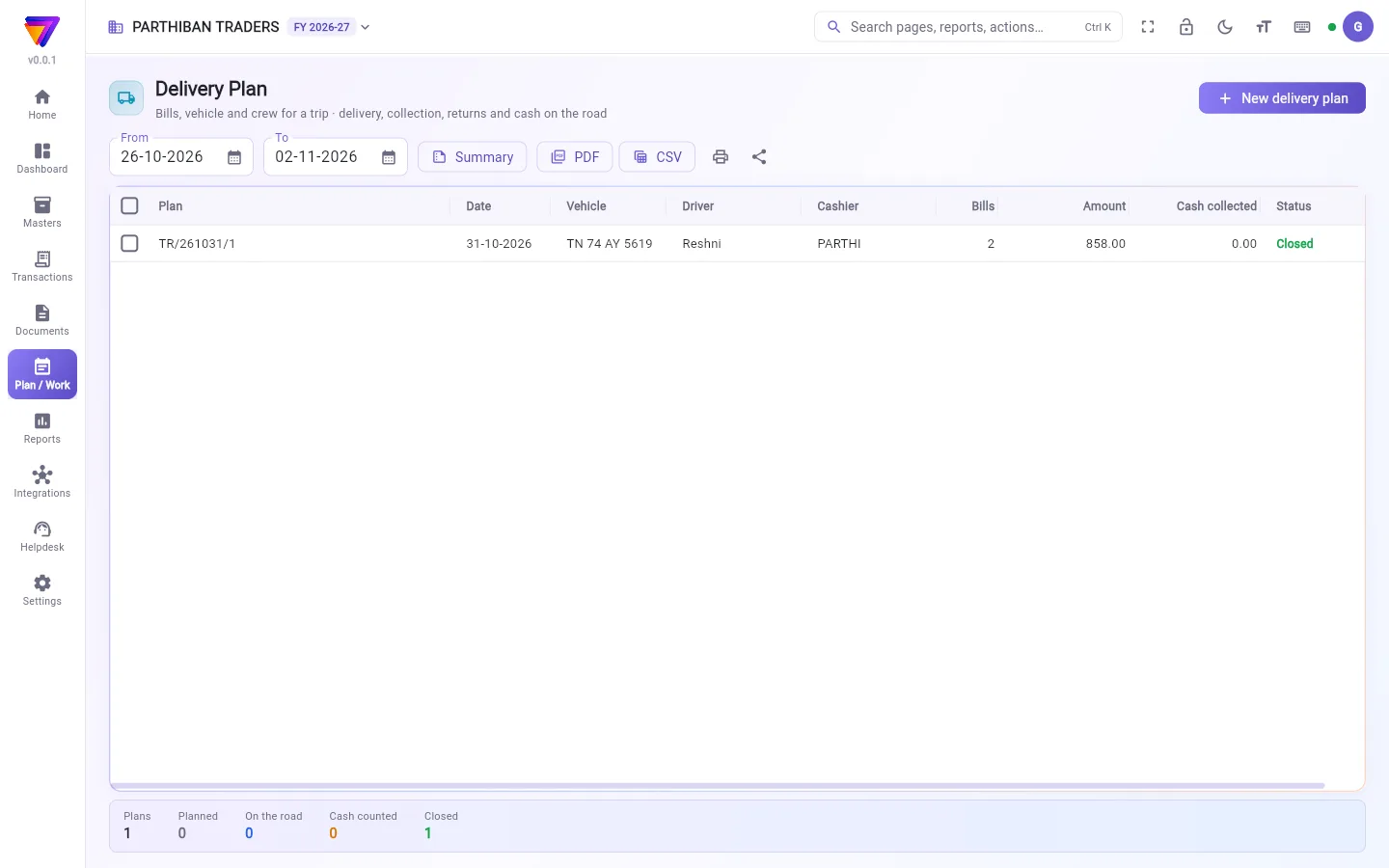
What you see
- From and To: the dates of the plans shown. It opens on the last seven days.
- Summary, PDF, CSV, print and share: for the plans shown. Tick plans first to sum up only those.
- The table: Plan, Date, Vehicle, Driver, Cashier, Bills, Amount, Cash collected and Status.
- The strip at the bottom counts the plans by status: Planned, On the road, Cash counted and Closed.
- If you are the driver, cashier or a helper on an open trip, My trips shows those trips at the top.
Plan numbers are made by date, for example TR/261031/1 for the first trip of 31-10-2026.
Make a delivery plan
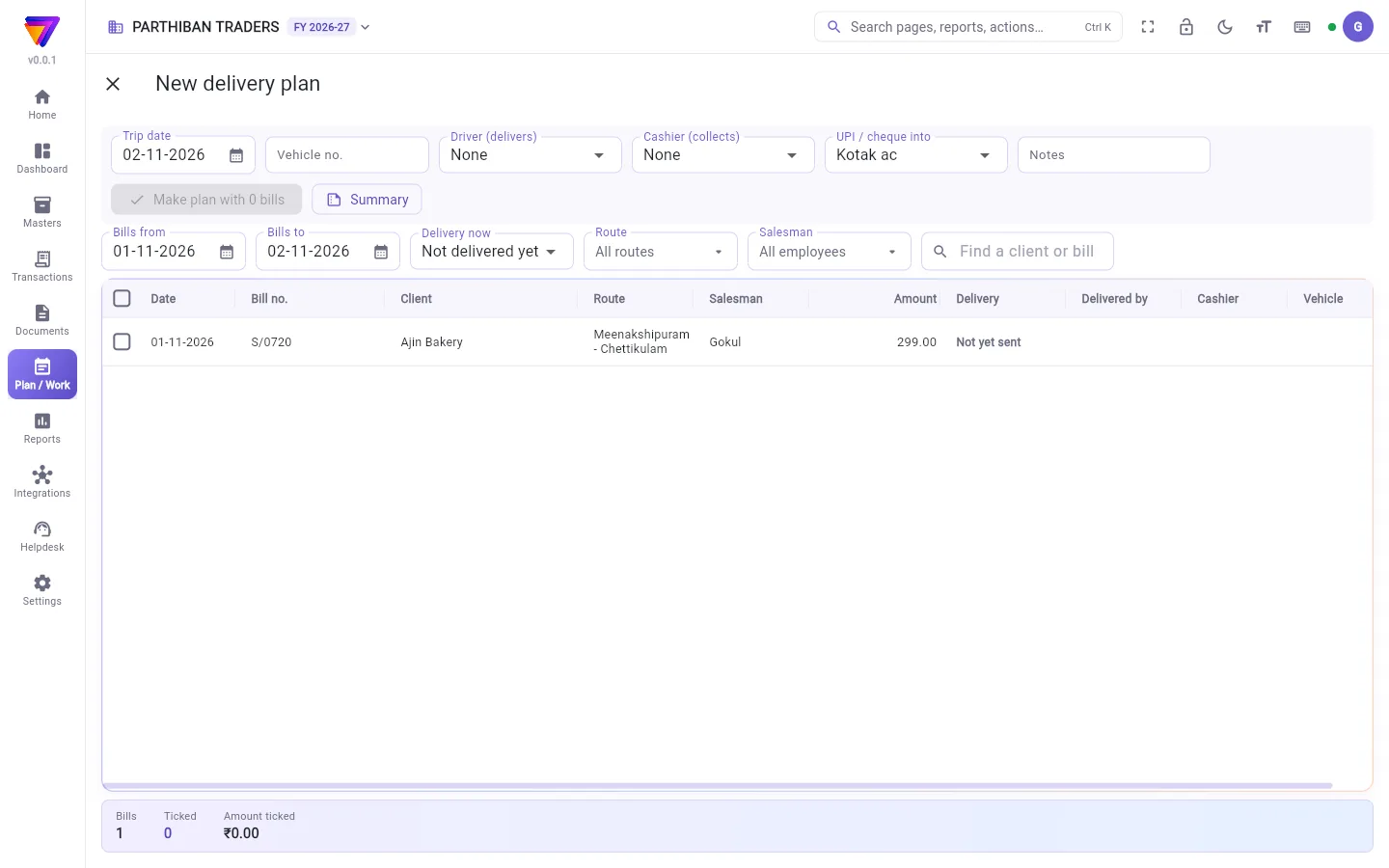
- Click New delivery plan.
- Set Trip date and Vehicle no.
- Choose Driver (delivers) and Cashier (collects). You must choose at least one of them.
- Choose UPI / cheque into: the bank account for UPI and cheque money. Without it, the crew can take only cash.
- Narrow the bills with Bills from, Bills to, Delivery now, Route, Salesman and the search box.
- Tick the bills to send.
- Click Make plan with N bills.
Bills already delivered or returned are not offered. Bills on another open plan are left out. Each bill on the plan shows in Score for the driver (to deliver) and for the cashier (to collect).
Follow and run a trip
Click a plan to open it. You see its status, the bills marked, the amount, and the cash, UPI and cheque collected. A bar shows N of M bills delivered. Switch between Bills table and Shops (mark / collect).
- Start trip moves the plan to On the road.
- On each shop, mark Delivered or Not delivered (you must give a reason), click Collect to take cash, UPI or cheque, or Goods back to take goods back. Goods back makes a sales return against the bill.
- Count cash: the cashier enters the notes and coins. The screen shows if the count is short or more than collected.
- Take cash & close (office only): enter Cash received now, choose the cash account in Into, and decide each bill not delivered: Next trip or Cancel bill. Click Close trip.
If the cash is short, you can switch on Charge the ₹N short to the cashier. Otherwise the short amount stays in the cash bag.
Updates from a phone without network wait and save when the phone is online. The plan shows how many are waiting.
Change or delete a plan
While a plan is Planned, Add bills / change crew adds bills or changes the driver, cashier or vehicle. A changed crew goes on every bill of the plan. The Take off this plan icon removes one bill. A plan must keep at least one bill.
More → Delete plan deletes a planned trip. The bills stay as they are and can go on another plan. More also has Print load chart, Print order report and Print collection report.
Who can do what
- Create gives New delivery plan. Edit gives the office actions: add bills, change the crew, take cash and close.
- Cancel gives Delete plan.
- The driver, cashier and helpers can start, mark, collect and count on their own trip, even without edit rights.
- Cancel bill at closing needs the right to cancel sales.
Good to know
- Delivery Plan comes with the Pro · Large Stockist and Enterprise plans.
- Closing moves the cash from the cash bag into the cash account you choose.
- If bills are not marked, closing asks first. Bills not marked stay "out for delivery".
Related
- Collection Plan: put open bills on a cashier without a delivery.
- Sales: the bills that go on a plan.
- Delivery in Score: what the crew sees on the phone.
- Reports: the Order, Load and Collection reports behind Summary.
ஒரு டெலிவரி திட்டம் என்பது ஒரு பயணம்: சில விற்பனை பில்கள், ஒரு வண்டி, டெலிவரி செய்யும் ஓட்டுநர், வசூலிக்கும் காசாளர். அலுவலகம் இங்கே திட்டத்தைப் போடும். குழு வழியில் ஒவ்வொரு பில்லையும் குறிக்கும், பணம் வசூலிக்கும், திரும்பும் சரக்கை எடுத்துக்கொள்ளும். பிறகு அலுவலகம் பணத்தை எண்ணிப் பெற்று பயணத்தை மூடும்.
திரையில் என்ன தெரியும்
- முதல் (From), வரை (To): காட்டப்படும் திட்டங்களின் தேதிகள். கடந்த ஏழு நாட்களுடன் திறக்கும்.
- சுருக்கம் (Summary), PDF, CSV, அச்சிடுதல், பகிர்தல்: காட்டப்படும் திட்டங்களுக்கு. சிலவற்றை மட்டும் கூட்ட, முதலில் அந்தத் திட்டங்களை டிக் செய்யுங்க.
- அட்டவணை: திட்டம் (Plan), தேதி (Date), வாகனம் (Vehicle), ஓட்டுநர் (Driver), காசாளர் (Cashier), பில்கள் (Bills), தொகை (Amount), வசூலான ரொக்கம் (Cash collected), நிலை (Status).
- கீழே உள்ள பட்டை திட்டங்களை நிலை வாரியாக எண்ணும்: திட்டமிட்டது (Planned), வழியில் (On the road), பணம் எண்ணப்பட்டது (Cash counted), மூடப்பட்டது (Closed).
- திறந்திருக்கும் ஒரு பயணத்தில் நீங்கள் ஓட்டுநர், காசாளர் அல்லது உதவியாளர் என்றால், என் பயணங்கள் (My trips) அந்தப் பயணங்களை மேலே காட்டும்.
திட்ட எண்கள் தேதிப்படி உருவாகும், உதாரணமாக 31-10-2026 அன்றைய முதல் பயணத்துக்கு TR/261031/1.
டெலிவரி திட்டம் போடுவது
- புதிய டெலிவரி திட்டம் (New delivery plan) கிளிக் செய்யுங்க.
- பயண தேதி (Trip date), வாகன எண் (Vehicle no.) அமையுங்க.
- ஓட்டுநர் (டெலிவரி செய்பவர்) (Driver (delivers)), காசாளர் (வசூலிப்பவர்) (Cashier (collects)) தேர்ந்தெடுங்க. இவர்களில் குறைந்தது ஒருவரையாவது தேர்ந்தெடுக்க வேண்டும்.
- UPI / காசோலை செல்லும் கணக்கு (UPI / cheque into) தேர்ந்தெடுங்க: UPI, காசோலைப் பணம் போகும் வங்கிக் கணக்கு. இது இல்லாமல், குழு ரொக்கம் மட்டுமே வாங்க முடியும்.
- பில்கள் முதல் (Bills from), பில்கள் வரை (Bills to), தற்போதைய டெலிவரி (Delivery now), வழித்தடம் (Route), விற்பனைப் பிரதிநிதி (Salesman), தேடல் பெட்டி கொண்டு பில்களைக் குறையுங்க.
- அனுப்ப வேண்டிய பில்களை டிக் செய்யுங்க.
- N பில்களுடன் திட்டம் உருவாக்கு (Make plan with N bills) கிளிக் செய்யுங்க.
ஏற்கனவே டெலிவரி ஆன அல்லது திரும்பிய பில்கள் பட்டியலில் வராது. திறந்திருக்கும் வேறொரு திட்டத்தில் உள்ள பில்கள் விடப்படும். திட்டத்தில் உள்ள ஒவ்வொரு பில்லும் Score-இல் ஓட்டுநருக்கு (டெலிவரி செய்ய) மற்றும் காசாளருக்கு (வசூலிக்க) தெரியும்.
பயணத்தைப் பின்தொடர்வதும் நடத்துவதும்
ஒரு திட்டத்தைத் திறக்க அதைக் கிளிக் செய்யுங்க. அதன் நிலை, குறித்த பில்கள், தொகை, வசூலான ரொக்கம், UPI, காசோலை எல்லாம் தெரியும். ஒரு பட்டை M பில்களில் N டெலிவரி ஆனது (N of M bills delivered) என்று காட்டும். பில்கள் அட்டவணை (Bills table), கடைகள் (குறி / வசூல்) (Shops (mark / collect)) இடையே மாறலாம்.
- பயணம் தொடங்கு (Start trip) திட்டத்தை வழியில் (On the road) நிலைக்குக் கொண்டுபோகும்.
- ஒவ்வொரு கடையிலும் டெலிவரி ஆனது (Delivered) அல்லது டெலிவரி ஆகவில்லை (Not delivered) என்று குறிங்க (காரணம் கட்டாயம் சொல்ல வேண்டும்); ரொக்கம், UPI அல்லது காசோலை வாங்க வசூலி (Collect) கிளிக் செய்யுங்க; சரக்கைத் திரும்ப எடுக்க திரும்பிய சரக்கு (Goods back) கிளிக் செய்யுங்க. திரும்பிய சரக்கு அந்த பில்லுக்கு எதிராக ஒரு விற்பனைத் திருப்பத்தைப் போடும்.
- பணம் எண்ணு (Count cash): காசாளர் நோட்டுகளையும் நாணயங்களையும் பதிவு செய்வார். எண்ணிக்கை வசூலானதை விடக் குறைவா அதிகமா என்று திரை காட்டும்.
- பணம் பெற்று மூடு (Take cash & close) (அலுவலகம் மட்டும்): இப்போது பெற்ற ரொக்கம் (Cash received now) போடுங்க, வரவுக் கணக்கு (Into)-இல் ரொக்கக் கணக்கைத் தேர்ந்தெடுங்க, டெலிவரி ஆகாத ஒவ்வொரு பில்லுக்கும் முடிவு செய்யுங்க: அடுத்த பயணம் (Next trip) அல்லது பில்லை ரத்து செய் (Cancel bill). பயணத்தை மூடு (Close trip) கிளிக் செய்யுங்க.
பணம் குறைவாக இருந்தால், குறைவான ₹N-ஐ காசாளர் கணக்கில் சேர் (Charge the ₹N short to the cashier) ஆன் செய்யலாம். இல்லையென்றால் குறைவான தொகை பணப் பையிலேயே (cash bag) இருக்கும்.
நெட்வொர்க் இல்லாத போனில் இருந்து வரும் அப்டேட்கள் காத்திருந்து, போன் ஆன்லைனில் வந்ததும் சேமிக்கப்படும். எத்தனை காத்திருக்கின்றன என்று திட்டம் காட்டும்.
திட்டத்தை மாற்றுவது அல்லது நீக்குவது
திட்டம் திட்டமிட்டது (Planned) நிலையில் இருக்கும் வரை, பில்கள் சேர் / குழுவை மாற்று (Add bills / change crew) பில்களைச் சேர்க்கும் அல்லது ஓட்டுநர், காசாளர், வண்டியை மாற்றும். மாற்றிய குழு திட்டத்தின் எல்லா பில்களிலும் பதியும். இந்தத் திட்டத்திலிருந்து நீக்கு (Take off this plan) ஐகான் ஒரு பில்லை நீக்கும். திட்டத்தில் குறைந்தது ஒரு பில்லாவது இருக்க வேண்டும்.
மேலும் → திட்டத்தை நீக்கு (More → Delete plan) திட்டமிட்ட பயணத்தை நீக்கும். பில்கள் அப்படியே இருக்கும், அவற்றை வேறொரு திட்டத்தில் போடலாம். மேலும் (More)-இல் ஏற்றப் பட்டியல் அச்சிடு (Print load chart), ஆர்டர் அறிக்கையை அச்சிடு (Print order report), வசூல் அறிக்கை அச்சிடு (Print collection report) ஆகியவையும் உண்டு.
யார் என்ன செய்யலாம்
- உருவாக்கு (Create) அனுமதி புதிய டெலிவரி திட்டம் (New delivery plan) தரும். திருத்து (Edit) அனுமதி அலுவலகச் செயல்களைத் தரும்: பில்கள் சேர்ப்பது, குழுவை மாற்றுவது, பணம் பெற்று மூடுவது.
- ரத்து (Cancel) அனுமதி திட்டத்தை நீக்கு (Delete plan) தரும்.
- ஓட்டுநர், காசாளர், உதவியாளர்கள் தங்கள் சொந்தப் பயணத்தில், திருத்தும் அனுமதி இல்லாவிட்டாலும், தொடங்கலாம், குறிக்கலாம், வசூலிக்கலாம், எண்ணலாம்.
- மூடும்போது பில்லை ரத்து செய் (Cancel bill)-க்கு விற்பனையை ரத்து செய்யும் அனுமதி தேவை.
தெரிந்துகொள்ள வேண்டியது
- டெலிவரி திட்டம் Pro · பெரிய ஸ்டாக்கிஸ்ட், என்டர்பிரைஸ் பிளான்களில் வரும்.
- மூடும்போது பணம் பணப் பையிலிருந்து நீங்கள் தேர்ந்தெடுக்கும் ரொக்கக் கணக்குக்குப் போகும்.
- பில்கள் குறிக்கப்படவில்லை என்றால், மூடும் முன் கேட்கும். குறிக்காத பில்கள் "டெலிவரிக்குச் சென்றுள்ளது" (out for delivery) என்றே இருக்கும்.
தொடர்புடையவை
- வசூல் திட்டம் (Collection Plan): டெலிவரி இல்லாமல் நிலுவை பில்களை ஒரு காசாளரிடம் கொடுப்பது.
- விற்பனை (Sales): திட்டத்தில் போகும் பில்கள்.
- Score-இல் டெலிவரி (Delivery in Score): குழு போனில் என்ன பார்க்கும்.
- அறிக்கைகள் (Reports): சுருக்கம் (Summary) பின்னால் உள்ள ஆர்டர், லோடு, வசூல் அறிக்கைகள்.