User manualபயனர் கையேடு · Office: Plan / WorkOffice: திட்டம் / வேலை (Plan / Work)
Order Planஆர்டர் திட்டம் (Order Plan)
Plan which clients a salesman should visit for orders, on which day, and check later who was visited and billed.ஒரு விற்பனைப் பிரதிநிதி ஆர்டருக்காக எந்த வாடிக்கையாளர்களை எந்த நாளில் சந்திக்க வேண்டும் என்று திட்டமிடுங்க; பிறகு யாரைச் சந்தித்தார், யாருக்கு பில் போட்டார் என்று சரிபாருங்க.
- Where to find itஎங்கே இருக்கிறது
- Office → Plan / Work → Order Plan
- Who uses itயார் பயன்படுத்துவார்கள்
- Owner, Adminஉரிமையாளர், நிர்வாகி
An order plan tells a salesman which clients to visit for orders, and when. The clients on the plan show in the salesman's beat in Score. Plan summary shows later which clients were visited and which placed an order.
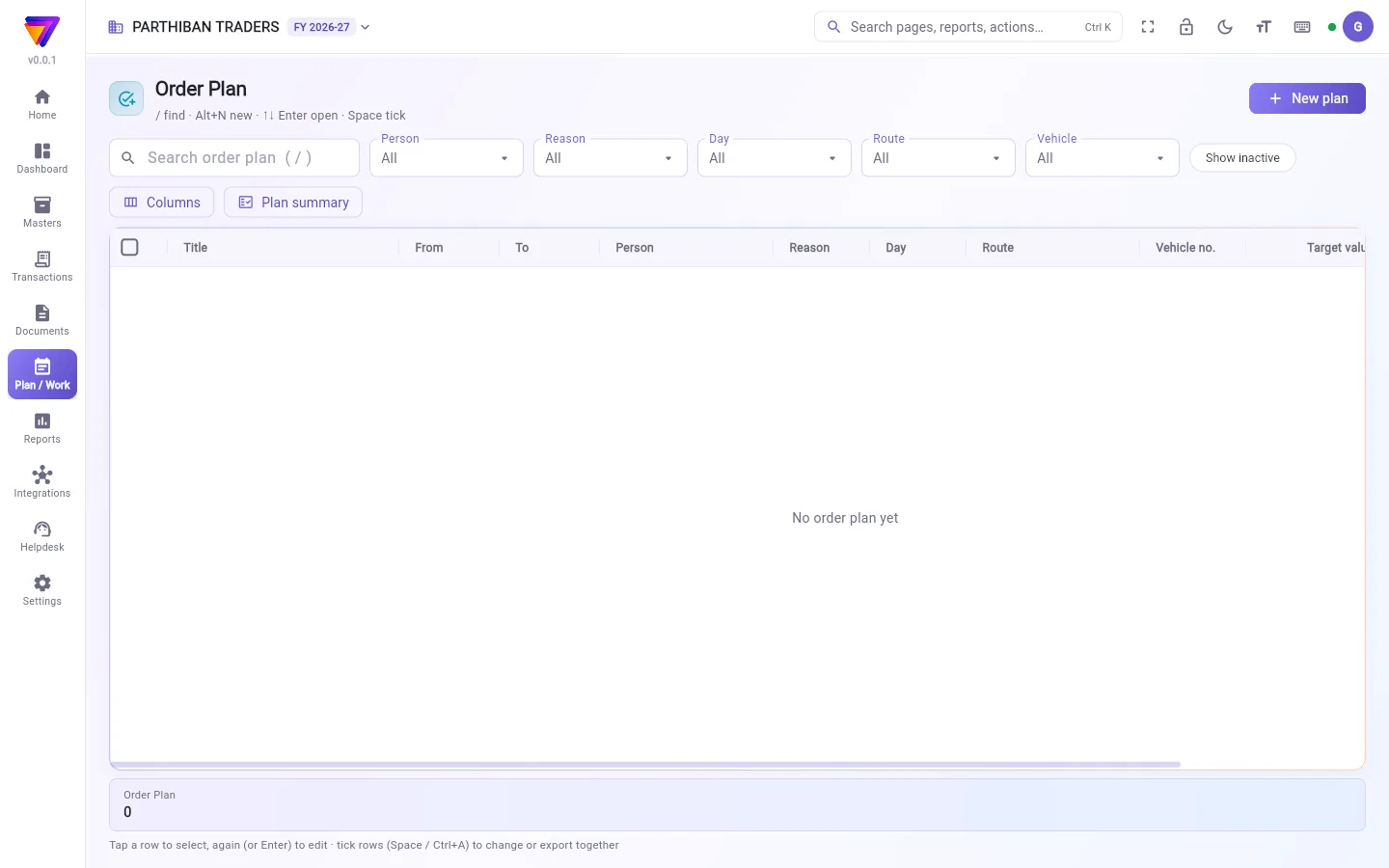
What you see
- A search box and the filters Person, Reason, Day, Route and Vehicle.
- Show inactive: also lists plans made inactive.
- Columns and Plan summary.
- The table: Title, From, To, Person, Reason, Day, Route, Vehicle no., Target value and more.
Make an order plan
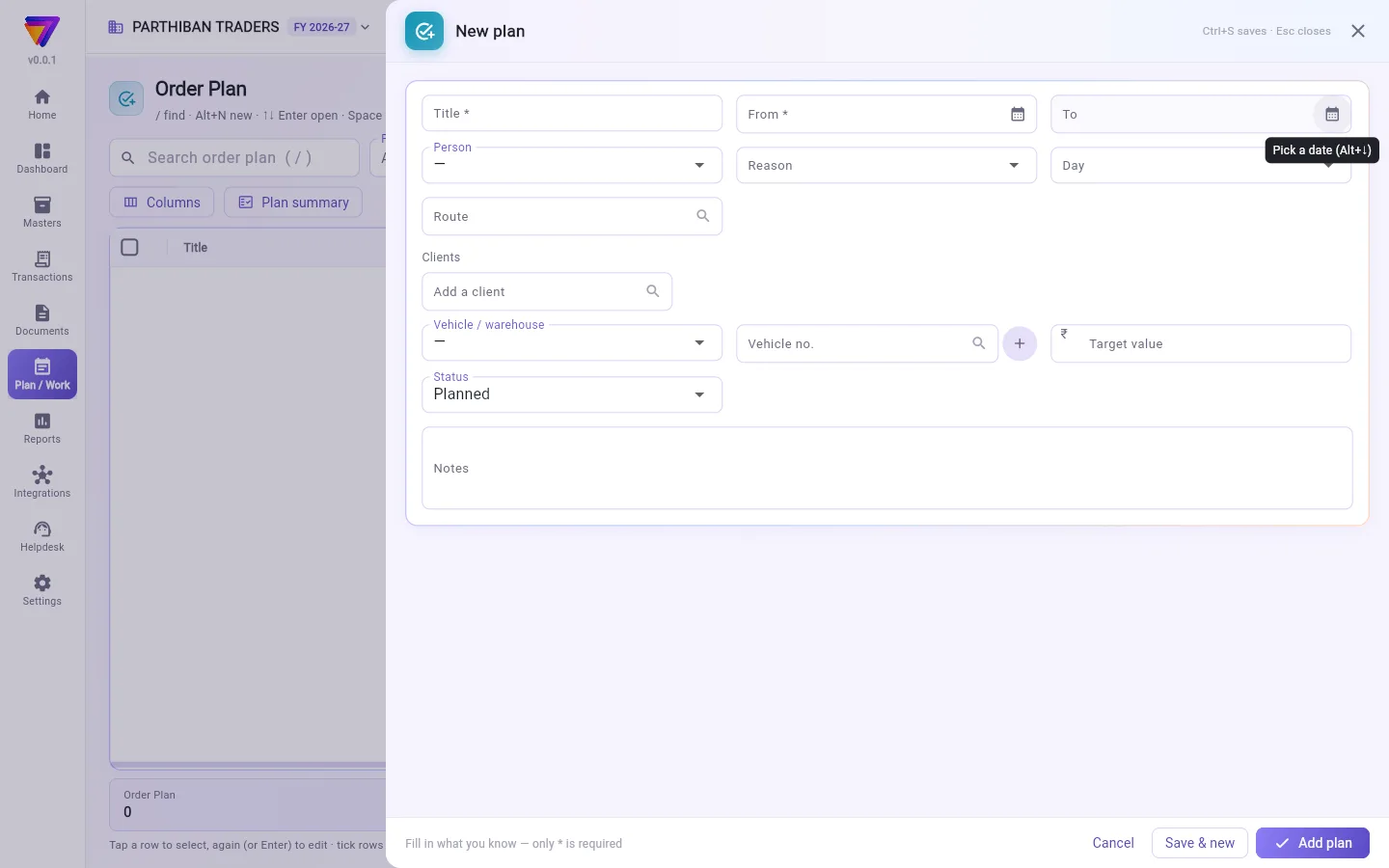
- Click New plan.
- Enter a Title and the From date. Add a To date if the plan ends.
- Choose the Person (the salesman).
- Choose a Day if the plan is for one weekday only, for example every Monday. Any day means every day from From to To.
- Choose a Route, or pick the Clients one by one.
- Enter a Target value if you want to track one.
- Click Add plan.
Fields
| Field | What to enter |
|---|---|
| Title | A name for the plan. Required. |
| From | The first day of the plan. Required. |
| To | The last day. Empty means the plan is for the From day only. |
| Person | The employee who works the plan. |
| Reason | Sale, Collection or Visit. |
| Day | Any day, or one weekday. |
| Route | The route whose clients are on the plan. |
| Clients | Clients picked by hand. These are used instead of the route's clients. |
| Vehicle / warehouse | The vehicle or warehouse the person works from. |
| Vehicle no. | The vehicle number. |
| Target value | The value you expect from the plan. |
| Status | Planned, In progress, Done or Dropped. |
| Notes | Anything else. |
Check a plan with Plan summary
- Click Plan summary.
- Set From, To and Person.
- Progress shows each plan's clients, how many were Visited and Billed, how many are Not covered, and Achieved against Target value, with the Pace.
- Visits shows each client on each planned day: visited or not, why, and the order and invoice if one was placed.
Good to know
- Order Plan comes with the Pro · Large Stockist and Enterprise plans.
- Score shows a plan only to the employee in Person. A plan with no person does not reach any phone.
- To stop a plan in Score, set Status to Done or Dropped. Making a plan inactive alone does not take it off the beat.
- Plans cannot be deleted. Tick them and use Make inactive.
Related
- Sales Plan and Marketing Plan: the same kind of plan for other work.
- Routes: the clients of each route.
- Plans in Score: what the salesman sees.
- Visits: the visits the summary counts.
ஆர்டர் திட்டம் ஒரு விற்பனைப் பிரதிநிதிக்கு ஆர்டருக்காக எந்த வாடிக்கையாளர்களை, எப்போது சந்திக்க வேண்டும் என்று சொல்லும். திட்டத்தில் உள்ள வாடிக்கையாளர்கள் Score-இல் அந்தப் பிரதிநிதியின் பீட்டில் (beat) தெரிவார்கள். யாரைச் சந்தித்தார், யார் ஆர்டர் கொடுத்தார் என்று பிறகு திட்டச் சுருக்கம் (Plan summary) காட்டும்.
திரையில் என்ன தெரியும்
- ஒரு தேடல் பெட்டியும், நபர் (Person), காரணம் (Reason), நாள் (Day), வழித்தடம் (Route), வாகனம் (Vehicle) வடிகட்டிகளும்.
- செயலற்றவற்றையும் காட்டு (Show inactive): செயலற்றதாக்கிய திட்டங்களையும் காட்டும்.
- நெடுவரிசைகள் (Columns), திட்டச் சுருக்கம் (Plan summary).
- அட்டவணை: தலைப்பு (Title), முதல் (From), வரை (To), நபர் (Person), காரணம் (Reason), நாள் (Day), வழித்தடம் (Route), வாகன எண் (Vehicle no.), இலக்கு மதிப்பு (Target value) மற்றும் பல.
ஆர்டர் திட்டம் போடுவது
- புதிய திட்டம் (New plan) கிளிக் செய்யுங்க.
- ஒரு தலைப்பு (Title), முதல் (From) தேதி போடுங்க. திட்டம் முடியும் என்றால் வரை (To) தேதியும் போடுங்க.
- நபர் (Person) (விற்பனைப் பிரதிநிதி) தேர்ந்தெடுங்க.
- திட்டம் வாரத்தில் ஒரு நாளுக்கு மட்டும் என்றால், உதாரணமாக ஒவ்வொரு திங்கள்கிழமையும், ஒரு நாள் (Day) தேர்ந்தெடுங்க. எந்த நாளும் (Any day) என்றால் முதல் (From) முதல் வரை (To) வரை ஒவ்வொரு நாளும்.
- ஒரு வழித்தடம் (Route) தேர்ந்தெடுங்க, அல்லது வாடிக்கையாளர்கள் (Clients)-ஐ ஒவ்வொருவராகத் தேர்ந்தெடுங்க.
- இலக்கைக் கண்காணிக்க வேண்டுமென்றால் இலக்கு மதிப்பு (Target value) போடுங்க.
- திட்டம் சேர் (Add plan) கிளிக் செய்யுங்க.
புலங்கள் (Fields)
| புலம் | என்ன போட வேண்டும் |
|---|---|
| தலைப்பு (Title) | திட்டத்துக்கு ஒரு பெயர். கட்டாயம். |
| முதல் (From) | திட்டத்தின் முதல் நாள். கட்டாயம். |
| வரை (To) | கடைசி நாள். காலியாக இருந்தால் திட்டம் முதல் (From) நாளுக்கு மட்டுமே. |
| நபர் (Person) | திட்டத்தை நடத்தும் பணியாளர். |
| காரணம் (Reason) | விற்பனை (Sale), வசூல் (Collection) அல்லது சந்திப்பு (Visit). |
| நாள் (Day) | எந்த நாளும் (Any day), அல்லது வாரத்தில் ஒரு நாள். |
| வழித்தடம் (Route) | திட்டத்தில் வர வேண்டிய வாடிக்கையாளர்களின் வழித்தடம். |
| வாடிக்கையாளர்கள் (Clients) | கையால் தேர்ந்தெடுத்த வாடிக்கையாளர்கள். வழித்தடத்தின் வாடிக்கையாளர்களுக்குப் பதிலாக இவர்கள் எடுத்துக்கொள்ளப்படுவார்கள். |
| வாகனம் / கிடங்கு (Vehicle / warehouse) | அந்த நபர் வேலை செய்யும் வண்டி அல்லது கிடங்கு. |
| வாகன எண் (Vehicle no.) | வண்டியின் எண். |
| இலக்கு மதிப்பு (Target value) | திட்டத்திலிருந்து எதிர்பார்க்கும் மதிப்பு. |
| நிலை (Status) | திட்டமிட்டது (Planned), நடைபெறுகிறது (In progress), முடிந்தது (Done) அல்லது கைவிடப்பட்டது (Dropped). |
| குறிப்புகள் (Notes) | மற்ற எதுவும். |
திட்டச் சுருக்கம் கொண்டு திட்டத்தைச் சரிபார்ப்பது
- திட்டச் சுருக்கம் (Plan summary) கிளிக் செய்யுங்க.
- முதல் (From), வரை (To), நபர் (Person) அமையுங்க.
- முன்னேற்றம் (Progress) ஒவ்வொரு திட்டத்தின் வாடிக்கையாளர்கள், எத்தனை பேர் சந்தித்தது (Visited), பில் போட்டது (Billed), எத்தனை பேர் சந்திக்காதவர்கள் (Not covered), இலக்கு மதிப்பு (Target value)-க்கு எதிராக அடைந்தது (Achieved), வேகம் (Pace) ஆகியவற்றைக் காட்டும்.
- சந்திப்புகள் (Visits) திட்டமிட்ட ஒவ்வொரு நாளிலும் ஒவ்வொரு வாடிக்கையாளரையும் காட்டும்: சந்தித்தாரா இல்லையா, ஏன், ஆர்டரோ இன்வாய்ஸோ போட்டிருந்தால் அதுவும்.
தெரிந்துகொள்ள வேண்டியது
- ஆர்டர் திட்டம் Pro · பெரிய ஸ்டாக்கிஸ்ட், என்டர்பிரைஸ் பிளான்களில் வரும்.
- Score ஒரு திட்டத்தை நபர் (Person)-இல் உள்ள பணியாளருக்கு மட்டுமே காட்டும். நபர் இல்லாத திட்டம் எந்த போனுக்கும் போகாது.
- Score-இல் ஒரு திட்டத்தை நிறுத்த, நிலை (Status)-ஐ முடிந்தது (Done) அல்லது கைவிடப்பட்டது (Dropped) என்று அமையுங்க. திட்டத்தைச் செயலற்றதாக்குவது மட்டும் அதைப் பீட்டிலிருந்து எடுக்காது.
- திட்டங்களை நீக்க முடியாது. அவற்றை டிக் செய்து செயலற்றதாக்கு (Make inactive) பயன்படுத்துங்க.
தொடர்புடையவை
- விற்பனைத் திட்டம் (Sales Plan), மார்க்கெட்டிங் திட்டம் (Marketing Plan): மற்ற வேலைகளுக்கான அதே வகைத் திட்டம்.
- வழித்தடங்கள் (Routes): ஒவ்வொரு வழித்தடத்தின் வாடிக்கையாளர்கள்.
- Score-இல் திட்டங்கள் (Plans in Score): விற்பனைப் பிரதிநிதி என்ன பார்ப்பார்.
- சந்திப்புகள் (Visits): சுருக்கம் எண்ணும் சந்திப்புகள்.