User manualபயனர் கையேடு · Office: TransactionsOffice: பரிவர்த்தனைகள் (Transactions)
Journal Entryகுறிப்பேடு பதிவு (Journal Entry)
Post any debit and credit between accounts, set amounts against party bills, or raise a debit or credit note.எந்தக் கணக்குகளுக்கு இடையேயும் பற்று, வரவு பதிவு செய்ய; தொகையை ஒரு தரப்பின் பில்களுக்கு எதிராக வைக்க; அல்லது பற்று / வரவுக் குறிப்பு போட.
- Where to find itஎங்கே இருக்கிறது
- Office → Transactions → Journal Entry
- Who uses itயார் பயன்படுத்துவார்கள்
- Accountantகணக்காளர்
A journal entry moves an amount from one account to another. Use it for corrections, provisions, and adjustments that no other voucher covers. It does not touch stock.
What you see
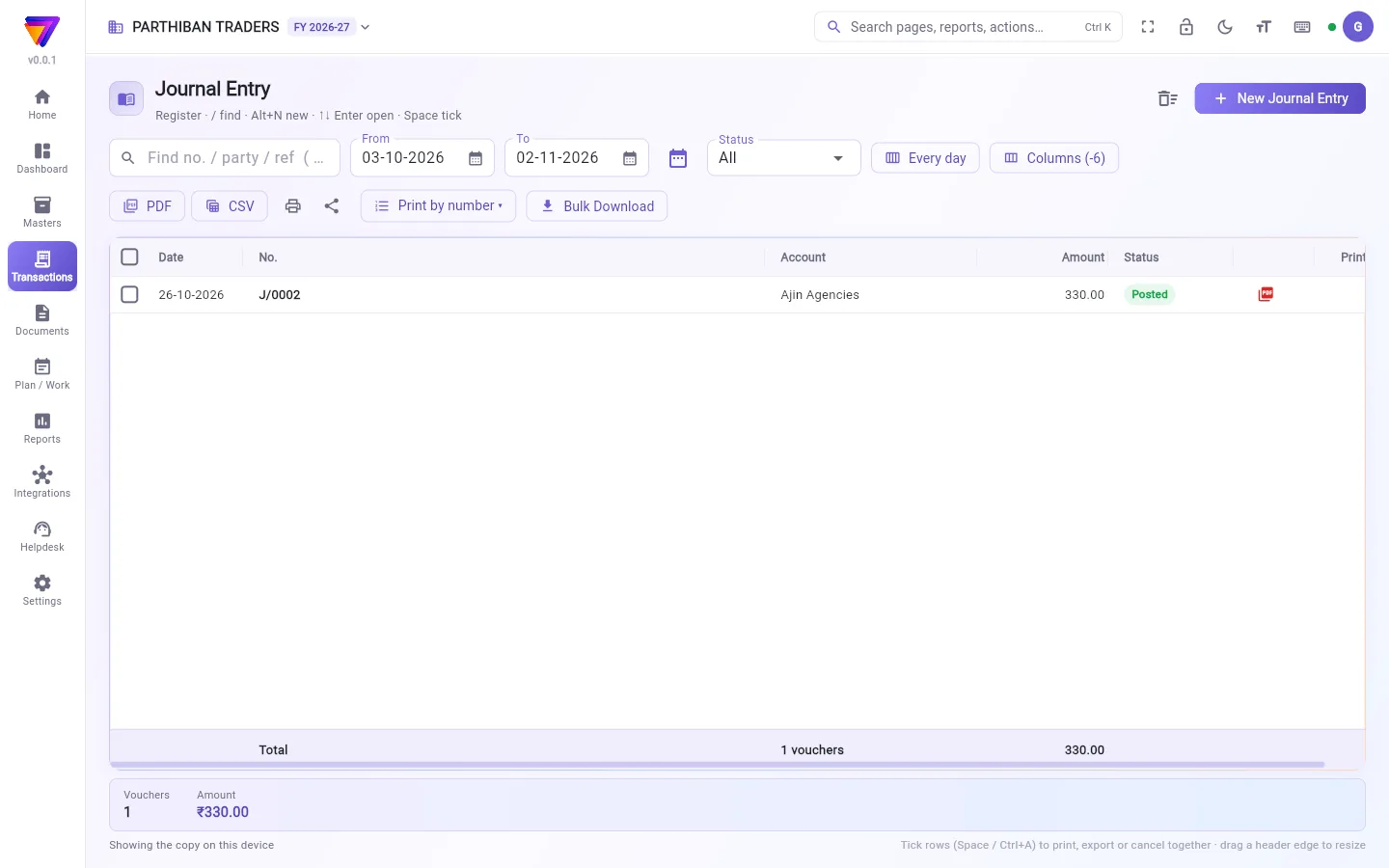
The register lists your journal entries, numbered J/0001, J/0002 and so on, with the Amount of each. It works like every other voucher register. See The register: finding, filtering and exporting bills.
Make a journal entry
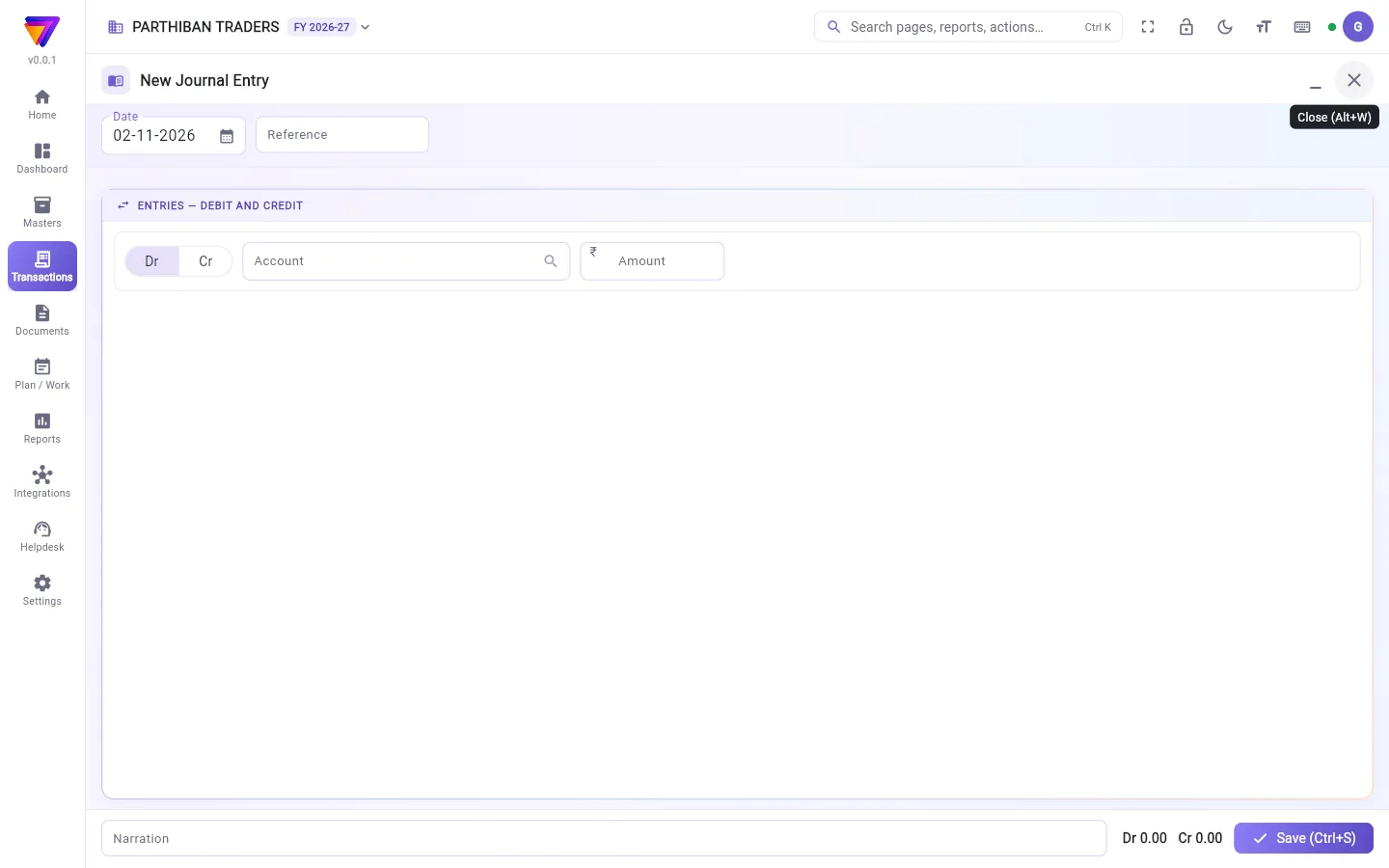
- Click New Journal Entry. The editor is titled Entries — debit and credit.
- Check the Date. Enter a Reference if you want.
- On the first line, choose Dr or Cr, the Account and the Amount.
- Add the next line. When you choose its account, it takes the side and amount that balance the entry. Change them if needed.
- Add more lines if you need them.
- Check the totals at the bottom: Dr and Cr must be equal. If they differ, the screen shows Differs by in red. Click Balance it to put the difference on the last line.
- Add a Narration.
- Click Save (Ctrl+S).
Set an amount against a party's bills
When a line is on a client's or vendor's account, the line shows Against bills.
- Click Against bills. The Set against bills window lists the party's open bills.
- Enter how much goes against each bill, or click Oldest first.
- Click Apply.
The total set against bills cannot be more than the line's amount.
Raise a debit or credit note on a party
If exactly one line is on a party's account, you see Keep as a bill of the party (debit / credit note).
- Turn it on to keep that party line open as a bill of the party. It is settled later by a collection or payment, like any other bill.
- You can set this only before the entry is saved for the first time.
Fields
| Field | What to enter |
|---|---|
| Dr / Cr | The side of each line. Each line is either a debit or a credit, not both. |
| Account | Any active account. |
| Amount | A figure above zero. |
| Date | The date of the entry. |
| Reference | Optional reference number. |
| Narration | Why you made the entry. |
Checks when you save
- There must be at least one debit and one credit. Otherwise: A journal needs at least one debit and one credit.
- Debits and credits must be equal.
- An inactive account is refused.
Good to know
- Available on Pro, Pro · Large Stockist and Enterprise.
- To move money between cash and bank, use Contra.
- If the books are locked for the date, the entry cannot be saved or changed.
Related
- Contra: cash and bank only.
- Accounts: the chart of accounts.
- Sales Return: credit notes for goods.
- Financial year and locks: lock a period.
குறிப்பேடு பதிவு ஒரு தொகையை ஒரு கணக்கிலிருந்து இன்னொரு கணக்குக்கு மாற்றும். திருத்தங்கள், ஒதுக்கீடுகள் (provisions), வேறு எந்த வவுச்சரிலும் வராத சரிசெய்தல்களுக்கு இதைப் பயன்படுத்துங்க. இது இருப்பைத் தொடாது.
திரையில் என்ன தெரியும்
பதிவேட்டில் உங்கள் குறிப்பேடு பதிவுகள் J/0001, J/0002 என்று எண்ணுடன், ஒவ்வொன்றின் தொகை (Amount)-யுடன் வரும். மற்ற எல்லா வவுச்சர் பதிவேடுகளையும் போலவே இதுவும் வேலை செய்யும். பார்க்க: பதிவேடு: பில்களைத் தேடுவது, வடிகட்டுவது, ஏற்றுமதி செய்வது.
குறிப்பேடு பதிவு போடுவது
- New Journal Entry (புதிய குறிப்பேடு பதிவு) அழுத்துங்க. எடிட்டரின் தலைப்பு பதிவுகள் — பற்று மற்றும் வரவு (Entries — debit and credit).
- தேதி (Date)-ஐச் சரிபாருங்க. வேண்டுமென்றால் குறிப்பு எண் (Reference) உள்ளிடுங்க.
- முதல் வரியில் பற்று (Dr) அல்லது வரவு (Cr), கணக்கு (Account), தொகை (Amount) தேர்ந்தெடுங்க.
- அடுத்த வரியைச் சேருங்க. அதன் கணக்கைத் தேர்ந்தெடுத்ததும், பதிவைச் சமன் செய்யும் பக்கமும் தொகையும் தானாக வரும். தேவைப்பட்டால் மாற்றுங்க.
- தேவைப்பட்டால் இன்னும் வரிகளைச் சேருங்க.
- கீழே உள்ள மொத்தங்களைச் சரிபாருங்க: பற்று (Dr), வரவு (Cr) இரண்டும் சமமாக இருக்க வேண்டும். வேறுபட்டால், திரையில் Differs by (வேறுபாடு) சிவப்பில் தெரியும். வேறுபாட்டைக் கடைசி வரியில் போட சமன் செய் (Balance it) அழுத்துங்க.
- விளக்கம் (Narration) சேருங்க.
- சேமி (Ctrl+S) (Save (Ctrl+S)) அழுத்துங்க.
ஒரு தரப்பின் பில்களுக்கு எதிராகத் தொகையை வைப்பது
ஒரு வரி வாடிக்கையாளர் அல்லது சப்ளையரின் கணக்கில் இருந்தால், அந்த வரியில் பில்களுக்கு எதிராக (Against bills) தெரியும்.
- பில்களுக்கு எதிராக (Against bills) அழுத்துங்க. பில்களுக்கு எதிராக வை (Set against bills) சாளரம் அந்தத் தரப்பின் திறந்த பில்களைக் காட்டும்.
- ஒவ்வொரு பில்லுக்கும் எவ்வளவு என்று உள்ளிடுங்க, அல்லது பழையது முதலில் (Oldest first) அழுத்துங்க.
- பயன்படுத்து (Apply) அழுத்துங்க.
பில்களுக்கு எதிராக வைக்கும் மொத்தம் அந்த வரியின் தொகையை விட அதிகமாக இருக்கக் கூடாது.
ஒரு தரப்புக்குப் பற்று அல்லது வரவுக் குறிப்பு போடுவது
சரியாக ஒரே ஒரு வரி ஒரு தரப்பின் கணக்கில் இருந்தால், தரப்பின் பில்லாக வை (பற்று / வரவுக் குறிப்பு) (Keep as a bill of the party (debit / credit note)) தெரியும்.
- அந்தத் தரப்பு வரியை அவர்களின் பில்லாகத் திறந்து வைக்க இதை இயக்குங்க. மற்ற பில்களைப் போலவே பிறகு வசூல் அல்லது பணம் செலுத்துதல் மூலம் தீர்க்கப்படும்.
- பதிவை முதல் முறை சேமிப்பதற்கு முன் மட்டுமே இதை அமைக்க முடியும்.
புலங்கள் (Fields)
| புலம் | என்ன உள்ளிட வேண்டும் |
|---|---|
| பற்று / வரவு (Dr / Cr) | ஒவ்வொரு வரியின் பக்கம். ஒவ்வொரு வரியும் பற்று அல்லது வரவு, இரண்டும் இல்லை. |
| கணக்கு (Account) | செயலில் உள்ள எந்தக் கணக்கும். |
| தொகை (Amount) | பூஜ்யத்துக்கு மேல் ஒரு தொகை. |
| தேதி (Date) | பதிவின் தேதி. |
| குறிப்பு எண் (Reference) | விருப்பக் குறிப்பு எண். |
| விளக்கம் (Narration) | இந்தப் பதிவை ஏன் போட்டீர்கள். |
சேமிக்கும்போது சரிபார்ப்புகள்
- குறைந்தது ஒரு பற்றும் ஒரு வரவும் இருக்க வேண்டும். இல்லையென்றால்: பதிவில் குறைந்தது ஒரு பற்றும் ஒரு வரவும் வேண்டும் (A journal needs at least one debit and one credit).
- பற்றும் வரவும் சமமாக இருக்க வேண்டும்.
- செயலில் இல்லாத கணக்கு மறுக்கப்படும்.
தெரிந்துகொள்ள வேண்டியது
- Pro, Pro · பெரிய ஸ்டாக்கிஸ்ட், Enterprise பிளான்களில் கிடைக்கும்.
- ரொக்கத்துக்கும் வங்கிக்கும் இடையே பணத்தை மாற்ற கான்ட்ரா பயன்படுத்துங்க.
- அந்தத் தேதிக்குக் கணக்குகள் பூட்டப்பட்டிருந்தால், பதிவைச் சேமிக்கவோ மாற்றவோ முடியாது.
தொடர்புடையவை
- கான்ட்ரா: ரொக்கம், வங்கி மட்டும்.
- கணக்குகள்: கணக்குகளின் பட்டியல்.
- விற்பனைத் திருப்பம்: சரக்குக்கான வரவுக் குறிப்புகள்.
- நிதியாண்டு மற்றும் பூட்டுகள்: ஒரு காலத்தைப் பூட்ட.