User manualபயனர் கையேடு · Office: Plan / WorkOffice: திட்டம் / வேலை (Plan / Work)
Employee Locationsபணியாளர் இருப்பிடங்கள் (Employee Locations)
See on a map where field staff are now, and where they billed, collected and visited on a day.களப் பணியாளர்கள் இப்போது எங்கே இருக்கிறார்கள், ஒரு நாளில் எங்கே பில் போட்டார்கள், வசூலித்தார்கள், சந்தித்தார்கள் என்று வரைபடத்தில் பாருங்க.
- Where to find itஎங்கே இருக்கிறது
- Office → Plan / Work → Employee Locations
- Who uses itயார் பயன்படுத்துவார்கள்
- Owner, Adminஉரிமையாளர், நிர்வாகி
This map shows where your field staff are, and where each bill, receipt and visit of a day was made. You can follow one person's day and play it back.
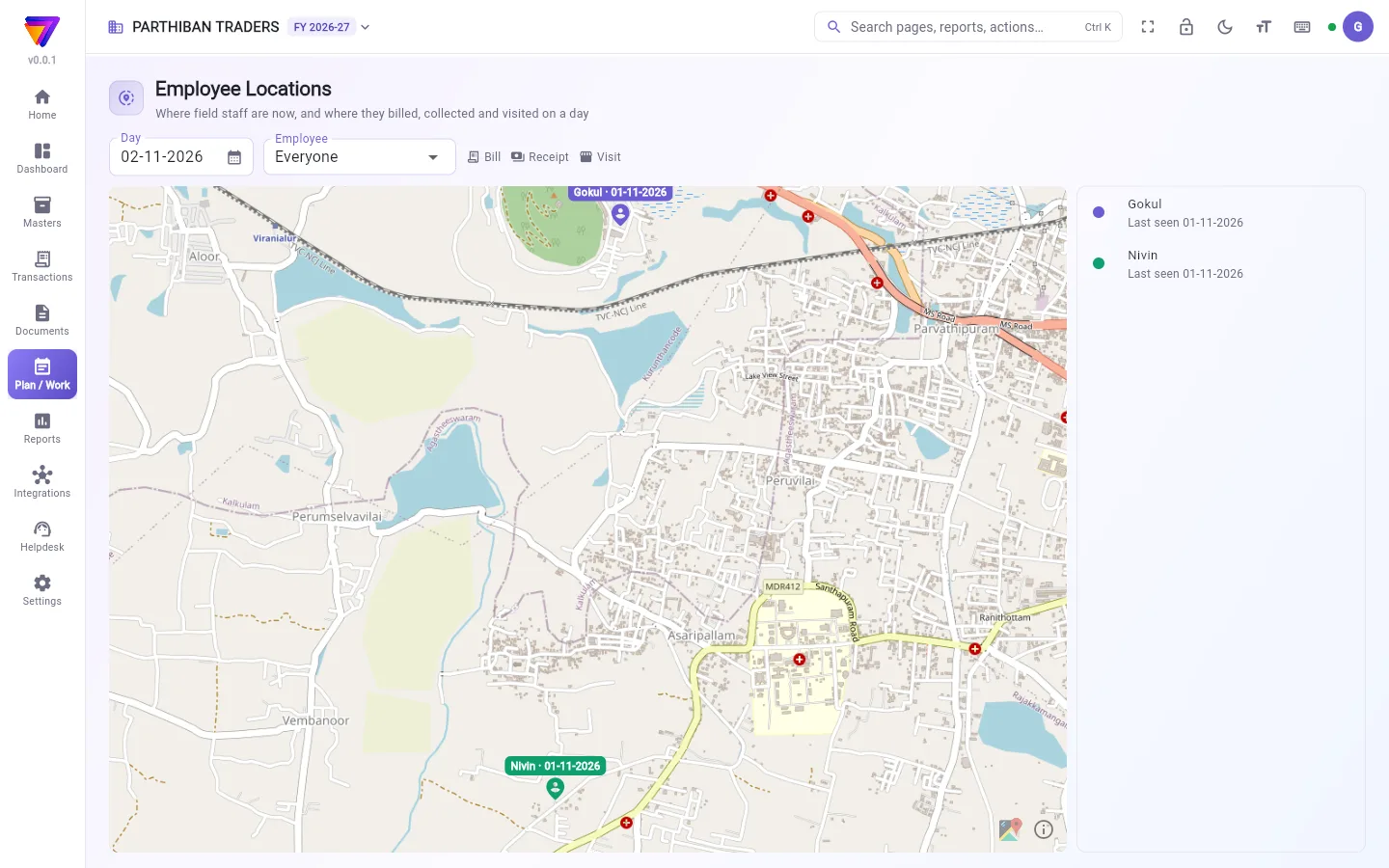
What you see
- Day: the day shown. It opens on today.
- Employee: Everyone, or one person.
- The legend: Bill, Receipt and Visit.
- The map, with a pin for each person's last known place, labelled with the name and date.
- The list on the right: each person with Last seen, the distance travelled, and the number of bills, receipts and visits.
Follow one person's day
- Pick the Day.
- Click a name in the list, or choose it in Employee.
- The map shows that person's trail and the places of their bills, receipts and visits.
- Click Play the day to play the route in time order. Click Pause to stop, and Whole day to see the full day again.
- Click a bill, receipt or visit on the map to see what it was and the time. Open in Google Maps opens the place.
Click the same name again to go back to everyone.
Turn location on or off
Locations come from the Score app on staff phones. It is controlled by Show where field staff are in Company settings.
When it is on, staff who open the app on a phone send their location every 5 minutes while the app is open. Bills, receipts and visits also keep where they were made.
Good to know
- Employee Locations comes with the Pro, Pro · Large Stockist and Enterprise plans.
- If nobody shows, the page reads: "Nothing to show for this day." Staff appear once they open the app on a phone with location allowed.
- A login is matched to an employee by phone number. Give each employee the same phone number they sign in with.
- You see bills, receipts and visits only for the voucher types your role can view.
Related
- Employee: staff records and phone numbers.
- Visits: visits recorded in the field.
- Company: the Show where field staff are switch.
- Score: getting around: the app staff use.
இந்த வரைபடம் உங்கள் களப் பணியாளர்கள் எங்கே இருக்கிறார்கள், ஒரு நாளின் ஒவ்வொரு பில், வசூல், சந்திப்பு எங்கே போடப்பட்டது என்று காட்டும். ஒருவரின் நாளைப் பின்தொடர்ந்து, அதை மீண்டும் ஓட்டிப் பார்க்கலாம்.
திரையில் என்ன தெரியும்
- நாள் (Day): காட்டப்படும் நாள். இன்றைய நாளுடன் திறக்கும்.
- பணியாளர் (Employee): அனைவரும் (Everyone), அல்லது ஒருவர்.
- குறியீட்டு விளக்கம்: பில் (Bill), வசூல் (Receipt), சந்திப்பு (Visit).
- வரைபடம்: ஒவ்வொருவரின் கடைசியாகத் தெரிந்த இடத்துக்கு ஒரு பின், பெயர், தேதியுடன்.
- வலப்பக்கப் பட்டியல்: ஒவ்வொருவரும் கடைசியாகப் பார்த்தது (Last seen), பயணித்த தூரம், பில்கள், வசூல்கள், சந்திப்புகளின் எண்ணிக்கையுடன்.
ஒருவரின் நாளைப் பின்தொடர்வது
- நாள் (Day) தேர்ந்தெடுங்க.
- பட்டியலில் ஒரு பெயரைக் கிளிக் செய்யுங்க, அல்லது பணியாளர் (Employee)-இல் தேர்ந்தெடுங்க.
- வரைபடம் அந்த நபர் போன பாதையையும், அவரின் பில்கள், வசூல்கள், சந்திப்புகளின் இடங்களையும் காட்டும்.
- பாதையை நேர வரிசையில் ஓட்ட நாளை ஓட்டிக் காட்டு (Play the day) கிளிக் செய்யுங்க. நிறுத்த இடைநிறுத்து (Pause), முழு நாளையும் மீண்டும் பார்க்க முழு நாள் (Whole day) கிளிக் செய்யுங்க.
- அது என்ன, எந்த நேரம் என்று பார்க்க வரைபடத்தில் ஒரு பில், வசூல் அல்லது சந்திப்பைக் கிளிக் செய்யுங்க. Google Maps-இல் திற (Open in Google Maps) அந்த இடத்தைத் திறக்கும்.
மீண்டும் எல்லோரையும் பார்க்க, அதே பெயரை மறுபடி கிளிக் செய்யுங்க.
இருப்பிடத்தை ஆன் அல்லது ஆஃப் செய்வது
இருப்பிடங்கள் பணியாளர்களின் போனில் உள்ள Score செயலியிலிருந்து வரும். இதை நிறுவன அமைப்புகள் (Company settings)-இல் உள்ள களப் பணியாளர்கள் இருக்கும் இடத்தைக் காட்டு (Show where field staff are) கட்டுப்படுத்தும்.
அது ஆன் ஆக இருக்கும்போது, போனில் செயலியைத் திறக்கும் பணியாளர்கள், செயலி திறந்திருக்கும் வரை ஒவ்வொரு 5 நிமிடத்துக்கும் தங்கள் இருப்பிடத்தை அனுப்புவார்கள். பில்கள், வசூல்கள், சந்திப்புகளும் அவை எங்கே போடப்பட்டன என்று சேமித்து வைக்கும்.
தெரிந்துகொள்ள வேண்டியது
- பணியாளர் இருப்பிடங்கள் Pro, Pro · பெரிய ஸ்டாக்கிஸ்ட், என்டர்பிரைஸ் பிளான்களில் வரும்.
- யாரும் தெரியவில்லை என்றால், பக்கத்தில் "Nothing to show for this day." (இந்த நாளுக்குக் காட்ட எதுவும் இல்லை) என்று வரும். இருப்பிட அனுமதி உள்ள போனில் செயலியைத் திறந்ததும் பணியாளர்கள் தெரிவார்கள்.
- ஒரு லாகின், போன் எண் மூலம் பணியாளருடன் பொருத்தப்படும். ஒவ்வொரு பணியாளருக்கும் அவர் சைன் இன் செய்யும் அதே போன் எண்ணைக் கொடுங்க.
- உங்கள் பொறுப்பு பார்க்க அனுமதி உள்ள வவுச்சர் வகைகளுக்கான பில்கள், வசூல்கள், சந்திப்புகள் மட்டுமே உங்களுக்குத் தெரியும்.
தொடர்புடையவை
- பணியாளர் (Employee): பணியாளர் பதிவுகளும் போன் எண்களும்.
- சந்திப்புகள் (Visits): களத்தில் பதிவு செய்த சந்திப்புகள்.
- நிறுவனம் (Company): களப் பணியாளர்கள் இருக்கும் இடத்தைக் காட்டு (Show where field staff are) ஸ்விட்ச்.
- Score: சுற்றிப் பார்ப்பது (Score: getting around): பணியாளர்கள் பயன்படுத்தும் செயலி.