User manualபயனர் கையேடு · Office: TransactionsOffice: பரிவர்த்தனைகள் (Transactions)
Item Challanபொருள் சலான் (Item Challan)
Send goods to a client without a bill. Save the challan first; stock goes out when you press Deliver.பில் இல்லாமல் வாடிக்கையாளருக்குச் சரக்கு அனுப்ப. முதலில் சலானைச் சேமிக்கலாம்; டெலிவர் அழுத்தும்போதுதான் இருப்பு வெளியேறும்.
- Where to find itஎங்கே இருக்கிறது
- Office → Transactions → Item Challan
- Who uses itயார் பயன்படுத்துவார்கள்
- Office staff, godown in-chargeஅலுவலக ஊழியர்கள், கிடங்கு பொறுப்பாளர்
An item challan records goods that go to a client without a bill, for example goods sent on approval. You can save it first and deliver later. Stock goes out only when you deliver. Your accounts do not change.
What you see
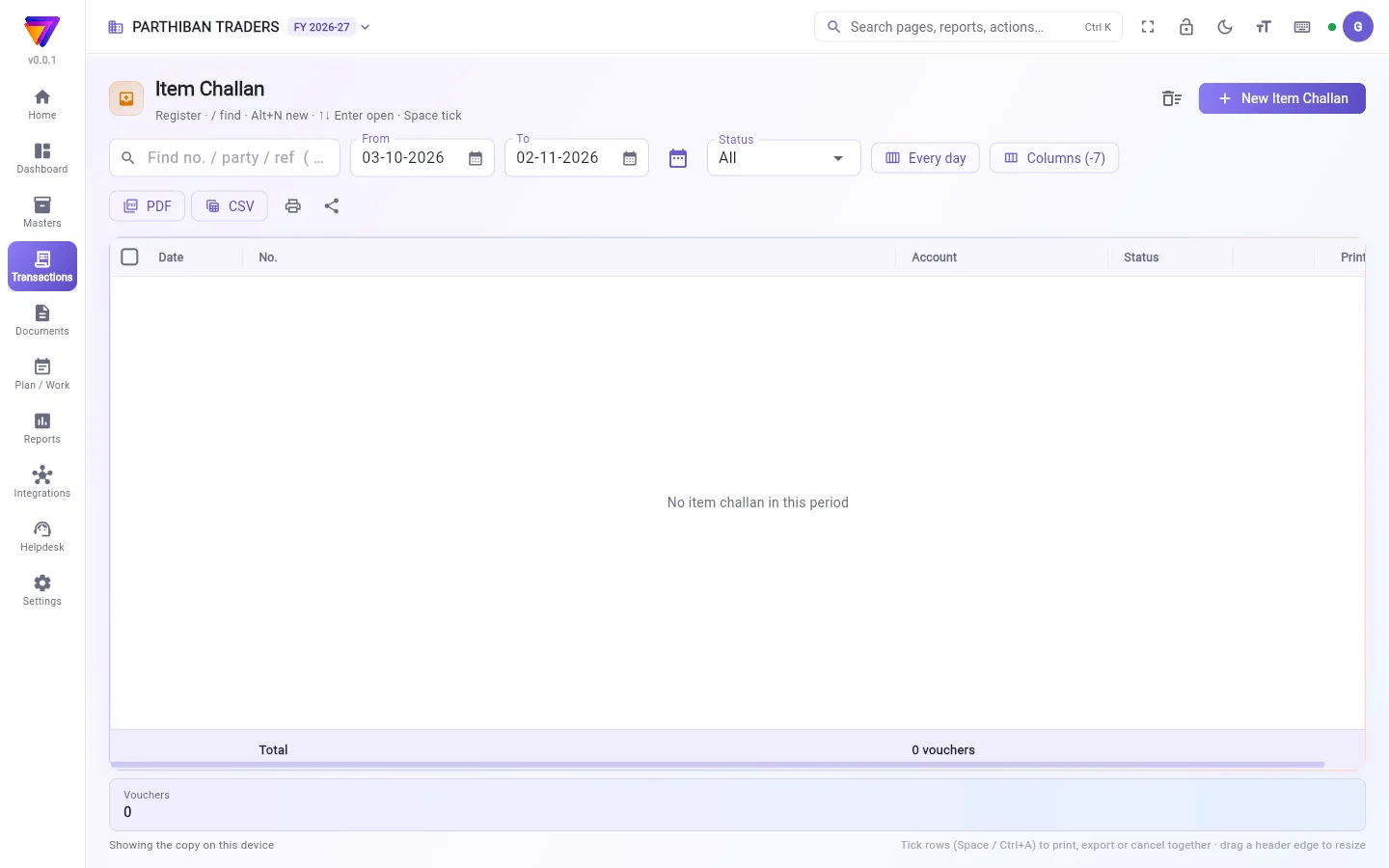
The register lists your challans, numbered DN/0001, DN/0002 and so on. It works like every other voucher register. See The register: finding, filtering and exporting bills.
A challan you saved but have not delivered shows as Draft. Use the Status filter to find them.
Make a challan
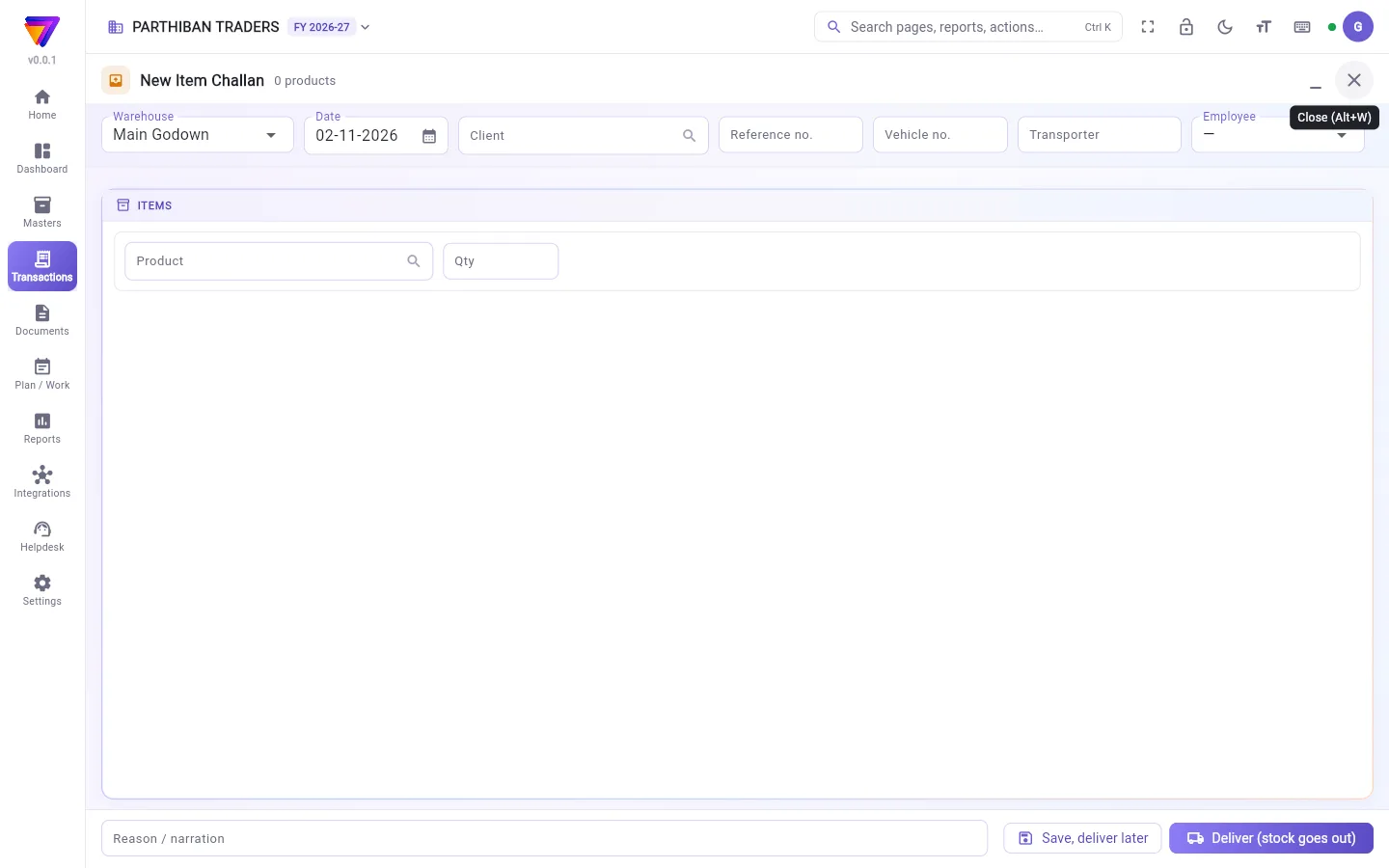
- Click New Item Challan.
- In Warehouse, choose where the goods leave from.
- In Client, choose who gets the goods. This is required.
- Check the Date.
- Fill in Reference no., Vehicle no., Transporter and Employee if you want.
- On each line, choose the Product, the Batch (if the product has batches) and the Qty. The line shows In stock for the warehouse.
- Add a Reason / narration if you want.
- Then choose one:
- Save, deliver later: the challan is kept, with no number and no stock change.
- Deliver (stock goes out): the challan gets its number and the stock leaves the warehouse.
Deliver a saved challan
- Open the challan from the register. Use the Status filter to find drafts.
- Check the lines.
- Click Deliver (stock goes out).
Fields
| Field | What to enter |
|---|---|
| Warehouse | Where the goods leave from. Required. |
| Client | The client the goods go to. Required. It must be an active client. |
| Product, Qty | At least one product, with a quantity above zero. |
| Batch | Required for a product that has batches. |
| Reference no., Vehicle no., Transporter, Employee | Optional details of the trip. |
Good to know
- Available on every plan (Basic and up).
- A challan does not bill the client, and it cannot be turned into a sale. When you bill the goods, make a sale. A sale also takes stock out, so the goods leave stock twice. Correct it before you bill, for example by cancelling the challan.
- If Allow billing more than the stock on hand is off in Settings, a delivery that takes stock below zero is refused.
Related
- Sales: bill the client for the goods.
- Delivery Challan: a pick-up list of undelivered bills. It is not the same as Item Challan.
- Client: add the client first.
- Stock Transfer: move goods to your own warehouse instead.
பில் போடாமல் வாடிக்கையாளருக்குப் போகும் சரக்கை பொருள் சலான் பதிவு செய்யும். உதாரணமாக, approval-க்கு அனுப்பும் சரக்கு. முதலில் சேமித்து, பிறகு டெலிவர் செய்யலாம். டெலிவர் செய்யும்போது மட்டுமே இருப்பு வெளியேறும். உங்கள் கணக்குகள் மாறாது.
திரையில் என்ன தெரியும்
பதிவேட்டில் உங்கள் சலான்கள் DN/0001, DN/0002 என்று எண்ணுடன் வரும். மற்ற எல்லா வவுச்சர் பதிவேடுகளையும் போலவே இதுவும் வேலை செய்யும். பார்க்க: பதிவேடு: பில்களைத் தேடுவது, வடிகட்டுவது, ஏற்றுமதி செய்வது.
சேமித்து இன்னும் டெலிவர் செய்யாத சலான் வரைவு (Draft) என்று காட்டும். அவற்றைக் கண்டுபிடிக்க நிலை (Status) வடிகட்டியைப் பயன்படுத்துங்க.
சலான் உருவாக்குவது
- புதிய பொருள் சலான் (New Item Challan) அழுத்துங்க.
- கிடங்கு (Warehouse)-இல், சரக்கு எங்கிருந்து போகிறது என்று தேர்ந்தெடுங்க.
- வாடிக்கையாளர் (Client)-இல், சரக்கு யாருக்குப் போகிறது என்று தேர்ந்தெடுங்க. இது கட்டாயம்.
- தேதி (Date)-ஐச் சரிபாருங்க.
- வேண்டுமென்றால் குறிப்பு எண் (Reference no.), வாகன எண் (Vehicle no.), போக்குவரத்தாளர் (Transporter), பணியாளர் (Employee) நிரப்புங்க.
- ஒவ்வொரு வரியிலும் பொருள் (Product), பேட்ச் (Batch) (பொருளுக்கு பேட்ச் இருந்தால்), அளவு (Qty) தேர்ந்தெடுங்க. அந்தக் கிடங்கில் உள்ள இருப்பில் (In stock) அளவை வரி காட்டும்.
- வேண்டுமென்றால் காரணம் / விளக்கம் (Reason / narration) சேருங்க.
- பிறகு இதில் ஒன்றைத் தேர்ந்தெடுங்க:
- சேமி, பின்னர் டெலிவர் செய் (Save, deliver later): சலான் சேமிக்கப்படும்; எண் வராது, இருப்பு மாறாது.
- டெலிவர் செய் (இருப்பு வெளியேறும்) (Deliver (stock goes out)): சலானுக்கு எண் கிடைக்கும், இருப்பு கிடங்கிலிருந்து வெளியேறும்.
சேமித்த சலானை டெலிவர் செய்வது
- பதிவேட்டிலிருந்து சலானைத் திறங்க. வரைவுகளைக் கண்டுபிடிக்க நிலை (Status) வடிகட்டியைப் பயன்படுத்துங்க.
- வரிகளைச் சரிபாருங்க.
- டெலிவர் செய் (இருப்பு வெளியேறும்) (Deliver (stock goes out)) அழுத்துங்க.
புலங்கள் (Fields)
| புலம் | என்ன உள்ளிட வேண்டும் |
|---|---|
| கிடங்கு (Warehouse) | சரக்கு எங்கிருந்து போகிறது. கட்டாயம். |
| வாடிக்கையாளர் (Client) | சரக்கு போகும் வாடிக்கையாளர். கட்டாயம். செயலில் உள்ள வாடிக்கையாளராக இருக்க வேண்டும். |
| பொருள், அளவு (Product, Qty) | குறைந்தது ஒரு பொருள், பூஜ்யத்துக்கு மேல் அளவுடன். |
| பேட்ச் (Batch) | பேட்ச் உள்ள பொருளுக்குக் கட்டாயம். |
| குறிப்பு எண், வாகன எண், போக்குவரத்தாளர், பணியாளர் (Reference no., Vehicle no., Transporter, Employee) | பயணத்தின் கூடுதல் விவரங்கள். விருப்பம். |
தெரிந்துகொள்ள வேண்டியது
- எல்லா பிளான்களிலும் கிடைக்கும் (Basic முதல்).
- சலான் வாடிக்கையாளருக்கு பில் போடாது; அதை விற்பனையாக மாற்றவும் முடியாது. சரக்குக்கு பில் போடும்போது ஒரு விற்பனை போடுங்க. விற்பனையும் இருப்பை வெளியே எடுக்கும், அதனால் சரக்கு இரண்டு முறை இருப்பிலிருந்து குறையும். பில் போடுவதற்கு முன் இதைச் சரிசெய்யுங்க, உதாரணமாக சலானை ரத்து செய்து.
- அமைப்புகளில் கையிருப்பை விட அதிகமாக பில் போட அனுமதி (Allow billing more than the stock on hand) அணைக்கப்பட்டிருந்தால், இருப்பை பூஜ்யத்துக்குக் கீழே கொண்டு போகும் டெலிவரி மறுக்கப்படும்.
தொடர்புடையவை
- விற்பனை: சரக்குக்கு வாடிக்கையாளருக்கு பில் போட.
- டெலிவரி சலான்: டெலிவரி ஆகாத பில்களின் பிக்-அப் பட்டியல். இது பொருள் சலான் இல்லை.
- வாடிக்கையாளர்: முதலில் வாடிக்கையாளரைச் சேருங்க.
- இருப்பு மாற்றம்: சரக்கை உங்கள் சொந்தக் கிடங்குக்கு மாற்ற.