User manualபயனர் கையேடு · Office: TransactionsOffice: பரிவர்த்தனைகள் (Transactions)
Cash Closingரொக்க முடிவு (Cash Closing)
Count a salesman's cash at day end, note by note, and check it against the cash the books say they should hand over.நாள் முடிவில் விற்பனைப் பிரதிநிதியின் ரொக்கத்தை நோட்டு வாரியாக எண்ணி, கணக்குப்படி அவர் ஒப்படைக்க வேண்டிய ரொக்கத்துடன் சரிபார்க்க.
- Where to find itஎங்கே இருக்கிறது
- Office → Transactions → Cash Closing
- Who uses itயார் பயன்படுத்துவார்கள்
- Cashier, accountant, owner; salesmen and delivery staff for their own dayகாசாளர், கணக்காளர், உரிமையாளர்; விற்பனைப் பிரதிநிதிகளும் டெலிவரி ஊழியர்களும் தங்கள் சொந்த நாளுக்கு
Cash Closing checks a salesman's cash at the end of the day. You count the notes and coins, and the page compares the count with what the books say they should have.
What you see
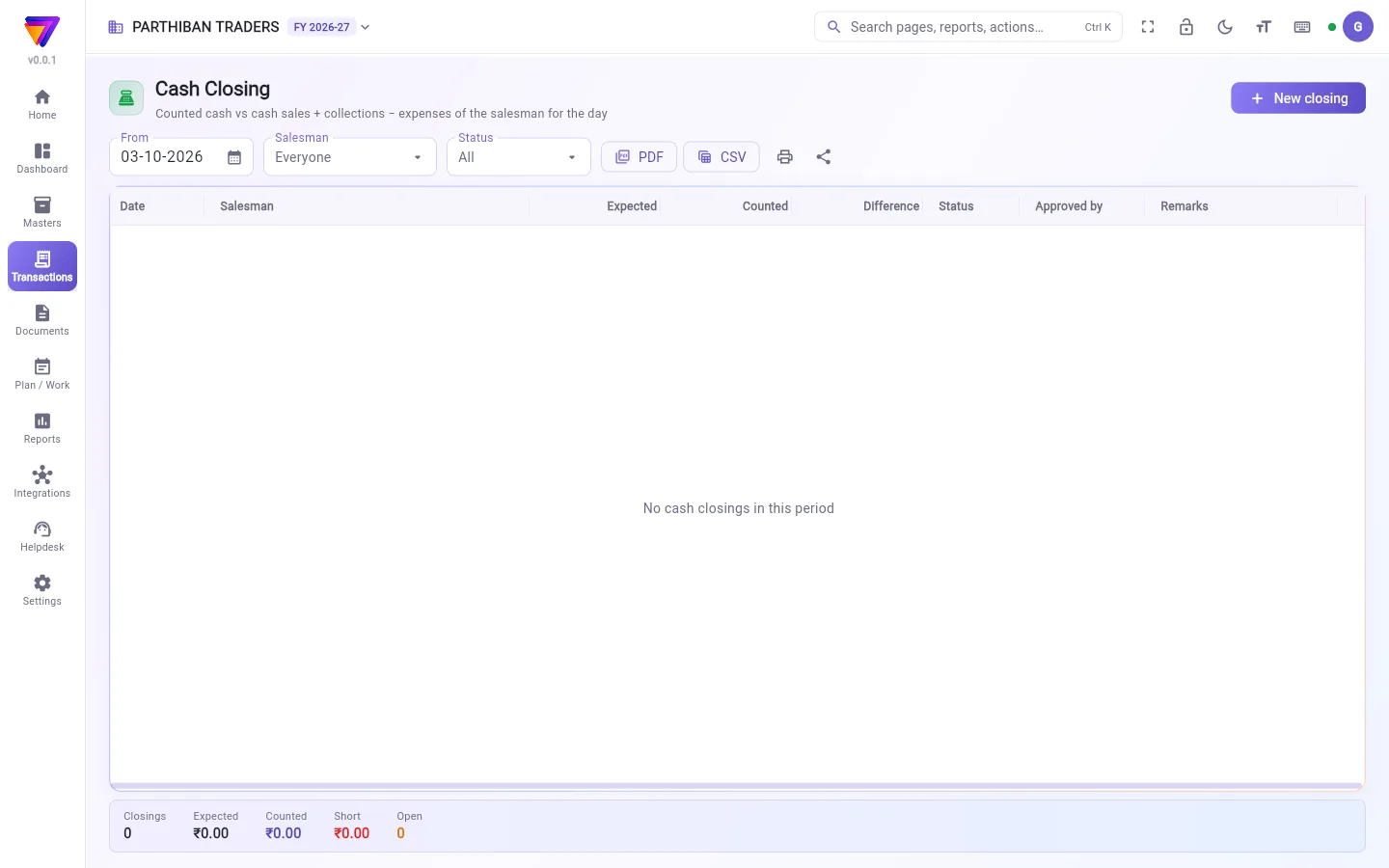
The list shows one row per closing: Date, Salesman, Expected, Counted, Difference, Status, Approved by and Remarks. A short difference shows in red, an excess in amber.
Filter with From, Salesman and Status (Open or Approved). The strip at the bottom shows Closings, Expected, Counted, Short and Open.
Close a salesman's day
- Click New closing.
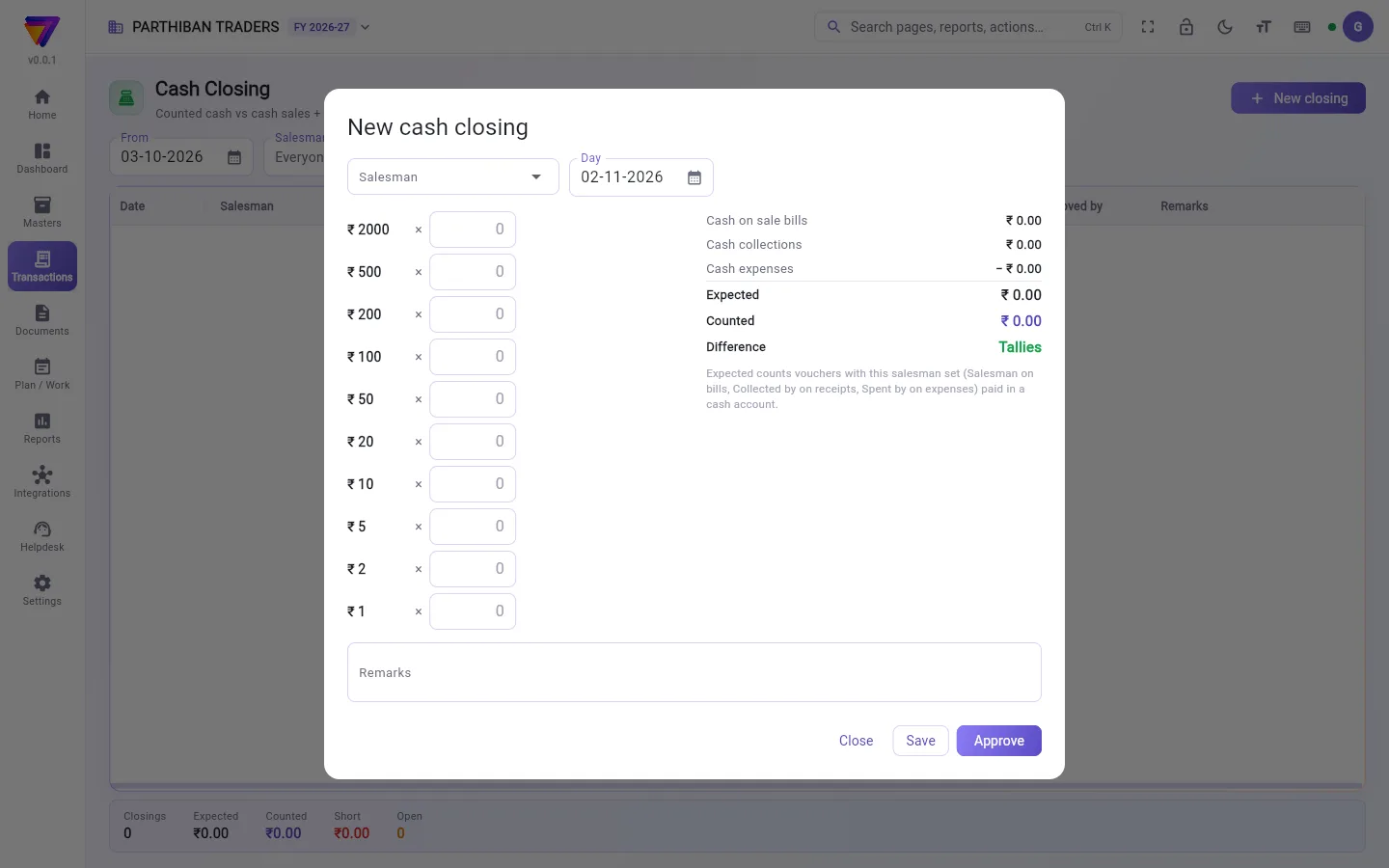
- Choose the Salesman and the Day. The page works out what they should hand over.
- For each note and coin, type how many you counted. The page adds them up.
- Read the right side:
- Cash on sale bills
- Cash collections
- Cash expenses (taken away)
- Expected, Counted, and Short, Excess or Tallies
- Add Remarks if there is a difference.
- Click Save. The closing stays Open and can still be changed.
If bills were added after you opened the closing, click the refresh button (Work out expected again).
Approve a closing
- Click the closing in the list.
- Check the count.
- Click Approve and confirm. An approved closing cannot be changed.
Deposit the cash in the bank
- Open a saved closing.
- Click Deposit to bank. A contra voucher opens, from your cash account to your bank, for the counted amount.
- Check the bank account and save the contra.
Who can do what
- Sales and Delivery roles can see closings and make new ones. They can change a closing they made until it is approved.
- Accountant, Admin and Owner can also change any open closing and Approve it.
- Deposit to bank needs permission to create a contra voucher.
- PDF and CSV need the export permission on this page.
Good to know
- Available on every plan (Basic and up).
- Expected counts only entries with this person set: Salesman on bills, Collected by on collections and Spent by on expenses. The entry must be paid in a cash account. UPI and cheque amounts are not counted.
- A collection still waiting for approval is not counted in Expected.
- There is one closing per salesman per day. If one exists, open it from the list.
- A closing does not post anything to your books. Only the deposit (a contra) does.
Related
- Collection / Receipt: set Collected by so collections count here.
- Expenses: set Spent by for a salesman's cash expenses.
- Contra: the voucher behind Deposit to bank.
- Sales: set the Salesman on each bill.
ரொக்க முடிவு, நாள் முடிவில் ஒரு விற்பனைப் பிரதிநிதியின் ரொக்கத்தைச் சரிபார்க்கும். நீங்கள் நோட்டுகளையும் காசுகளையும் எண்ணுவீங்க; கணக்குப்படி அவரிடம் இருக்க வேண்டியதுடன் பக்கம் அந்த எண்ணிக்கையை ஒப்பிடும்.
திரையில் என்ன தெரியும்
பட்டியலில் ஒவ்வொரு முடிப்புக்கும் ஒரு வரிசை: தேதி (Date), விற்பனைப் பிரதிநிதி (Salesman), எதிர்பார்ப்பு (Expected), எண்ணியது (Counted), வித்தியாசம் (Difference), நிலை (Status), அங்கீகரித்தவர் (Approved by), குறிப்புகள் (Remarks). குறைவு சிவப்பிலும், அதிகம் மஞ்சள் (amber) நிறத்திலும் தெரியும்.
முதல் (From), விற்பனைப் பிரதிநிதி (Salesman), நிலை (Status) (திற (Open) அல்லது அங்கீகரிக்கப்பட்டது (Approved)) வைத்து வடிகட்டுங்க. கீழே உள்ள பட்டை முடிப்புகள் (Closings), எதிர்பார்ப்பு (Expected), எண்ணியது (Counted), குறைவு (Short), திற (Open) காட்டும்.
விற்பனைப் பிரதிநிதியின் நாளை முடிப்பது
- புதிய முடிப்பு (New closing) அழுத்துங்க.
- விற்பனைப் பிரதிநிதி (Salesman), நாள் (Day) தேர்ந்தெடுங்க. அவர் எவ்வளவு ஒப்படைக்க வேண்டும் என்று பக்கம் கணக்கிடும்.
- ஒவ்வொரு நோட்டுக்கும் காசுக்கும், எத்தனை எண்ணினீர்கள் என்று உள்ளிடுங்க. பக்கம் கூட்டிக் காட்டும்.
- வலது பக்கத்தைப் படியுங்க:
- விற்பனை பில்களில் ரொக்கம் (Cash on sale bills)
- ரொக்க வசூல் (Cash collections)
- ரொக்கச் செலவுகள் (Cash expenses) (கழிக்கப்படும்)
- எதிர்பார்ப்பு (Expected), எண்ணியது (Counted), மற்றும் குறைவு (Short), அதிகம் (Excess) அல்லது சரியாக உள்ளது (Tallies)
- வித்தியாசம் இருந்தால் குறிப்புகள் (Remarks) சேருங்க.
- சேமி (Save) அழுத்துங்க. முடிப்பு திற (Open) நிலையில் இருக்கும்; இன்னும் மாற்றலாம்.
முடிப்பைத் திறந்த பிறகு பில்கள் சேர்க்கப்பட்டிருந்தால், refresh பொத்தானை (எதிர்பார்த்ததை மீண்டும் கணக்கிடு (Work out expected again)) அழுத்துங்க.
முடிப்பை அங்கீகரிப்பது
- பட்டியலில் முடிப்பை அழுத்துங்க.
- எண்ணிக்கையைச் சரிபாருங்க.
- அங்கீகரி (Approve) அழுத்தி உறுதி செய்யுங்க. அங்கீகரித்த முடிப்பை மாற்ற முடியாது.
ரொக்கத்தை வங்கியில் கட்டுவது
- சேமித்த ஒரு முடிப்பைத் திறங்க.
- வங்கியில் செலுத்து (Deposit to bank) அழுத்துங்க. எண்ணிய தொகைக்கு, உங்கள் ரொக்கக் கணக்கிலிருந்து வங்கிக்கு ஒரு கான்ட்ரா வவுச்சர் திறக்கும்.
- வங்கிக் கணக்கைச் சரிபார்த்து கான்ட்ராவைச் சேமியுங்க.
யார் என்ன செய்யலாம்
- விற்பனை (Sales), டெலிவரி (Delivery) பொறுப்புகள் முடிப்புகளைப் பார்க்கவும் புதியவை போடவும் முடியும். தாங்கள் போட்ட முடிப்பை அது அங்கீகரிக்கப்படும் வரை மாற்றலாம்.
- கணக்காளர் (Accountant), நிர்வாகி (Admin), உரிமையாளர் (Owner) எந்தத் திறந்த முடிப்பையும் மாற்றி அங்கீகரி (Approve) செய்யலாம்.
- வங்கியில் செலுத்து (Deposit to bank) செய்ய கான்ட்ரா வவுச்சர் உருவாக்கும் அனுமதி வேண்டும்.
- PDF, CSV எடுக்க இந்தப் பக்கத்தில் ஏற்றுமதி (export) அனுமதி வேண்டும்.
தெரிந்துகொள்ள வேண்டியது
- எல்லா பிளான்களிலும் கிடைக்கும் (Basic முதல்).
- எதிர்பார்ப்பு (Expected) இந்த நபர் அமைக்கப்பட்ட பதிவுகளை மட்டுமே கணக்கில் எடுக்கும்: பில்களில் விற்பனைப் பிரதிநிதி (Salesman), வசூலில் வசூலித்தவர் (Collected by), செலவுகளில் செலவு செய்தவர் (Spent by). பதிவு ஒரு ரொக்கக் கணக்கில் செலுத்தப்பட்டிருக்க வேண்டும். UPI, காசோலைத் தொகைகள் கணக்கில் வராது.
- இன்னும் அங்கீகாரத்துக்குக் காத்திருக்கும் வசூல் எதிர்பார்ப்பு (Expected)-இல் வராது.
- ஒரு விற்பனைப் பிரதிநிதிக்கு ஒரு நாளுக்கு ஒரு முடிப்புதான். ஏற்கனவே ஒன்று இருந்தால், பட்டியலிலிருந்து அதைத் திறங்க.
- முடிப்பு உங்கள் கணக்கில் எதையும் பதிவு செய்யாது. வங்கியில் கட்டுவது (ஒரு கான்ட்ரா) மட்டுமே பதிவாகும்.
தொடர்புடையவை
- வசூல்: வசூல் இங்கே கணக்கில் வர வசூலித்தவர் (Collected by) அமையுங்க.
- செலவுகள்: விற்பனைப் பிரதிநிதியின் ரொக்கச் செலவுகளுக்கு செலவு செய்தவர் (Spent by) அமையுங்க.
- கான்ட்ரா: வங்கியில் செலுத்து (Deposit to bank)-க்குப் பின்னால் உள்ள வவுச்சர்.
- விற்பனை: ஒவ்வொரு பில்லிலும் விற்பனைப் பிரதிநிதி (Salesman) அமையுங்க.